


Managing Citations
Learn more about creating citations and citation management software such as Zotero.
- Creating Citations & Avoiding Plagiarism
- Citation Examples: APA
- Citation Examples: Chicago
- Citation Management Software
Creating Citations & Avoiding Plagiarism
What are citations?
Citations are addresses. They tell readers where to find a specific piece of research.
Think of a postal address. There are certain pieces of information that must be included and they must be presented in a certain order (format) so that a letter can find its destination. Postal addresses may vary slightly in different countries or regions, but in the end they all contain the same pieces of critical information. This can be compared to the slightly varied formats of different style guides for citations.
Citations provide basic information like author, title, publisher and year of publication that allow researchers to locate a particular piece of information.
Why are citations needed?
- When we use someone else's ideas, we use citations to tell others exactly where that idea came from (attribution).
- Citations are critical for scholarly communication and knowledge creation because they allow researchers to trace the origins of and development of ideas over time (communication).
- Citations lend credibility to research by situating it within a larger scholarly dialogue (credibility).
How to write citations?
Just like addresses, citations have a very specific format, and different academic disciplines may have slightly different ways that they format citations; adopting the format from one of several style-guides.
Please note: FoB uses APA-style citations and FoAD uses Chicago-style citations.
It is recommended to use Citation Management Software such as Zotero to store your sources and generate bibliographies.
APA
Read more
APA-style citations are outlined in the Publication Manual of the American Psychological Association: the Official Guide to APA Style, but the basic format is as follows:
| Surname of Author(s), Initial of first name of Author(s).(Year of Publication). Title (Edition No.). Publisher. URL |
Basic Example
| Maesse, J., Pühringer, S., Rossier, T., & Benz, P. (Eds.). (2021). Power and influence of economists: Contributions to the social studies of economics (1st ed.). Routledge. https://doi.org/10.4324/9780367817084 |
Further Examples
Chicago
Read more
Chicago-style is outlined in The Chicago Manual of Style (CMOS), but the basic format consists of two parts:
Plagiarism
What is plagiarism?
Plagiarism means presenting someone else’s work, or your own previous work in the case of self-plagiarism, as your own. Plagiarism is intellectual theft and is regarded as academic misconduct.
Types of plagiarism
There are different types of plagiarism and all are serious violations of academic honesty.
- Direct plagiarism: the word-for-word transcription of part of someone else’s work, without attribution and without quotation marks.
- Mosaic Plagiarism occurs when a student borrows phrases from a source without using quotation marks, or finds synonyms for the author’s language while keeping to the same general structure and meaning of the original.
- Self-plagiarism occurs when a student submits his or her own previous work, or mixes parts of previous works.
- Accidental plagiarism occurs when a person neglects to cite their sources or unintentionally paraphrases a source by using similar words, groups of words without attribution.
Avoiding plagiarism
Plagiarism can be committed unintentionally. Make sure you always provide proper source references so that others can see which ideas are those of other authors.
Providing proper source references also enables other people to check these sources.
Additional Resources
Purdue OWL (Online Writing Lab)
The Online Writing Lab (OWL) at Purdue University in the US has been online since 1995 and is one of the most comprehensive sources available regarding style and citation. Indeed, it often has more information than the actual style guides due to the large number of examples available.
Citation Generators
If you have the information about an article or book, you can use one of the tools below to put it in the right format.
-
ZoteroBibA tool for the quick generation of a citation using a URL, DOI, ISBN, arXiv ID, PMID, or title.
-
Citation BuilderAnother library created tool - this time from NC State University Libraries. It has is the most simplified of the tools - choose the type of resource you have, fill out the information, and then select either APA or MLA citation style. Click Submit. It is ready to copy & paste.
Thanks to the following sources for providing partial inspiration/content for this page: University Library Groningen.
Citation Examples: APA
It is recommended to use Citation Management Software such as Zotero to store your sources and generate bibliographies.
Overview
APA-style citations are outlined in the Publication Manual of the American Psychological Association: the Official Guide to APA Style, but the basic format is as follows:
| Surname of Author(s), Initial of first name of Author(s).(Year of Publication). Title (Edition No.). Publisher. URL |
Generative Artificial Intelligence (AI)
APA (7th edition, updated guidance September 2025)
APA recommends citing specific AI-generated outputs similarly to software references, using the developer as author. Because AI conversations are generally not retrievable by readers, APA also recommends including the prompt in the body of your paper or in an appendix when it is relevant.
For cases where the tool does not generate a stable URL, APA suggests including prompts and output in an appendix, or seeking guidance from your instructor or editor.
Guidelines for APA Style Referencing in Undergraduate Assignments:
-
In-Text Citations and Reference List:
- In-text citations are necessary for direct mentions of AI-generated content.
- In the reference list, attribute authorship to the organisation behind the AI model.
-
Integration into Research Description:
- Explain the use of AI tools in your research in the introduction or methods section.
- Provide details about the prompts used to interact with the AI.
-
Handling Text Passages:
- For brief AI-generated excerpts, incorporate them directly into your paper.
- For longer responses, include relevant portions in the main text or direct readers to an appendix or online supplement for the complete content.
Following these guidelines ensures proper acknowledgment and referencing of AI-generated content in your academic writing.
Format
Author. (Date). Name of tool (Version of tool) [Large language model]. URL
In-text citation
| (OpenAI, 2025) |
Reference
| OpenAI. (2025). ChatGPT (GPT-4o version) [Large language model]. https://chatgpt.com |
Consult the APA Style blog for the most current examples, including guidance on citing AI integrated into software such as Microsoft Copilot.
Books
Book/eBook (single author)
Author. (Year). Title (Edition). Publisher. DOI or URL.
In-text citation
| (Kuhlmann, 2021) |
Reference
| Kuhlmann, S. (2021). Public administration in germany. Springer International Publishing. https://doi.org/10.1007/978-3-030-53697-8. |
eBooks and DOIs
If a book has a DOI (Digital Object Identifier), add this to the end of the reference. If the article does not have a DOI but does have an accessible URL, include this at the end of the reference instead. You can check to see if the book you are referencing has a DOI at Crossref.
Book/eBook (two authors)
For sources with two authors, include both surnames in your in-text citation and full reference, maintaining the source's name order:
In-text citation
|
(Smith & Johnson, 2015, p.8) |
Reference
| Smith, A., & Johnson, B. (2015). Strategies for effective business management. Business Press. |
Book/eBook (three to twenty authors)
For sources with three to twenty authors, cite the first author followed by 'et al' in the in-text citation. List all authors in the full reference, separating them with commas and using an ampersand before the last one:
In-text citation
| (Jones et al., 2019) |
Reference
| Jones, M., Davis, R., Clark, P., & Brown, S. (2019). Enhancing Leadership Skills in Business Education. Journal of Business Education, 12(3), 245-260. |
Book/eBook (more than twenty authors)
For sources with more than twenty authors, include only the first author followed by 'et al' in the in-text citation. List the first 19 authors in the full reference, separated by commas, followed by an ellipsis (...) and the final author:
In-text citation
| (Williams et al., 2020) |
Reference
| Williams, C., Adams, E., Turner, G., Harris, M., Miller, J., Moore, K., ...Taylor, R. (2020). Innovations in Business Research. Business Journal, 8, 112-125. |
Book chapters
Chapter in an edited book
In-text citation
| (Smith, 2020) |
Reference
| Smith, J. (2020). Innovations in Market Analysis. In K. Johnson & R. Anderson (Eds.), Business Trends: Navigating the Future (3rd ed., pp. 112-135). Horizon Publications. |
Conferences
Conference Presentation
- Author of paper.
- Year of publication in citation, and full dates of the conference in the reference.
- Title of presentation in italics, with description of presentation type in square brackets.
- Name of conference.
- Location.
- If a link to the video of the presentation is available, add this to the end of the reference.
In-text citation
| (Bird, 2019) |
Reference
| Bird, N. (2019, May 15-17). Strategies for Business Innovation: Exploring the Dynamics of Corporate Dispositions [Conference presentation]. BizInnovate 2019, Virtual Conference. |
Online video
Format
Creator. (Date). Title. [Video]. Site name. URL.
In-text citation
| (MadeUp Business Conference, 2020) |
Reference
| MadeUp Business Conference. (2020). The MadeUp Business Conference experience. [Video]. YouTube. https://www.youtube.com/watch?v=YLxV5L6IaFA |
Webpage
Format
Corporate or individual author. (Date). Title. URL.
In-text citation
| (Fictional Business Conference, 2021) |
Reference
| Fictional Business Conference. (2021, August 6). Updates on Business Innovations. https://www.fictionalbusinessconference.com/updates-business-innovations |
Thanks to the following sources for providing partial inspiration/content for this page: University College London.
Citation Examples: Chicago
It is recommended to use Citation Management Software such as Zotero to store your sources and generate bibliographies.
Chicago style refers to the Chicago Manual of Style, 17th Edition (CMOS 17).
Note: The 18th edition of the Chicago Manual of Style (CMOS 18) was published in September 2024 and introduces some changes, particularly to the handling of electronic sources and AI-generated content. The examples on this page follow CMOS 17, which remains widely used. Please confirm with your instructor which edition is required for your programme.
Citing sources in Chicago Author-Date style consists of two parts:
- An in-text citation (a brief parenthetical reference within the body of your text)
- A bibliography entry (the full source details, listed alphabetically at the end of your paper)
Every in-text citation must correspond to a full entry in your bibliography, and every bibliography entry should be cited at least once in your text. Together, the two parts allow the reader to trace any claim back to its original source.
DOIs preferred over URLs: When citing electronic sources, always use a DOI (Digital Object Identifier) if one is available, as DOIs are permanent and stable. Only use a URL if no DOI exists. A DOI is formatted as a full link: https://doi.org/10.xxxx/xxxxx.
In-text Citations (Author-Date Format)
Basic Format
Detailed Examples and Cases
Multiple Works by the Same Author in the Same Year
If an author has published multiple works in the same year, alphabetise the titles in the reference list and then add a, b, c, etc. to the year.
(Sheringham 2010a)
(Sheringham 2010b)
Sheringham's first study focused on archival practices in urban spaces (Sheringham 2010a), while his later work expanded the analysis to include suburban landscapes (Sheringham 2010b).
Multiple Citations
To cite more than one reference in a single in-text citation, separate the references by semicolons. If the works are by the same author, use just the year and separate with a comma. See CMOS 15.30 for details.
(Thelen 2004; Gourevitch and Shinn 2005)
(Thelen 2004, 2006; Gourevitch and Shinn 2005)
Several scholars have argued that corporate governance structures are shaped by national institutional frameworks (Thelen 2004; Gourevitch and Shinn 2005).
Figures (Artwork/Images)
Images should appear shortly after you mention them in your paper, should be numbered (Figure 1, Figure 2, etc.), and should appear in the List of Figures of your research.
Chicago style also states that "a brief statement of the source of an illustration, known as a credit line, is usually appropriate" (CMOS 3.29: Sources and permissions). Chicago style does not prescribe the exact format of this statement. The style does not require that images included in a paper be listed in the bibliography.
If you wish to include an image in your paper, BI requires at least the following information:
- Author or creator's name
- Title, or brief description if no title exists
- Year (if available)
- Format (plan, photo, diagram, oil on canvas, etc.), if not apparent
- Origin (publication title, website, etc.)
- URL (for online sources only)
- Date of access (for online sources only)
Additional data that add context, such as a caption, are encouraged.
Example
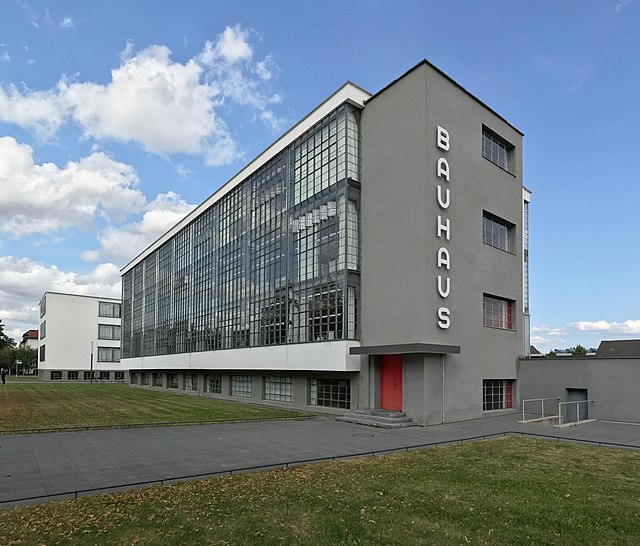
In the example above, the elements correspond to:
Figure 1. Caption, Author/Creator, Title, Date, Publisher/website, URL. License.
Bibliography / References / Works-Cited
The bibliography appears at the end of your paper and provides the full publication details for every source cited in the text. Entries are listed alphabetically by the first author's last name (or by title, ignoring articles such as "A," "The," or "An," when no author is available). The bibliography allows your reader to locate and verify each source you have used.
Formatting note: Bibliography entries use a hanging indent: the first line of each entry is flush left, and all subsequent lines are indented (typically by 1.27 cm / 0.5 in). In Microsoft Word, you can apply this via Paragraph > Special > Hanging. In Google Docs, use Format > Align & indent > Indentation options > Special indent > Hanging.
Generative Artificial Intelligence (AI)
Chicago (18th edition): Author-Date
Chicago style lists the AI tool's developer as the author. The date is the date you generated the content, not a publication date.
In-text citation
(OpenAI 2024)
Reference list entry (with a shareable URL)
OpenAI. 2024. Response to "Describe three approaches to sustainable façade design for a tropical climate." ChatGPT-4o, November 14, 2024. https://chatgpt.com/share/[link].
Reference list entry (prompt included in the text of your paper)
OpenAI. 2024. Text generated by ChatGPT-4o, November 14, 2024. https://chatgpt.com/share/[link].
If no shareable URL is available
Some AI tools, including institutionally licensed versions of Copilot and Gemini, do not generate shareable links. In that case, describe the exchange clearly in your text and note that the conversation is not publicly retrievable. A bibliography entry is optional but should include as much identifying information as possible:
Microsoft. 2024. Response to "Summarize current building regulations for passive house design in Northern Europe." Microsoft Copilot, October 3, 2024. Conversation not publicly retrievable.
Notes
- Replace the example prompts with your own. Keep the prompt text in quotation marks.
- Include the model version (GPT-4o, Gemini 1.5, etc.) where you know it; this matters because different versions produce different outputs.
- Chicago 18th edition guidance on AI citation is covered at section 14.112. The guidance is subject to further revision; check the Chicago Manual of Style Q&A for updates.
Books / eBooks
Book (single author)
Author's Last name, First name. Year of publication. Title: Subtitle. Edition. Place of publication: Publisher.
Thelen, Kathleen. 2004. How Institutions Evolve: The Political Economy of Skills in Germany. Cambridge: Cambridge University Press.
Book (two or three authors)
First author Last name, First name, and second author First name Last name. Year of publication. Title: Subtitle. Edition. Place of publication: Publisher.
Gourevitch, Peter, and James Shinn. 2005. Political Power and Corporate Control: The New Global Politics of Corporate Governance. New Jersey: Princeton University Press.
Book (four or more authors)
First Author Last name, First name, remaining authors' First name Last name. Year of publication. Title: Subtitle. Edition. Place of Publication: Publisher.
De la Bédoyère, Camilla, Ihor Holubizky, Julia Kelly, Michael Kerrigan, James Mackay, William Matar, Tom Middlemos, Michael Robinson, and Iain Zaczek. 2006. A Brief History of Art. London: Flame Tree Publishing.
eBooks
Author(s) Last name, First name. Year of publication. Title: Subtitle. Edition. Place of Publication: Publisher. DOI, URL, or database name.
Beaumont, Lesley A. 2012. Childhood in Ancient Athens: Iconography and Social History. London: Routledge. https://ebookcentral.proquest.com/lib/ucd/detail.action?docID=1114632.
Note: If a book is available in print and online, you must cite the version you consulted. Access dates are only included if no publication date information is available. If no place of publication is available for an eBook, write "n.p." ("no place") in its position.
Note: If you access your book on an eReader or other type of platform, insert that instead of the URL (e.g., Kindle, Google Play Books, Apple Books).
Note: Where page numbers are not available or change depending on the device used, CMOS 17 advises including chapter numbers or section headings instead. If a scanned version of the original book is available online, this version is preferable for citation.
Journal Articles
Journal article (single author)
Author(s) Last name, First name. Year of publication. "Title of Article." Journal Title Volume, Issue no. (month or season): Pages.
Barber, Marcus. 2024. "Global Warming and the Political Ecology of Health: Emerging Crises and Systemic Solutions." The Australian Journal of Anthropology 21, no. 3 (Winter): 390–391.
Journal article (two or three authors)
First Author Last name, First name, remaining authors First name Last name. Year of publication. "Title of Article." Journal Title Volume, Issue no. (month or season): Pages.
Morgan, Sylvia, Danny Carswell, and Lynda Lamore. 2010. "The Rise of Political Correctness in Post-War Britain." Twentieth Century Britain 25, no. 3 (March): 412–416.
Journal article (four or more authors)
First Author Last name, First name, remaining authors First name Last name. Year of publication. "Title of Article." Journal Title Volume, Issue no. (month or season): Pages.
Virtue, Simon, Holly Wright, Dale Diamond, and Sheila Murphy. 1943. "Was Mark Twain a Nihilist?" American Literary Essays 3, no. 88 (Winter): 13–27.
eJournal article
Author(s) Last name, First name. Year of publication. "Title of Article." Journal Title Volume, Issue no. (month or season): Pages. DOI or URL.
Mulvin, Lynda, and Steven E. Sidebotham. 2004. "Roman Game Boards from Abu Sha'ar (Red Sea Coast, Egypt)." Antiquity 78, no. 301 (September): 602–617. https://doi.org/10.1017/S0003598X00113250.
Note: CMOS 17 advises including an access date only when no publication date is provided.
Note: Month of publication only needs to be included where given in the source.
Note: For four or more authors, list all authors in the bibliography. In a footnote, list only the first author followed by "et al." For more than ten authors, list the first seven in the bibliography followed by "et al."
Theses and Dissertations
Author Last name, First name. Year. "Title of Thesis." Type of thesis, Institution. DOI or URL.
Okonkwo, Adaeze. 2024. "Brand Storytelling and Consumer Engagement in the German Start-Up Ecosystem." Master's thesis, Berlin International University of Applied Sciences. https://repository.berlin-international.de/items/example.
Note: The type of thesis should be specified exactly (e.g., "Bachelor's thesis," "Master's thesis," "PhD diss."). If the thesis is available in the BI Institutional Repository or another online repository, include the DOI or URL.
Reports and White Papers
Author(s) or Organisation. Year. Title of Report. Report number (if applicable). Place of publication: Publisher. DOI or URL.
Organisation for Economic Co-operation and Development. 2023. OECD SME and Entrepreneurship Outlook 2023. Paris: OECD Publishing. https://doi.org/10.1787/342b8564-en.
McKinsey & Company. 2024. The State of AI in Early 2024: Gen AI Adoption Spikes and Starts to Generate Value. https://www.mckinsey.com/capabilities/quantumblack/our-insights/the-state-of-ai.
Note: When an organisation is both the author and the publisher, it is acceptable to list the organisation as the author and omit it from the publisher position, or to list it in both positions. Be consistent throughout your bibliography.
Conference Papers and Proceedings
Unpublished conference paper
Author(s) Last name, First name. Year. "Title of Paper." Paper presented at Conference Name, Location, Date. DOI or URL.
Chen, Wei, and Laura Müller. 2023. "Sustainable Materials in Modular Housing: A Comparative Analysis." Paper presented at the International Conference on Sustainable Design, Copenhagen, September 14–16, 2023.
Paper published in a proceedings volume
Author(s) Last name, First name. Year. "Title of Paper." In Title of Proceedings, edited by First name Last name, Pages. Place of publication: Publisher. DOI or URL.
Nakamura, Yuki. 2022. "User Experience Design for Ageing Populations." In Proceedings of the 2022 Design Research Society Conference, edited by Ri Pierce and Paul Rodgers, 312–325. London: Design Research Society. https://doi.org/10.21606/drs.2022.example.
Artworks / Images
Note: CMOS 17 states that paintings, sculptures, and photographs can normally be cited in the text with full source details. A bibliography entry is not a requirement (CMOS 14.235: Citing paintings, photographs, and sculpture).
Creator/Artist(s) Last name, First name. Title. Date of creation/completion. Medium, Dimensions (dimensions conversion). Location of work. DOI, URL, or database name.
Gloag, Isobel. The Woman with the Puppets. 1915. Oil on canvas, 64.5 × 82.5 cm (25.39 × 32.48 in). Hugh Lane Gallery, Dublin, Ireland. http://emuseum.pointblank.ie/online_catalogue/work-detail.php?objectid=619.
Thanks to the following sources for providing partial inspiration and content for this page: Concordia University Chicago, Klinck Memorial Library and UCD Library, University College Dublin.
Citation Management Software
Overview
A reference manager supports researchers in three core steps: searching, storing, and writing. It helps you find relevant literature, store papers and their bibliographic metadata in a personal database, and insert citations and bibliographies in a chosen style when writing.
Fenner, M., Scheliga, K., & Bartling, S. (2014). Reference management. In S. Bartling & S. Friesike (Eds.), Opening Science (pp. 125–137). Springer. https://doi.org/10.1007/978-3-319-00026-8_8
Citation managers reduce transcription errors, automate reformatting when you switch citation styles, and provide structured deduplication across multiple database exports for systematic reviews.
Choosing a Tool
The table below compares the three tools most commonly used in academic contexts. The library recommends Zotero for all students: it is free, open-source, and has no storage paywall for the core workflow.
| Feature | Zotero | Mendeley | EndNote |
|---|---|---|---|
| Cost | Free (open-source) | Free (basic); owned by Elsevier | Paid |
| Storage (free tier) | 300 MB sync; unlimited local | 2 GB | n/a (local only) |
| Browser connector | Yes — all major browsers | Yes | Limited |
| Word processor | Word, LibreOffice, Google Docs | Word, LibreOffice | Word |
| Group libraries | Yes — free, unlimited members | Yes — limited to 25 members | No |
| Deduplication | Built-in duplicate detection | Basic | Basic |
| Open-source | Yes | No | No |
| PDF annotation | Yes (built-in reader, Zotero 7+) | Yes | Yes |
| Cite styles available | 10,000+ (CSL) | 4,000+ (CSL) | 7,000+ |


Installation
Zotero has two required components and one optional one:
- Zotero desktop application: Available for Windows, macOS, Linux, iOS, and Android.
- Browser Connector: a browser extension for Chrome, Firefox, Edge, and Safari. Once installed, a toolbar button appears in your browser. Clicking it captures the metadata (and often the PDF) of whatever page you are viewing — a journal article, a book record, a webpage — directly into your Zotero library.
- Word processor plugin: automatically installed with the desktop app for Microsoft Word and LibreOffice. A Google Docs connector is also available. The plugin inserts in-text citations and generates a bibliography in any style, and reformats both instantly if you switch styles.
Keep the Zotero desktop application open while you are writing. The word processor plugin communicates with the desktop app to retrieve your references; it cannot function if the app is closed.
Core Features
Collecting Sources
- Browser Connector: Save a source with one click from any database, catalogue, or webpage. Zotero detects the item type (journal article, book, report, webpage) and populates the correct metadata fields automatically. For most databases (EBSCO, JSTOR, Google Scholar), it also downloads the PDF where your access allows.
- Manual entry: Add items by DOI, ISBN, or arXiv ID via File → Add Item by Identifier, or enter metadata manually.
- Import from databases: Export search results from EBSCO or JSTOR as RIS or BibTeX files and import them in bulk via File → Import. This is the recommended method for SLR database searches.
Organizing Your Library
- Collections: Create a folder (collection) per database search or project. One item can belong to multiple collections without being duplicated. For SLRs, create one collection per database, one for each screening phase, and one final collection for included studies.
- Tags: Apply keyword tags to items for thematic grouping. Tags can be added manually or imported automatically from database keywords.
- Saved searches: Create persistent, auto-updating searches across your library based on any field combination.
Reading and Annotating
Zotero includes a built-in PDF and EPUB reader with full annotation support: highlights, comments, and text notes are stored in Zotero and can be exported. Annotations appear in the item pane alongside metadata and are searchable across your library.
Citing Sources
The word processor plugin inserts citations and manages bibliographies dynamically. Key operations:
- Insert Citation (Ctrl/Cmd + Shift + A in Word): Search your Zotero library and insert an in-text citation at the cursor.
- Insert Bibliography: Generates a full reference list at the cursor position, automatically sorted and formatted.
- Switch Style: Change the citation style across the entire document in one step; all in-text citations and the bibliography reformat automatically. No manual reformatting is required.
Supported styles include APA 7, Chicago 17 (Author-Date and Notes-Bibliography), MLA, Harvard, and over 10,000 others from the CSL style repository.
Group Libraries
Group libraries allow multiple users to share a Zotero collection in real time. They are free and have no member limit. Use cases:
- Sharing a reading list with fellow students working on a joint project
- Collaborative SLRs where two reviewers need access to the same reference set
- Supervisor access to a student's reference library for review
To create a group: go to zotero.org, sign in, and create a group under Groups. Invite members by email or Zotero username. Group libraries appear in the left panel of the desktop app.
Zotero for Systematic Literature Reviews
For SLRs, Zotero's most important functions are import, deduplication, and collection structure. The workflow below follows the steps described in Conducting Your Search.
Step 1: Create a collection structure before searching
Create the following collections in Zotero before you begin:
My SLR/
├── 01_Database Searches/
│ ├── EBSCO [date]
│ ├── JSTOR [date]
│ └── Google Scholar [date]
├── 02_After Deduplication/
├── 03_Title-Abstract Screening/
│ ├── Included
│ └── Excluded
├── 04_Full-Text Screening/
│ ├── Included
│ └── Excluded
└── 05_Final Included Studies/
This structure mirrors your PRISMA flow diagram and makes it easy to report numbers at each stage.
Step 2: Import search results
Export results from each database as an RIS or BibTeX file, then import into the corresponding sub-collection via File → Import. Do this separately for each database so counts per database are preserved.
Step 3: Deduplicate
- Select all items across your database sub-collections and copy them into the 02_After Deduplication collection.
- Click Duplicate Items in the left panel. Zotero groups likely duplicates for review.
- Review each pair: click Merge Items to keep the record with the most complete metadata.
- Record the number of duplicates removed for your PRISMA diagram.
Zotero's automatic duplicate detection works on title similarity and DOI matching. Always review suggested duplicates manually before merging — conference pre-prints and final journal versions of the same paper will be flagged as duplicates but may need to be kept separately depending on your protocol.
Step 4: Use tags for screening decisions
During title/abstract screening, add tags such as include, exclude, or uncertain to each item. The Tags panel (bottom-left) lets you filter your library instantly by any tag, making it easy to move items between collections after screening.
Further Learning
| Resource | Description |
|---|---|
| Zotero Quick Start Guide | Official introduction from the Zotero team |
| Word Processor Plugins | Official instructions for Word, LibreOffice, and Google Docs |
| Zotero for Systematic Reviews | UCL Library guide on deduplication for SLRs |
| ZoteroBib | Quick browser-based citation generator (no account needed; does not require the desktop app) |