


Searching for Information
Ready to move beyond typing random words into search engines?
- How to search the library's catalogue (OPAC)
- Developing a search strategy
- Advanced Search Techniques
- Making the most of Generative AI (ChatGPT etc.)
- Open Access (OA)
How to search the library's catalogue (OPAC)
Our online catalogue (OPAC) contains all of our holdings, including:
- books
- monographic series
- periodicals
- theses (including link to full-text)
- audio / visual media
Simple Search
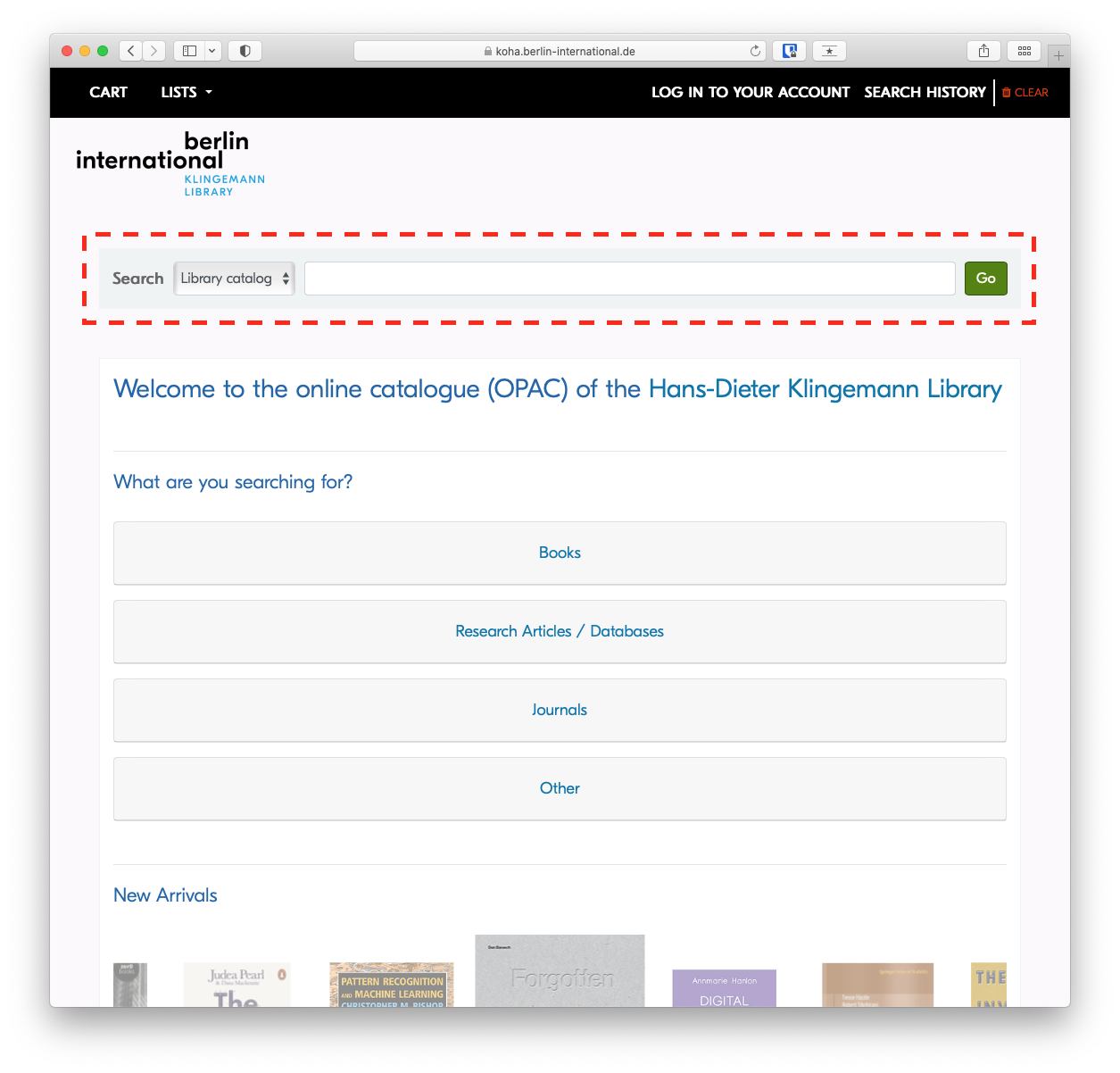
To perform a keyword search, simply type your search in the search field and press enter.
Advanced Search
The Advanced Search will allow you to narrow or broaden your search as needed, based on expanded criteria.
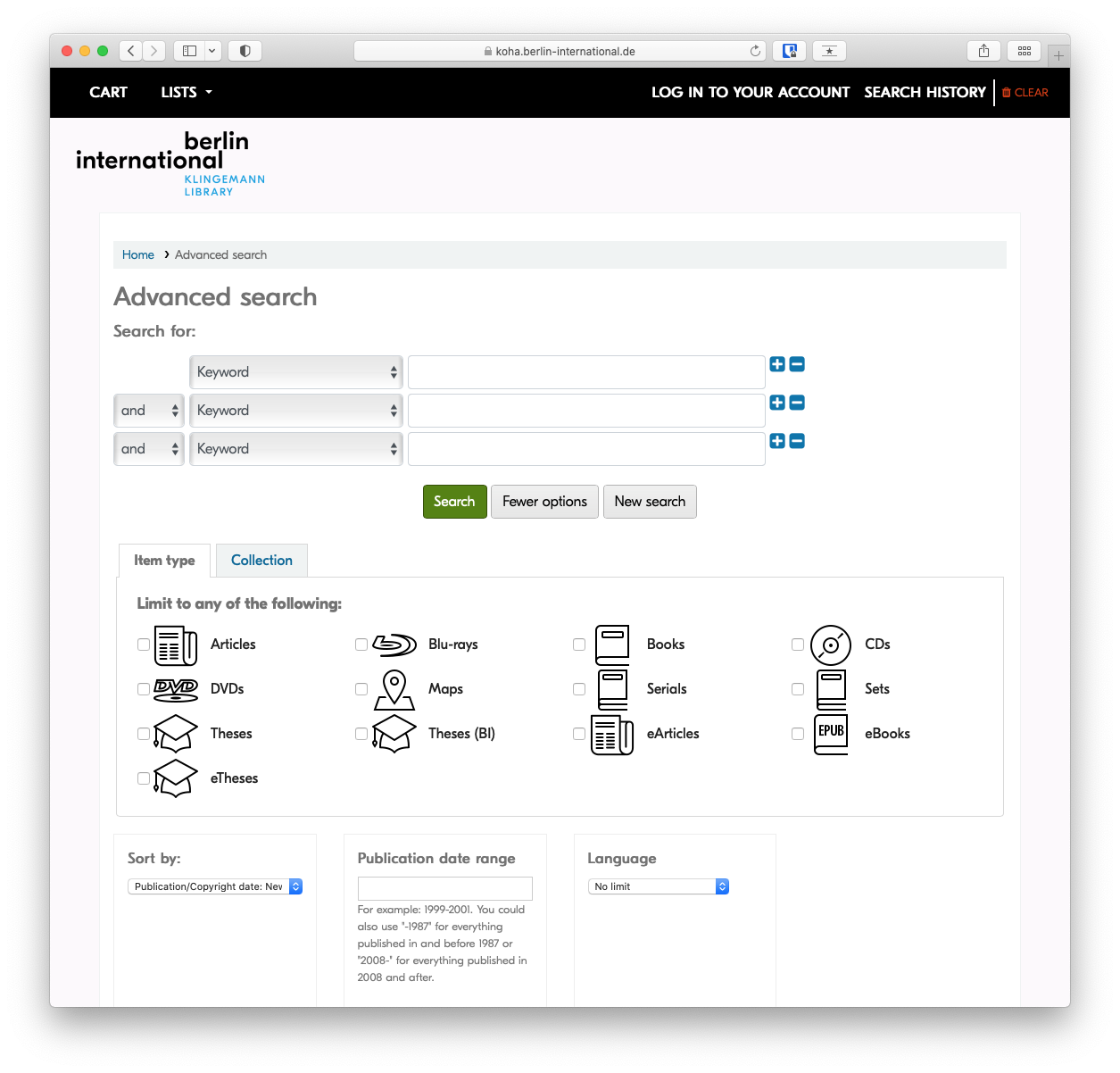
Search in specific fields
If you're interested in learning more, see the article on advanced search techniques
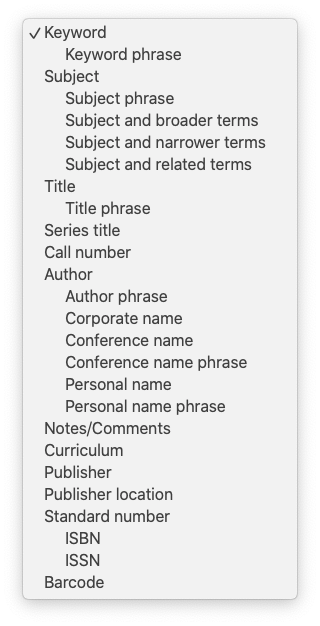
While Keyword is the default search, there are many additional fields that can be searched specifically by selecting them from the drop-down menu. The most relevant are Title, Author and Subject.
Subject
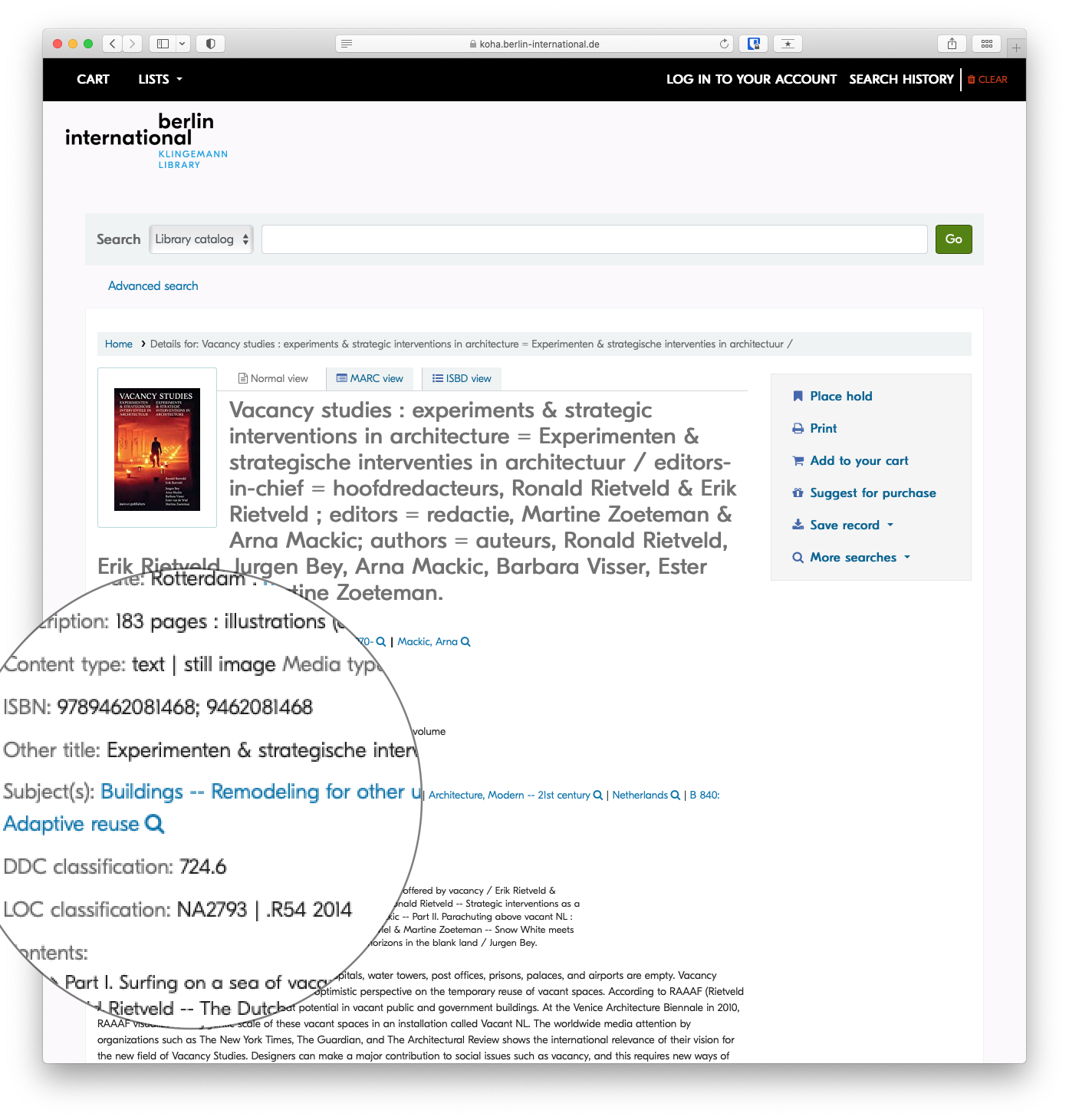
Subject headings are important because you can use them to find similar information more efficiently. Once you've found a record of interest, you may want to note the assigned subject headings to find similar items.
More on Subject Headings
A subject heading is a specific word or phrase used to find and organise books and articles by topic. Subject headings can be a great way to easily find things related directly to your topic. Once you have identified a book or article that is worthwhile, look at the subject headings. In the online catalogue these are found in the catalog record and you can click directly on the subject heading to get a list of books on the same subject.
Subject headings are different from keywords in that they are specific terms assigned to a subject by a subject analyst or the author.
In the library catalogue and many databases, an items's subject(s) will be a link, so that you can click on the subject heading to find similar items. You also might want to note the exact words to search them as a keyword later.
Combine search fields
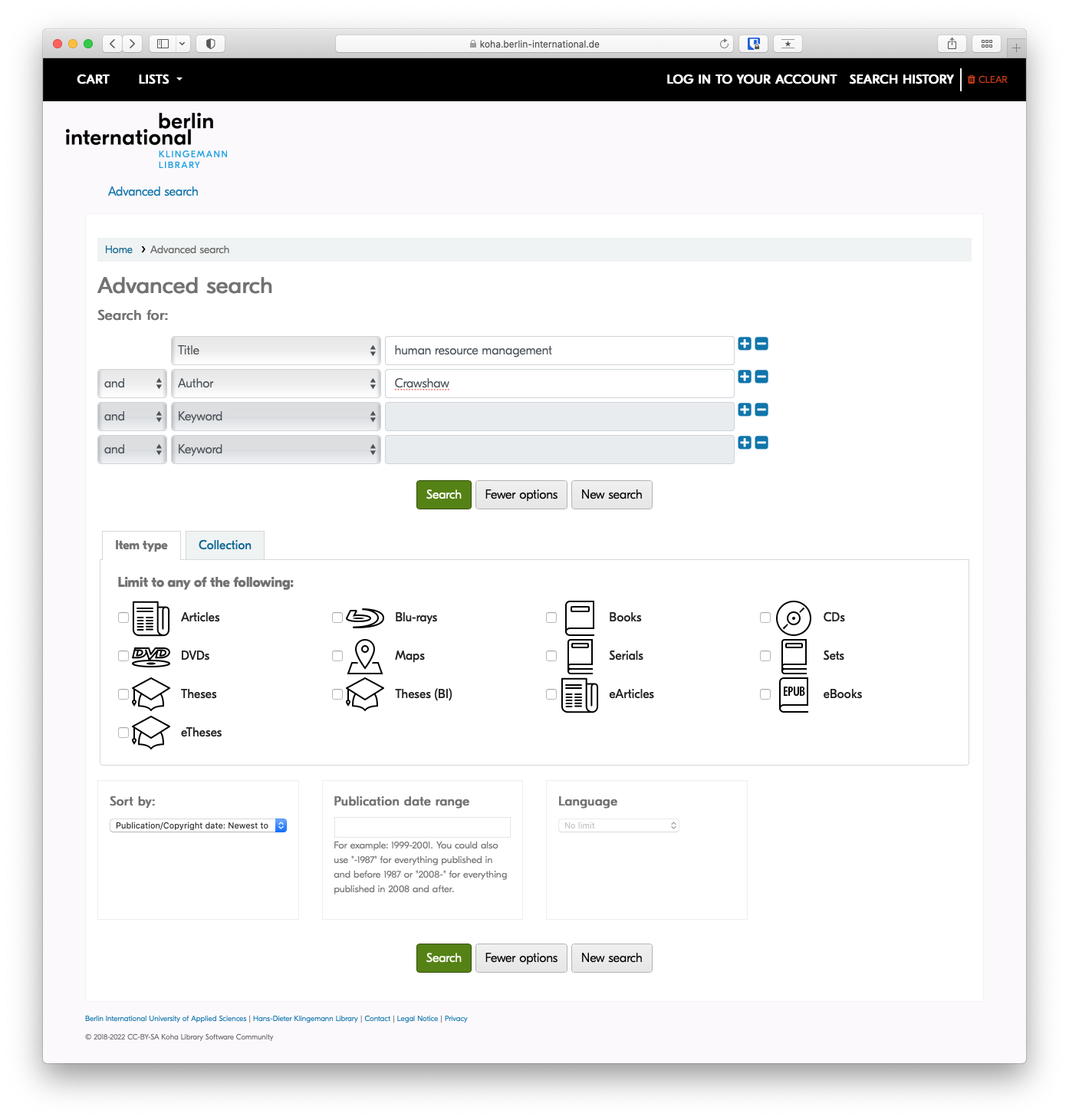
Sometimes searching in a specific field still returns too many results when you're looking for something specific. IN those cases, it is helpful to combine two or more search fields using AND, OR , or NOT form the drop-down menus to the left of the search field.
Example: A title search for 'human resource management' may return dozens of results, but when combined with an author search, as in the screenshot below, only items with 'human resource management' in the title AND 'Crawshaw' as an author will be returned.
Results
Refine your search
Once your search has returned results, you can narrow those results, or refine your search based on varied criteria, eg author, availability, item type or topic.
By Availability
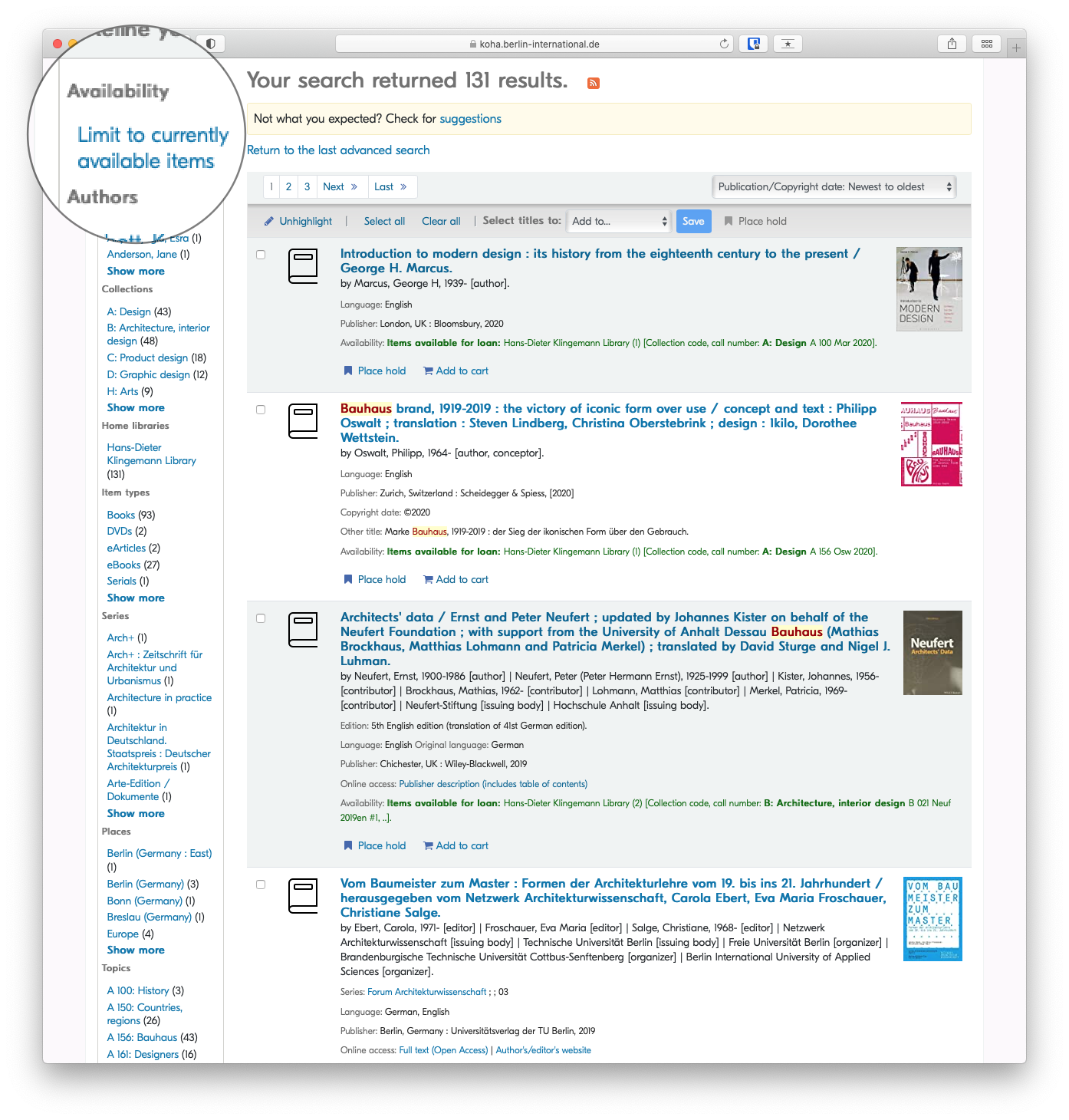
By Item Type

Developing a search strategy
Overview
Searching for academic literature is different from using Google. A simple web search guesses what you mean; academic databases match your exact words. This means you must build a structured search strategy to ensure you find the most relevant literature without missing crucial studies. This guide outlines how to translate your research question into a database search.
Writing a systematic literature review? See our advanced guide on Conducting Your Search for instructions on building complex concept blocks and testing search strings.
Prerequisites
Before building a search strategy, you must have completed:
- Step 1: Defined your research question.
- Step 2: Gathered background information and academic keywords.
Step 1: Identify Your Key Concepts
Do not type your entire research question into a library database. Instead, break it down into its core concepts (the most important nouns). Ignore instructional words (like "assess" or "describe") and relationship words (like "impact" or "effect").
Example Research Question:
"How do recent European Union regulations impact the marketing strategies of fast fashion retailers?"
Key Concepts:
- Concept 1: European Union regulations
- Concept 2: Marketing strategies
- Concept 3: Fast fashion
Step 2: Brainstorm Alternative Search Terms
| Concept 1: Regulations | Concept 2: Marketing | Concept 3: Fast Fashion |
|---|---|---|
| European Union | Marketing strategy | Fast fashion |
| EU law | Advertising | Disposable clothing |
| Legislation | Public relations | Ultra-fast fashion |
| Policy | Branding | Apparel industry |
Using Truncation and Wildcards
Save time by searching for multiple word endings at once using an asterisk (*). This is called truncation.
- Searching for
market*will find: market, markets, marketing, marketers. - Searching for
sustainab*will find: sustainable, sustainability.
Step 3: Combine Your Terms with Boolean Operators
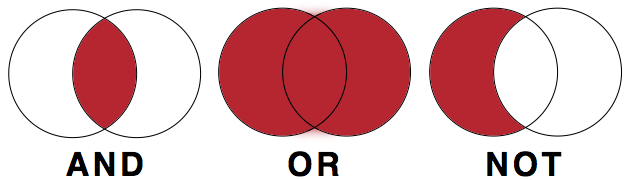
Library databases use three commands—AND, OR, and NOT—to connect your search terms. These must usually be typed in ALL CAPS.
- OR (Expands your search): Connects synonyms. It tells the database to find articles containing any of the words.
- Example: "fast fashion" OR "apparel industry"
- AND (Narrows your search): Connects different concepts. It tells the database to find articles containing all of the words.
- Example: "fast fashion" AND marketing
- NOT (Excludes terms): Removes irrelevant results. Use with caution, as it might remove good articles that happen to mention the excluded word.
- Example: "fast fashion" NOT footwear
Building the Search String
Use brackets to group your synonyms (your OR terms) before connecting them with AND.
("fast fashion" OR "apparel industry") AND (marketing OR advertising) AND ("European Union" OR EU)
Step 4: Choose the Right Tool
Now that you have a search string, you need to decide where to run it. Different tools hold different types of information.
- The Library OPAC (Catalogue): Use this to find physical books, e-books, and architectural magazines held locally at BI. It is best for broad overviews and foundational theories.
- Academic Databases (e.g., EBSCO, JSTOR): Use these to find peer-reviewed journal articles. They are essential for finding the most current, specific research, particularly for your BA thesis.
- Google Scholar: A useful supplement to library databases, but it lacks the advanced filtering options of EBSCO and may hit paywalls. (If you hit a paywall, always check if the BI Library has access).
Library Access: Remember to use the EZProxy Bookmarklet to access paywalled articles from off-campus.
Step 5: Search, Review, and Adjust (Iterative Searching)
Searching is an iterative process. You will rarely get perfect results on your first try.
- Too many results? Add another concept using AND, or use database filters to limit the publication date (e.g., the last 5 years) or language.
- Too few results? Remove a concept, or add more synonyms using OR.
- Wrong results? Review the titles and abstracts of the first few results. Look for the keywords the authors used, add them to your search strategy, and try again.
Using Generative AI to Design Searches
Generative AI can help you brainstorm synonyms and structure your Boolean strings. You can prompt an AI with: "I am researching the impact of EU regulations on fast fashion marketing. Generate a list of academic synonyms for these concepts and format them into a Boolean search string."
Always review the AI's string before using it, as it may include unnecessary punctuation or overly complex terms. For more guidance, see Enhancing Search Queries with AI.
Next Steps
Once you have found a selection of relevant books and articles, you must evaluate them for academic credibility before deciding to use them in your writing.
Continue to: How to evaluate academic sources
Adapted from My Learning Essentials resources developed by the University of Manchester Library and licensed under CC BY-NC 3.0.
Advanced Search Techniques
For more information on using generative AI to design searches, see Enhancing Search Queries with AI.
Keyword
Generally keywords are the default for search queries, and it's important to know how a keyword search works.
Keyword searches will return results in which the keyword appears anywhere in the record, whether title, description, author, etc. A search for multiple keywords will return results in which both keywords appear anywhere in the record, not necessarily beside each other.
Example: industrial design would return all results that include the terms industrial and design irrespective of where the terms were in relation to each other
Grouping keywords with quotation marks
An easy way to group keywords is to enclose them in quotation marks. This can be particularly helpful when searching for specific titles of items.
Example: 'industrial design' would only return results where industrial and design were located beside each other
Boolean Operators (AND, OR, NOT)
AND
Use the Boolean operator AND to narrow search terms more effectively.
Example: Bauhaus AND Albers would return results that include both Bauhaus and Albers
OR
Use the Boolean operator OR to combine search terms.
The Boolean operator OR is helpful for search terms with varying spelling, e.g. o/ou or s/z in English; or when looking for a search term in different languages:
Example: 'labor policy' OR 'labour policy' would return results containing either labor or labour.
Example: 'industrial design' OR Industriedesign would return results containing either industrial design or Industriedesign
NOT
Use the Boolean operator NOT to exclude results.
Example: bauhaus NOT band would return only results which include the term bauhaus but do not include the term band
Wildcards
Wildcards are used in search terms to represent one or more other characters.
The two most commonly used wildcards are:
An asterisk (*) may be used to specify any number of characters. It is typically used at the end of a root word, when it is referred to as "truncation." This is great when you want to search for variable endings of a root word.
Example: searching for librar* would tell the database to look for all possible endings to that root. Results will include library, libraries, librarian, librarians or librarianship.
A question mark (?) may be used to represent a single character, anywhere in the word. It is most useful when there are variable spellings for a word, and you want to search for all variants at once.
Example: Searching for colo?r would return both color and colour.
Wildcard characters can vary among search providers
Making the most of Generative AI (ChatGPT etc.)
Overview
Generative AI tools such as ChatGPT, Microsoft Copilot, Google Gemini, and Claude can assist with many parts of the research and writing process. They can help you brainstorm, draft, refine prompts, and structure search queries. They can also produce convincing but inaccurate content, fabricate sources, and reflect biases present in their training data.
This guide helps you use these tools critically and responsibly. It covers:
- what generative AI can and cannot do reliably
- how to write effective prompts
- how to use AI to assist with database searching
- how to cite AI-generated content
- what risks to watch for
Before you use any AI tool in your coursework, check your course or assignment guidelines. Policies vary by instructor, department, and faculty. If the policy is not stated, ask.
What generative AI does and does not do
Generative AI tools produce text (and sometimes images or code) by drawing on patterns learned during training on large datasets. How they handle information at the point of use varies by tool and by how you access it.
Some tools work from training data alone. These have a knowledge cutoff: they cannot access recent publications, current events, or library resources. Their outputs reflect what was in their training data, nothing more.
Other tools can retrieve external content before generating a response, a technique often called retrieval-augmented generation (RAG). Tools such as Microsoft Copilot, Google Gemini, and certain modes of ChatGPT can search the web or draw on connected sources. Some research-oriented tools (Perplexity, Elicit, Scite) are designed specifically to retrieve and summarize scholarly content.
Retrieval capability does not make a tool reliable. Even tools with web access can:
- misrepresent, misquote, or selectively paraphrase the sources they retrieve
- generate citations to sources that look real but are wrong in detail or do not exist
- present a confident synthesis that misses important contrary evidence
- reflect biases present in whatever sources they surface or were trained on
In practice, you should not assume that because a tool "searched the web" its output is accurate or that its citations are correct. Verify any source an AI tool mentions before citing it, regardless of which tool you used.
Other risks apply across most current tools:
- Bias: AI outputs reflect assumptions and gaps in training data. Be alert to skewed perspectives or missing viewpoints.
- Privacy: Many tools may use your inputs to improve future models. Do not enter personal data, confidential information, or unpublished research unless you have confirmed the tool's data handling policy.
- Academic integrity: Undisclosed AI use may violate institutional policies, regardless of which tool you used or how.
If you are unsure how a specific tool handles data or retrieval, check its documentation or ask a librarian.
Citation and Attribution
Citation practices for generative AI are still evolving. Each major style has issued guidance, but all note that their recommendations may change. Always check your assignment requirements and consult with your instructor if you are unsure whether and how to disclose AI use.
The general principle across styles is: if you use AI-generated content in your work, disclose it. This applies to quoted or paraphrased text, images, and data.
Citing Generative AI: APA
Citing Generative AI: Chicago
Writing Prompts
Expand
Crafting effective prompts for a Generative AI tool is crucial for obtaining high-quality outputs. This guide provides a concise overview and tips to enhance your prompts:
Be Specific:
Generic prompts yield generic results. Specify the type, genre, audience, length, and tone for better outcomes.
Create a visually engaging poster promoting a sustainable design exhibition for a design-savvy audience. Keep it concise and modern.
Draft a concise business proposal outlining key strategies for a sustainable product launch in the current market. Target audience: investors and industry professionals.
"Act as if..." Approach:
Request the AI to assume a certain role, process, or object. This provides context and refines responses, e.g., "Act as if you are my personal trainer" when seeking recipe suggestions.
Act as if you are a design consultant. Provide creative suggestions for enhancing user experience in a mobile app focusing on simplicity and aesthetics.
Act as if you are a marketing strategist. Develop a marketing plan for a new business venture, considering target demographics and competition.
Specify Output Format:
Clearly state the desired output format, such as code, stories, reports, etc. Use phrases like "Present this in the form of..." or "Create a [output format] about/that contains..."
Design an infographic illustrating the evolution of graphic design trends in the last decade. Present this in the form of a visually appealing and informative graphic.
Compose a market analysis report on emerging e-commerce trends. Present this in the form of a concise and visually appealing slide deck for a business presentation.
Use "Do" and "Don't":
Save time and improve results by specifying preferences. For instance, "Create a recipe that includes tomatoes, chicken, and carbs, but exclude chili peppers and wheat-containing ingredients."
Develop a logo for a startup specializing in sustainable packaging solutions. Do incorporate eco-friendly elements and vibrant colors. Don't use overly complex designs.
Draft a proposal for a business event sponsorship. Do highlight the potential benefits for sponsors. Don't include excessive jargon or technical details.
Provide Examples:
Offer a sample sentence or paragraph for the AI to reference, avoiding copyrighted material. This helps shape the desired output.
Provide a description of a modern furniture design studio. For example, discuss the studio's philosophy, materials used, and signature design elements.
Describe a successful case study of a business implementing sustainable practices. For example, highlight the specific strategies adopted and the resulting positive impact on the company's image and profitability.
Consider Tone and Audience:
Specify the audience and desired tone. For example, "Give me ideas for a funny and heartwarming best man's speech suitable for a family audience."
Generate ideas for a creative pitch introducing a new design tool to fellow design students. Ensure the tone is inspiring and resonates with the enthusiasm of budding designers.
Develop content for a promotional video targeting potential investors in a tech startup. Ensure the tone is professional, highlighting the innovation and market potential of the product.
Build on Previous Prompts:
Start with a basic question and refine it over time. Adjust wording, tone, or add more context to guide the AI toward the desired output.
What are the key elements to consider in designing an interactive and user-friendly website? Build on this by providing examples relevant to design students' projects.
Begin with a basic outline for a business plan. Now, add more details about market analysis, financial projections, and potential challenges faced by startups in the current economic landscape.
Correct Mistakes and Give Feedback:
Treat the AI like a colleague, providing feedback on useful parts and areas for improvement. Correct any mistakes to enhance future responses.
The design concept is great, but it needs more emphasis on sustainability. Could you provide alternative color schemes and materials that align with eco-friendly principles?
The market analysis is insightful. However, it lacks information on potential risks. Please incorporate a section discussing potential challenges and mitigation strategies.
Ask for Prompt Creation Assistance:
If unsure how to formulate a prompt, ask the AI for help in creating one. Seek guidance by asking, "What should I ask you to help me write a blog post about AI?"
I'm brainstorming ideas for a design blog post. What prompt should I use to generate content about the impact of minimalist design on user experience?
I need to create a persuasive pitch for a business idea. How can I structure a prompt to gather information on effective strategies for presenting market potential and profitability?
Inquire about Additional Needs:
Conclude prompts by asking, "Tell me what else you need to do this" to fill in any gaps and enhance the AI's ability to generate better outputs.
I want to design a portfolio showcasing my best work. Tell me what else you need to generate prompts that will guide me in creating a visually appealing and impactful portfolio.
I'm preparing a business report on the future of e-commerce. Tell me what additional details or data you need to generate prompts that will help me gather comprehensive insights for the report.
Enhancing Search Queries with AI
Expand
Constructing advanced search queries can be difficult, even for advanced researchers. Research databases use structured query syntax: Boolean operators (AND, OR, NOT), wildcards, and phrase searching. Constructing complex queries takes practice. Generative AI can help you build an initial query structure based on your research question.
Prompt:
Given the research question below, construct a search query to be used in a research database that uses synonyms and employs nesting, booleans (AND, OR, NOT) and wildcards (*):"How does critical design contribute to the reimagining of urban spaces, specifically focusing on its impact on community engagement, sustainability, and the overall user experience in the architectural design process?"
Response:
("critical design" OR "speculative design" OR "design fiction") AND
("urban spaces" OR "city planning" OR "urban development") AND
("community engagement" OR "public participation" OR "stakeholder involvement") AND
("sustainability" OR "environmental impact" OR "ecological design") AND
("user experience" OR "human-centered design" OR "occupant satisfaction") AND
("architectural design process" OR "built environment design" OR "architectural innovation")
Important: Always test AI-generated search queries in the actual database and adjust them. Different databases use different syntax, and the AI does not know which database you are using or what terms it indexes. Treat AI-generated queries as a starting draft, not a final product.
Hallucinations and fabricated citations
Generative AI tools frequently produce inaccurate or entirely invented citations. This is sometimes called "hallucination": the AI generates plausible-sounding but false information. This is a well-documented limitation, not an occasional bug.
When asked to produce a list of sources, an AI tool may return:
- real books or articles with incorrect authors, titles, or dates
- titles that do not exist at all
- real titles that are unrelated to the topic you asked about
This happens inconsistently. A single response may include both real and fabricated citations, with no indication of which is which.
Do not cite any source from an AI output without first verifying it exists, using your library catalog, a database such as Scopus or Web of Science, or Google Scholar. Submitting fabricated citations in academic work is a serious integrity issue, regardless of whether the AI produced them.
The same caution applies to AI-generated factual claims, statistics, and quotations. These should always be verified against a primary or reliable secondary source before you use them.
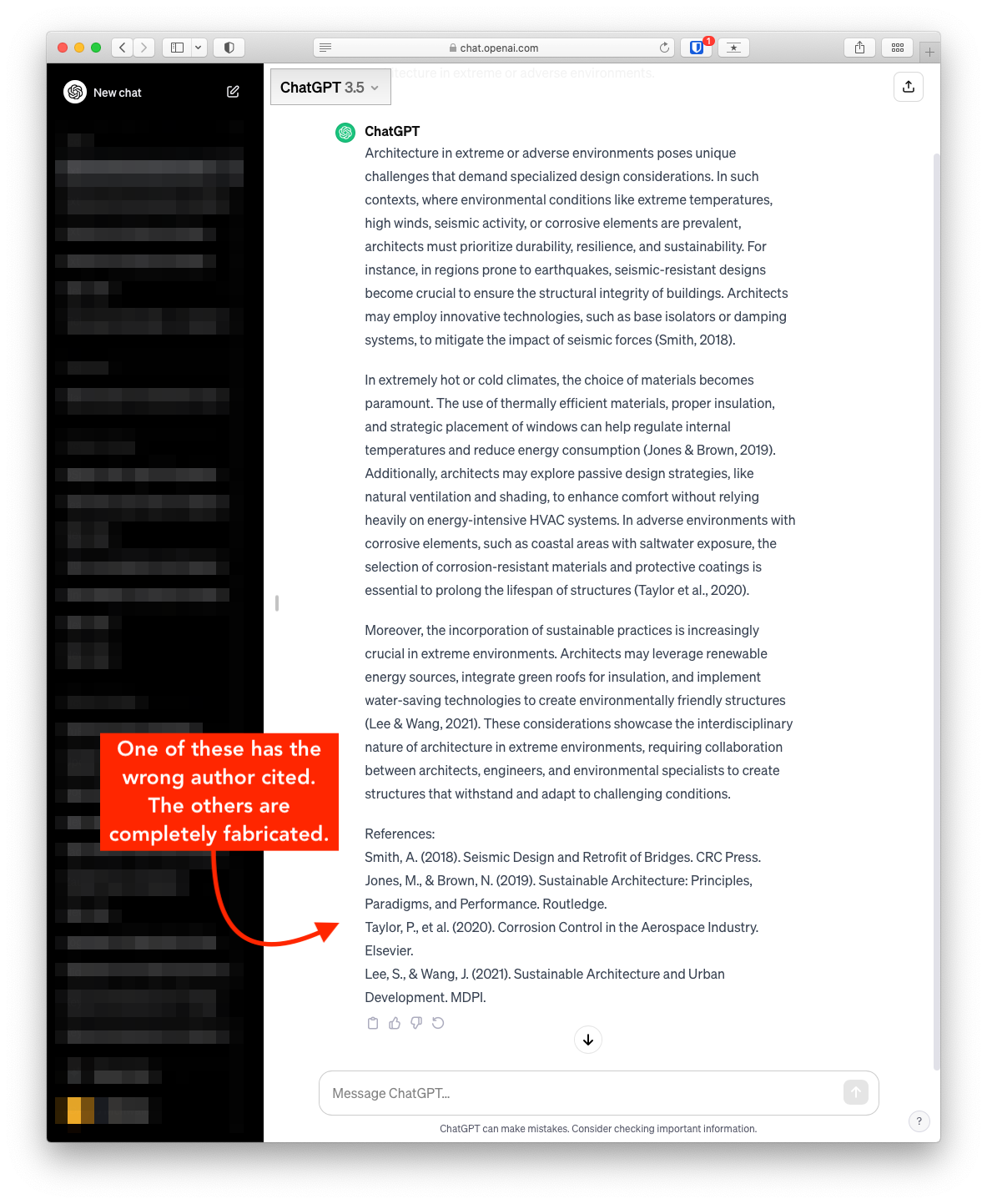
Prompt:
Please provide a list of books, including author, about architecture in extreme or adverse environments.
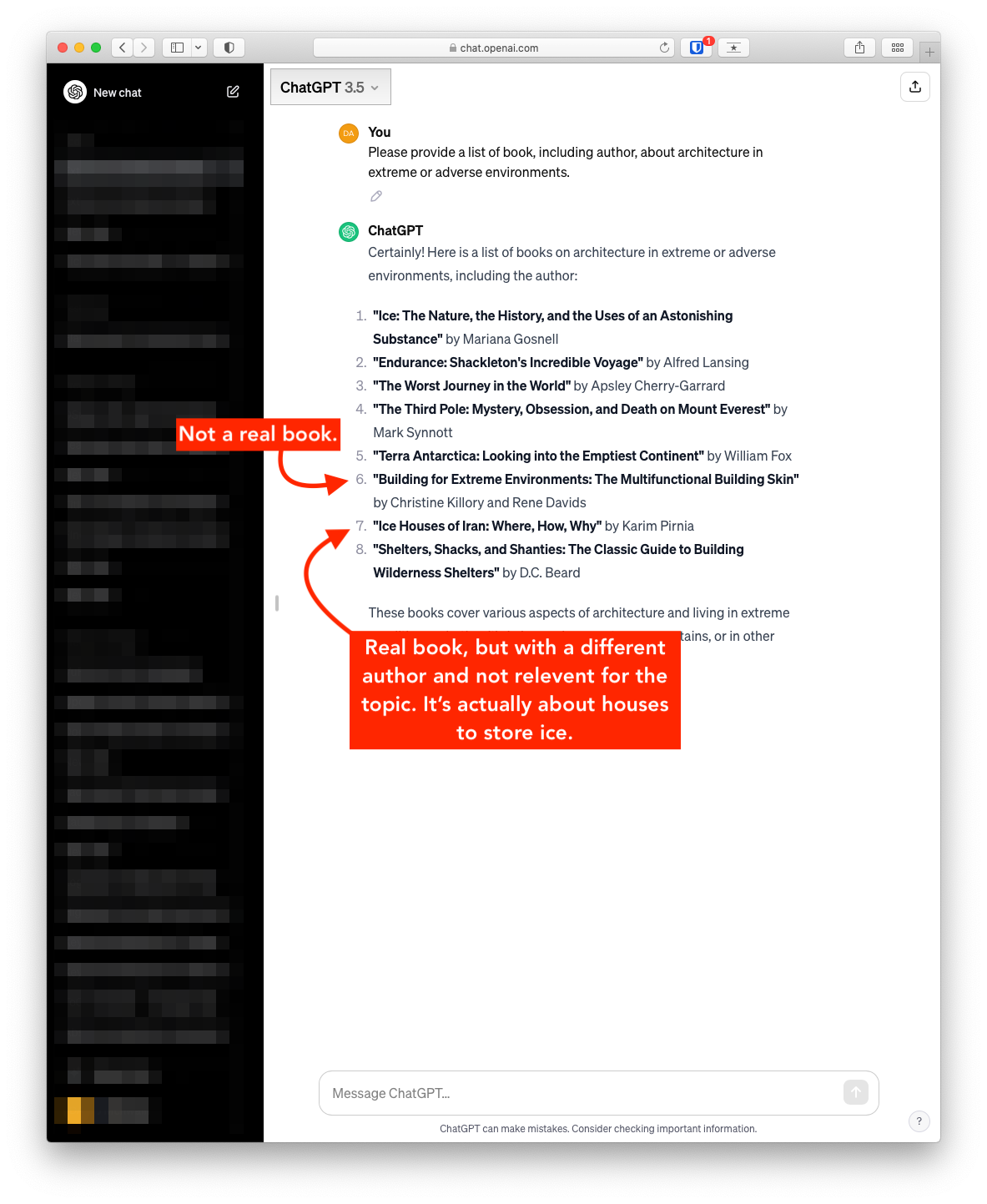
In the next below, ChatGPT was provided with the following prompt:
Please provide two to three paragraphs with in-text citations about architecture in extreme or adverse environments.
The only reference returned that appears to be real is the first, though the author seems to be incorrect. The others are not real.
Open Access (OA)
What Is Open Access?
Open Access (OA) refers to the free, immediate, online availability of research outputs such as journal articles or books, combined with the rights to use these outputs fully in the digital environment. Unlike traditional subscription-based journals, OA content is open to all readers with no access fees. Most open access publications are released under Creative Commons licenses, allowing for broader reuse and distribution while maintaining proper attribution.
Open access is not a fringe movement: it is the direction in which scholarly publishing is heading worldwide. Berlin itself is a birthplace of the modern OA movement — the Berlin Declaration on Open Access to Knowledge in the Sciences and Humanities (2003) remains one of the foundational documents of the global open access movement and has been signed by hundreds of research institutions. As a holder of the Open Library Badge, the Klingemann Library is committed to advancing these principles at Berlin International.
Models of Open Access
Open access is commonly described using a colour system. The four models most relevant to researchers at Berlin International are summarised below.
| Model | How It Works | Who Pays? | When Is It Open? |
|---|---|---|---|
| Gold OA | Published in a fully open access journal. Peer-reviewed and freely available at the point of publication. | Often an Article Processing Charge (APC) paid by the author, institution, or funder. Many Gold OA journals, however, charge no fees at all (see Diamond OA). | Immediately upon publication. |
| Green OA | The author self-archives a version of the work (preprint or accepted manuscript) in an institutional or disciplinary repository. | Free for the author. The article may also be published in a subscription journal. | Immediately, or after an embargo period set by the publisher. Check policies via Sherpa/Romeo. |
| Diamond OA | A special form of Gold OA: the journal charges no fees to authors or readers. Typically community-driven and non-commercial. | Funded by institutions, scholarly societies, or volunteers — not by authors. | Immediately upon publication. |
| Hybrid OA | Individual articles are made open access within a subscription journal, usually by paying an APC. The rest of the journal remains behind a paywall. | An APC paid by the author or institution (often higher than in fully OA journals). | Immediately for the paid article; the journal itself remains subscription-based. |
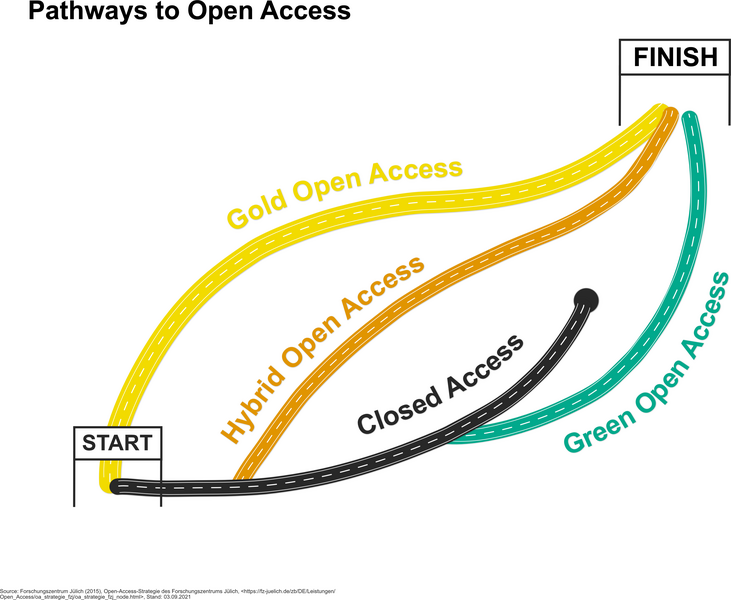
Source: open-access.network (2021), Pathways of Open Access (CC BY 4.0 International)
A note on Hybrid OA and “double dipping”
Hybrid journals collect subscription fees from libraries and APCs from individual authors who choose to publish open access. Critics call this “double dipping” because the publisher is paid twice for the same content. If you are considering a hybrid journal, check whether your institution or funder has a transformative agreement with the publisher that offsets the APC. In Germany, the DEAL agreements with Wiley and Springer Nature are examples of such arrangements, though Berlin International is not currently a DEAL participant.
Why Open Access Matters at Berlin International
Open access offers concrete advantages for researchers and students at a small, international institution:
- Visibility for early-career researchers. OA publications are indexed more broadly and cited more frequently, helping faculty and graduates at a smaller university build their academic profiles.
- Thesis discoverability. When students deposit their theses in the BI Institutional Repository, the work becomes findable worldwide, strengthening both the student's portfolio and the university's research profile.
- Equitable access. Many of our students and partners are based in countries where institutional subscriptions are limited. OA ensures that everyone can read and build on BI research.
- Funder compliance. An increasing number of research funders, including the European Commission (Horizon Europe) and the DFG, require that publicly funded research be published in open access.
- Portfolio building for design faculty. OA repositories and platforms allow designers and architects to share visual research, project documentation, and creative work alongside traditional text publications.
Finding Open Access Resources
Via the Library's Catalog
Many open access items in our catalog can be identified by the OA symbol  . Thanks to enrichment data from the Directory of Open Access Books (DOAB) and the Directory of Open Access Journals (DOAJ), these resources link directly to the open access full text, ensuring immediate access without restrictions. This is part of our broader commitment to openness, as recognised by the Open Library Badge.
Via the Research Database Index
The library's Research Database Index lists all research databases available to the BI community. Many of these include open access content alongside subscription resources. When searching for journal articles, try combining subscription databases with the open access discovery tools below to ensure you find the broadest range of sources.
Open Access Discovery Tools
Recommended tools for finding OA content
- Unpaywall — A free browser extension (Firefox, Chrome) that automatically finds legal open access versions of articles as you browse. Install it once and it works in the background on publisher sites and databases.
- CORE — Aggregates millions of open access papers from repositories and journals worldwide. Useful for cross-disciplinary searching.
- OpenAlex — A free, open bibliometric tool that indexes scholarly works, authors, institutions, and venues. Useful for mapping the open access landscape in your field.
- DOAJ — The authoritative directory of quality-controlled open access journals. Search by subject to find suitable journals in design, business, and related fields.
- DOAB — The equivalent directory for peer-reviewed open access books and monographs.
- BASE (Bielefeld Academic Search Engine) — A powerful search engine for scholarly open access resources, with advanced filtering by document type, language, and subject.
- Open Access Button — Helps locate free, legal versions of research articles. If no OA version exists, it can send an automated request to the author.
Open Access Resources by Discipline
The following resources are particularly relevant to the disciplines taught at Berlin International. For a full list of all databases available to the BI community, consult the Research Database Index.
Design and Architecture
- CumInCAD — Cumulative Index of Computer Aided Architectural Design. An open access bibliographic database covering publications in the field of computer-aided design in architecture, including full-text links.
- DOAJ: Architecture journals — Search the DOAJ specifically for peer-reviewed open access journals in architecture and design.
- DOAJ: Design journals — Filtered search for design-related OA journals.
- Figshare — A general-purpose repository well suited for depositing design artefacts, images, portfolios, presentations, and datasets alongside traditional text outputs.
- Are.na — A collaborative research and bookmarking platform popular in the design community for sharing visual references and research collections.
Business and Management
- SSRN (Social Science Research Network) — A major preprint server for the social sciences and business research. Researchers can upload working papers and preprints for immediate open access.
- EconBiz — A search portal for economics and business studies maintained by the ZBW (German National Library of Economics). Includes open access content and links to full texts.
- RePEc (Research Papers in Economics) — A decentralised database of working papers, journal articles, and software in economics and related fields, with extensive open access content.
- DOAJ: Business and management journals — Filtered DOAJ search for quality-assessed OA journals in business, management, and organisational studies.
How to Publish Open Access
Publishing open access can seem complex, but the steps below provide a practical roadmap. Faculty members are encouraged to contact the library at any stage for personalised support.
1. Identify Suitable Journals or Publishers
Use Sherpa/Romeo to check publisher policies on open access. This platform provides detailed information about copyright and self-archiving policies for thousands of journals, helping you identify where and how you can publish your work openly. You can also search the DOAJ to find quality-assessed open access journals in your discipline, and consult the Research Database Index for an overview of all databases available to the BI community.
2. Deposit Work in Repositories
Repositories are essential for Green OA. Berlin International's Institutional Repository is now live and accepting deposits. Faculty members can deposit accepted manuscripts, preprints, working papers, and other research outputs directly. Students should consult the thesis submission guide for instructions on depositing completed theses.
Additional repository options include:
- Zenodo — A general-purpose open repository hosted by CERN and funded by the European Commission. Accepts any research output (papers, datasets, presentations, posters, software) and assigns a DOI.
- re3data.org — A comprehensive registry of research data repositories across disciplines. Use it to find the right repository for your datasets.
What is the Zweitveröffentlichungsrecht (secondary publication right)?
Under German copyright law (§ 38(4) UrhG), authors of scholarly articles resulting from publicly funded research may make the accepted manuscript version publicly available twelve months after initial publication, regardless of any exclusive rights granted to the publisher. This right applies to articles in periodical publications that appear at least twice per year, and it cannot be waived by contract. It provides a straightforward legal basis for Green OA self-archiving in the BI Institutional Repository. For further details, see the open-access.network guide on the Zweitveröffentlichungsrecht.
3. Disseminate Your Research
After publication, make sure your work reaches the widest possible audience:
- Unpaywall — Ensure your OA deposit is discoverable. Unpaywall harvests from repositories, so depositing in the BI repository or Zenodo means your work will be found automatically.
- ORCID — Register for a free ORCID iD to link all your publications to a single, persistent author identifier. This helps avoid confusion with other researchers who share your name.
- Academic social networks — Platforms such as ResearchGate or Academia.edu can increase visibility, but uploading publisher PDFs to these platforms may violate copyright. Always check with Sherpa/Romeo first, and prefer depositing in a proper repository.
4. Create and Share Open Educational Resources (OERs)
Faculty members can contribute to open education by developing and sharing teaching materials. Platforms include:
- OER Commons — A resource library for finding and contributing openly licensed educational materials.
- twillo — A German OER portal for higher education, supported by the Stifterverband. Particularly relevant for sharing materials in the German academic context.
- BI LibGuide on OER — Our own guide to open educational resources.
Understanding Licensing: Creative Commons
When publishing open access, selecting the right license is essential. Creative Commons (CC) licenses are the standard in scholarly publishing. They allow you to retain copyright while specifying how others may reuse your work. All CC licenses require attribution (credit to the original author); the differences lie in what additional restrictions apply.
| License | Commercial Use? | Adaptations? | Notes |
|---|---|---|---|
| CC BY | Yes | Yes | Most permissive. Recommended by the Berlin Declaration and most funders. Maximises reuse and citation potential. |
| CC BY-SA | Yes | Yes, under the same license | “Share Alike” ensures derivative works remain open. Used by Wikipedia. |
| CC BY-NC | No | Yes | Restricts commercial use. Note: the definition of “commercial” can be ambiguous (e.g., educational fee-charging institutions). |
| CC BY-NC-SA | No | Yes, under the same license | Combines non-commercial and share-alike conditions. Used by the Klingemann Library LibGuides. |
| CC BY-ND | Yes | No | “No Derivatives” prevents others from adapting the work. Rarely recommended for academic use. |
| CC BY-NC-ND | No | No | Most restrictive CC license. Limits both commercial reuse and adaptation. |
Which license should I choose?
For maximum impact and compliance with the Berlin Declaration and most funder mandates, CC BY is recommended. It allows the broadest possible reuse while always requiring attribution. If you have specific concerns about commercial exploitation of your work, CC BY-NC is a common compromise, but be aware that it can restrict legitimate uses (e.g., a commercial educational platform redistributing your paper). The Creative Commons website provides an interactive License Chooser to help you decide. For further guidance, see the open-access.network page on licenses.
Recognising and Avoiding Predatory Publishers
Predatory publishers exploit the open access model by charging publication fees without providing genuine peer review, editorial oversight, or lasting archival. Their journals may look professional at first glance, but the work they publish lacks quality assurance and may damage your academic reputation. This is a particular risk for researchers at international institutions who may receive unsolicited publication invitations in English.
Warning Signs
- Unsolicited emails inviting you to submit, join an editorial board, or speak at a conference, especially if they are overly flattering or use a generic tone.
- Promises of extremely fast peer review (days, not weeks).
- Lack of clear information about the editorial board, peer review process, or publication fees on the journal's website.
- A journal title that closely imitates a well-known publication, often incorporating words like “International,” “European,” or “American.”
- No listing in established indexes such as the DOAJ, Scopus, or Web of Science.
How to Check a Journal
Tools and strategies for evaluating journals
- Think. Check. Submit. — An industry-endorsed checklist to help researchers evaluate whether a journal is trustworthy before submitting their work. Available in multiple languages.
- DOAJ — Inclusion in the DOAJ is a strong quality indicator. The DOAJ applies rigorous criteria covering peer review, editorial transparency, and licensing. If a journal is listed in the DOAJ, it has been vetted.
- Compass to Publish — A tool from the University of Liège that lets you assess a journal's legitimacy by answering a series of questions.
- Ask a colleague. If you have never heard of a journal and cannot find it in standard indexes, consult colleagues in your field or contact the library.
For a detailed German-language checklist, see the open-access.network's guidance on predatory publishing.
Open Access in Berlin and Germany
Berlin International operates within a rich regional and national OA ecosystem. The following resources provide context and support:
Key resources in the Berlin and German OA landscape
- Berlin Declaration on Open Access (2003) — The foundational statement of the global OA movement, signed by hundreds of research organisations worldwide. Originated in Berlin.
- Open-Access-Strategie für Berlin — The State of Berlin's strategy for promoting open access in the city's research institutions.
- open-access.network — Germany's central information platform on open access. Provides comprehensive guides, FAQs, a helpdesk, and training materials in German and English. Funded by the BMBF.
- open-access.network FAQ — Answers to common questions about licensing, self-archiving, predatory journals, and more.
- Berlin Universities Publishing (BerlinUP) — A non-commercial, scholar-owned OA publisher supported by the Berlin University Alliance (FU, HU, TU, Charité).
- Zweitveröffentlichungsrecht — Information on the German secondary publication right (§ 38(4) UrhG), which enables authors to self-archive accepted manuscripts after twelve months.
Support from the Library
The Klingemann Library is here to assist you at every step of the open access process. We provide:
- Guidance on selecting suitable OA journals, repositories, and licenses.
- Support with navigating funder mandates and institutional policies on open access.
- Instruction on using tools such as Sherpa/Romeo, Unpaywall, ORCID, and the Research Database Index.
- Help with depositing research outputs in the BI Institutional Repository.
- Advice on recognising and avoiding predatory publishers.
For more information or personalised support, please email us or chat via Teams.