



Develop a Search Strategy and Find Sources
Overview
Searching for academic literature is different from using Google. A simple web search guesses what you mean; academic databases match your exact words. This means you must build a structured search strategy to ensure you find the most relevant literature without missing crucial studies. This guide outlines how to translate your research question into a database search.
Writing a systematic literature review? See our advanced guide on Conducting Your Search for instructions on building complex concept blocks and testing search strings.
Prerequisites
Before building a search strategy, you must have completed:
- Step 1: Defined your research question.
- Step 2: Gathered background information and academic keywords.
Step 1: Identify Your Key Concepts
Do not type your entire research question into a library database. Instead, break it down into its core concepts (the most important nouns). Ignore instructional words (like "assess" or "describe") and relationship words (like "impact" or "effect").
Example Research Question:
"How do recent European Union regulations impact the marketing strategies of fast fashion retailers?"
Key Concepts:
- Concept 1: European Union regulations
- Concept 2: Marketing strategies
- Concept 3: Fast fashion
Step 2: Brainstorm Alternative Search Terms
| Concept 1: Regulations | Concept 2: Marketing | Concept 3: Fast Fashion |
|---|---|---|
| European Union | Marketing strategy | Fast fashion |
| EU law | Advertising | Disposable clothing |
| Legislation | Public relations | Ultra-fast fashion |
| Policy | Branding | Apparel industry |
Using Truncation and Wildcards
Save time by searching for multiple word endings at once using an asterisk (*). This is called truncation.
- Searching for
market*will find: market, markets, marketing, marketers. - Searching for
sustainab*will find: sustainable, sustainability.
Step 3: Combine Your Terms with Boolean Operators
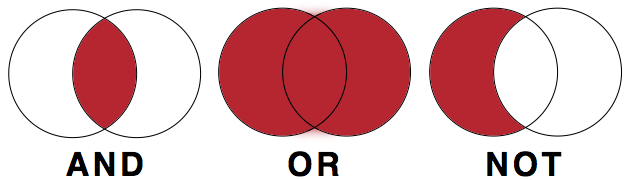
Library databases use three commands—AND, OR, and NOT—to connect your search terms. These must usually be typed in ALL CAPS.
- OR (Expands your search): Connects synonyms. It tells the database to find articles containing any of the words.
- Example: "fast fashion" OR "apparel industry"
- AND (Narrows your search): Connects different concepts. It tells the database to find articles containing all of the words.
- Example: "fast fashion" AND marketing
- NOT (Excludes terms): Removes irrelevant results. Use with caution, as it might remove good articles that happen to mention the excluded word.
- Example: "fast fashion" NOT footwear
Building the Search String
Use brackets to group your synonyms (your OR terms) before connecting them with AND.
("fast fashion" OR "apparel industry") AND (marketing OR advertising) AND ("European Union" OR EU)
Step 4: Choose the Right Tool
Now that you have a search string, you need to decide where to run it. Different tools hold different types of information.
- The Library OPAC (Catalogue): Use this to find physical books, e-books, and architectural magazines held locally at BI. It is best for broad overviews and foundational theories.
- Academic Databases (e.g., EBSCO, JSTOR): Use these to find peer-reviewed journal articles. They are essential for finding the most current, specific research, particularly for your BA thesis.
- Google Scholar: A useful supplement to library databases, but it lacks the advanced filtering options of EBSCO and may hit paywalls. (If you hit a paywall, always check if the BI Library has access).
Library Access: Remember to use the EZProxy Bookmarklet to access paywalled articles from off-campus.
Step 5: Search, Review, and Adjust (Iterative Searching)
Searching is an iterative process. You will rarely get perfect results on your first try.
- Too many results? Add another concept using AND, or use database filters to limit the publication date (e.g., the last 5 years) or language.
- Too few results? Remove a concept, or add more synonyms using OR.
- Wrong results? Review the titles and abstracts of the first few results. Look for the keywords the authors used, add them to your search strategy, and try again.
Using Generative AI to Design Searches
Generative AI can help you brainstorm synonyms and structure your Boolean strings. You can prompt an AI with: "I am researching the impact of EU regulations on fast fashion marketing. Generate a list of academic synonyms for these concepts and format them into a Boolean search string."
Always review the AI's string before using it, as it may include unnecessary punctuation or overly complex terms. For more guidance, see Enhancing Search Queries with AI.
Next Steps
Once you have found a selection of relevant books and articles, you must evaluate them for academic credibility before deciding to use them in your writing.
Continue to: [Link to: How to evaluate academic sources]
Adapted from My Learning Essentials resources developed by the University of Manchester Library and licensed under CC BY-NC 3.0.