


Research Skills
- Searching for Information
- How to search the library's catalogue (OPAC)
- Developing a search strategy
- Advanced Search Techniques
- Making the most of Generative AI (ChatGPT etc.)
- Open Access (OA)
- Structuring Your Paper
- Managing Citations
- Creating Citations & Avoiding Plagiarism
- Citation Examples: APA
- Citation Examples: Chicago
- Citation Management Software
- Systematic Literature Reviews
Searching for Information
Ready to move beyond typing random words into search engines?
How to search the library's catalogue (OPAC)
Our online catalogue (OPAC) contains all of our holdings, including:
- books
- monographic series
- periodicals
- theses (including link to full-text)
- audio / visual media
Simple Search
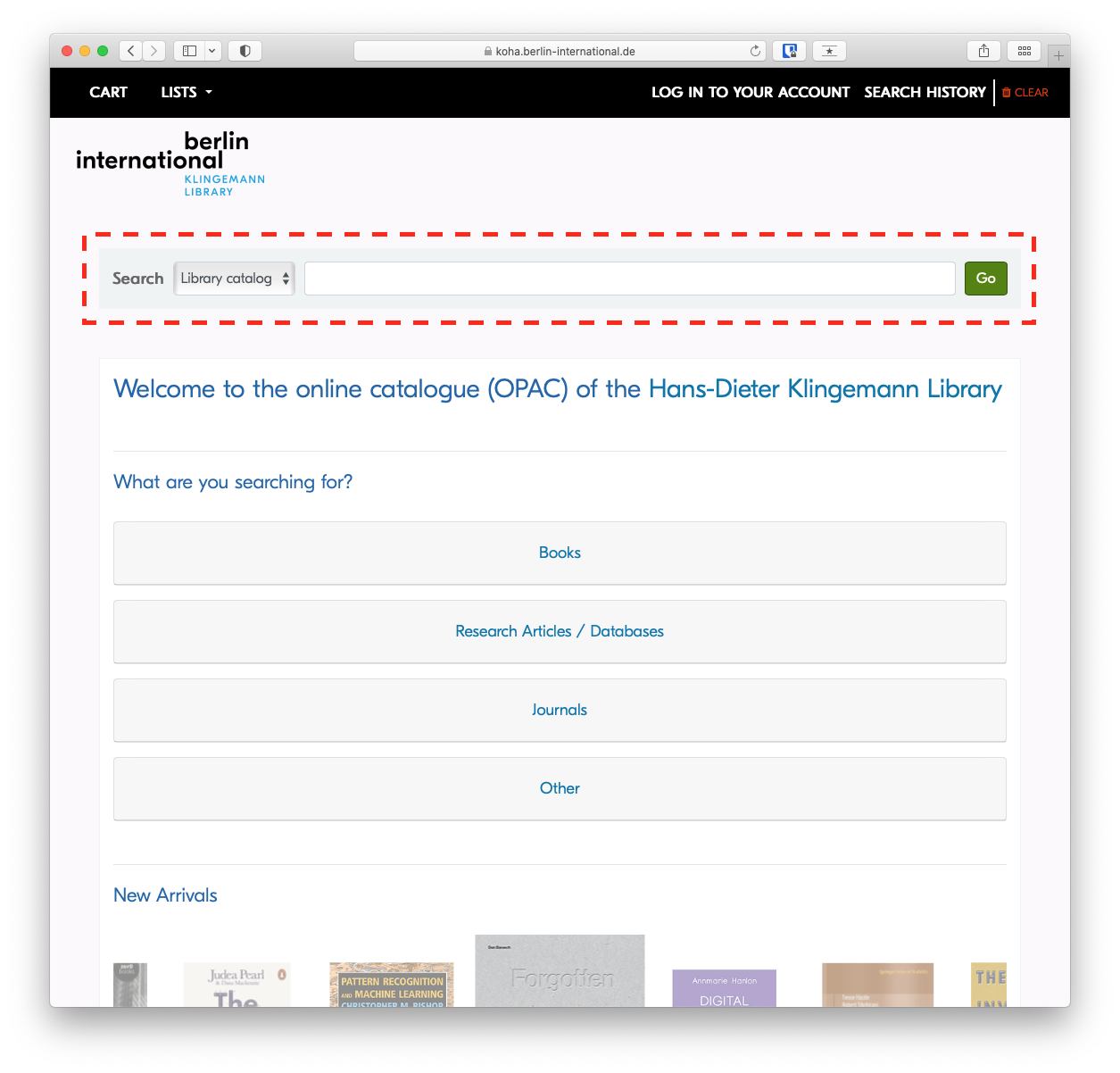
To perform a keyword search, simply type your search in the search field and press enter.
Advanced Search
The Advanced Search will allow you to narrow or broaden your search as needed, based on expanded criteria.
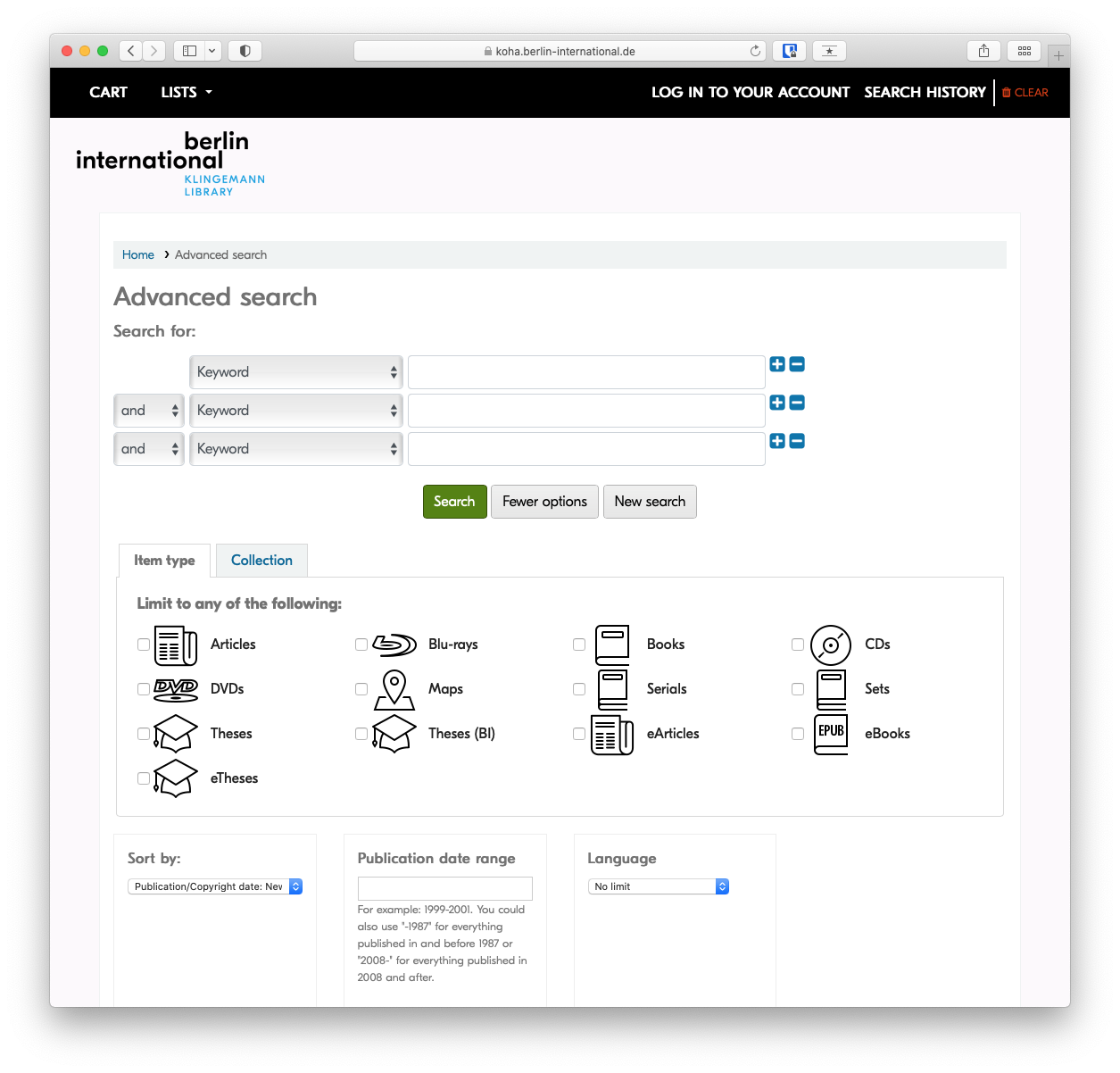
Search in specific fields
If you're interested in learning more, see the article on advanced search techniques
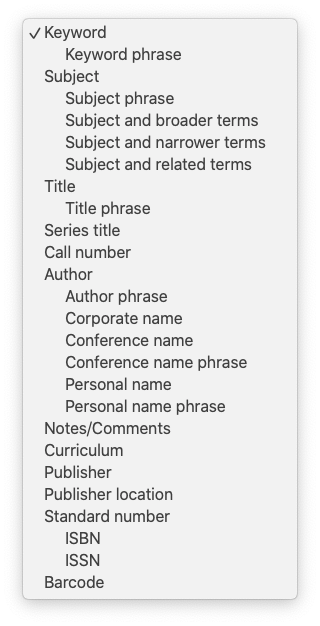
While Keyword is the default search, there are many additional fields that can be searched specifically by selecting them from the drop-down menu. The most relevant are Title, Author and Subject.
Subject
Subject headings are important because you can use them to find similar information more efficiently. Once you've found a record of interest, you may want to note the assigned subject headings to find similar items.
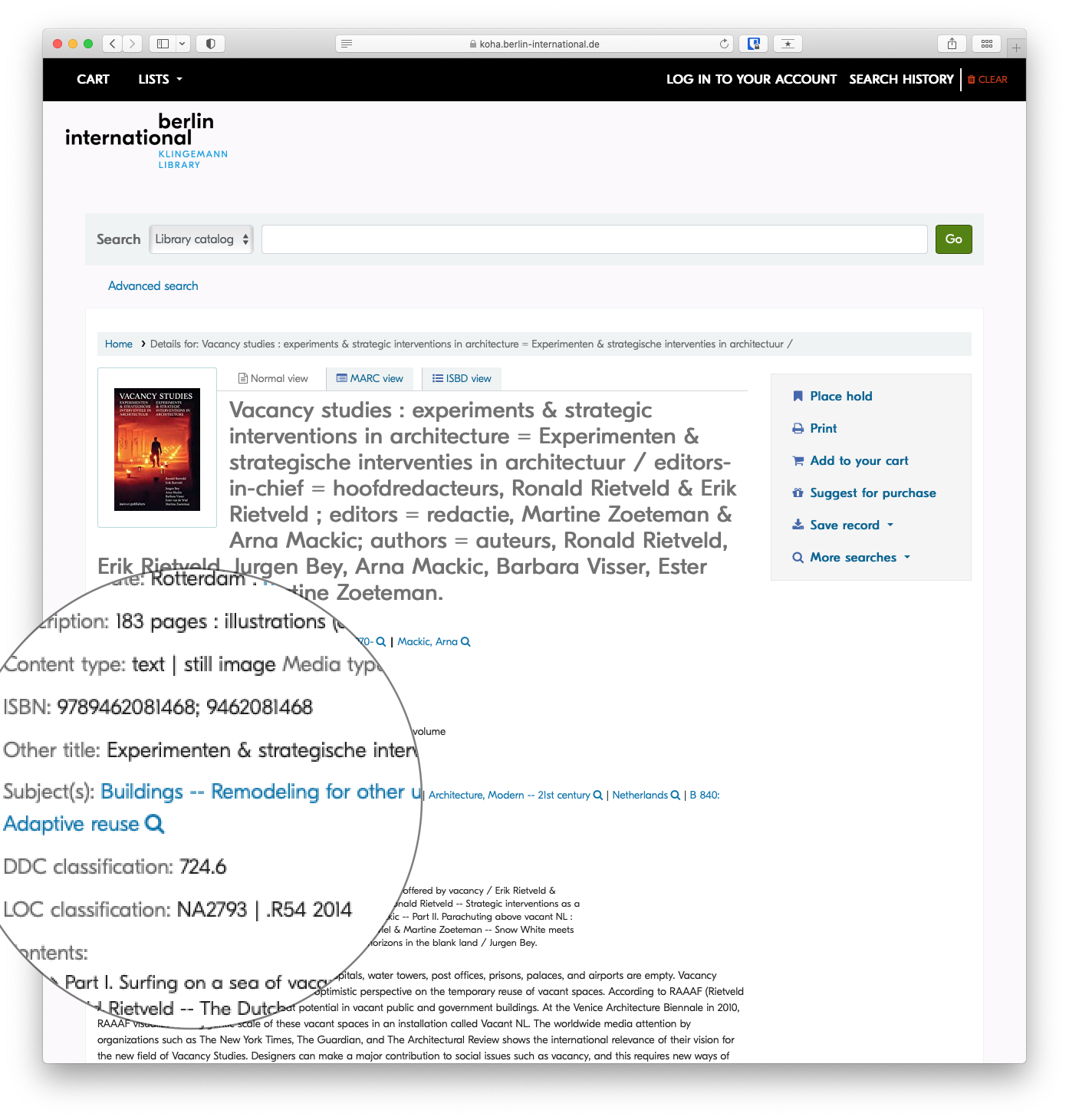
More on Subject Headings
A subject heading is a specific word or phrase used to find and organise books and articles by topic. Subject headings can be a great way to easily find things related directly to your topic. Once you have identified a book or article that is worthwhile, look at the subject headings. In the online catalogue these are found in the catalog record and you can click directly on the subject heading to get a list of books on the same subject.
Subject headings are different from keywords in that they are specific terms assigned to a subject by a subject analyst or the author.
In the library catalogue and many databases, an items's subject(s) will be a link, so that you can click on the subject heading to find similar items. You also might want to note the exact words to search them as a keyword later.
Combine search fields
Sometimes searching in a specific field still returns too many results when you're looking for something specific. IN those cases, it is helpful to combine two or more search fields using AND, OR , or NOT form the drop-down menus to the left of the search field.
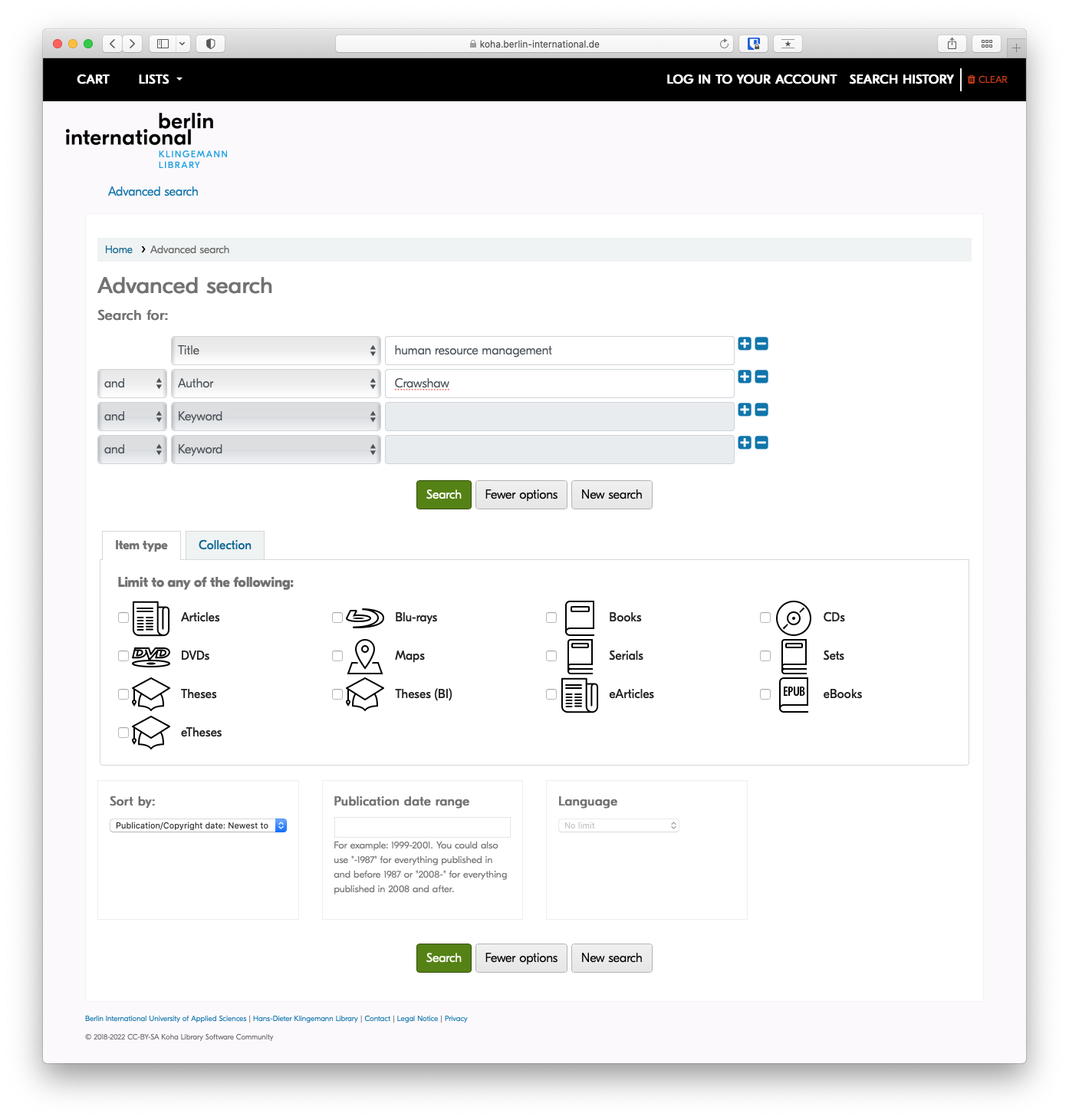
Example: A title search for 'human resource management' may return dozens of results, but when combined with an author search, as in the screenshot below, only items with 'human resource management' in the title AND 'Crawshaw' as an author will be returned.
Results
Refine your search
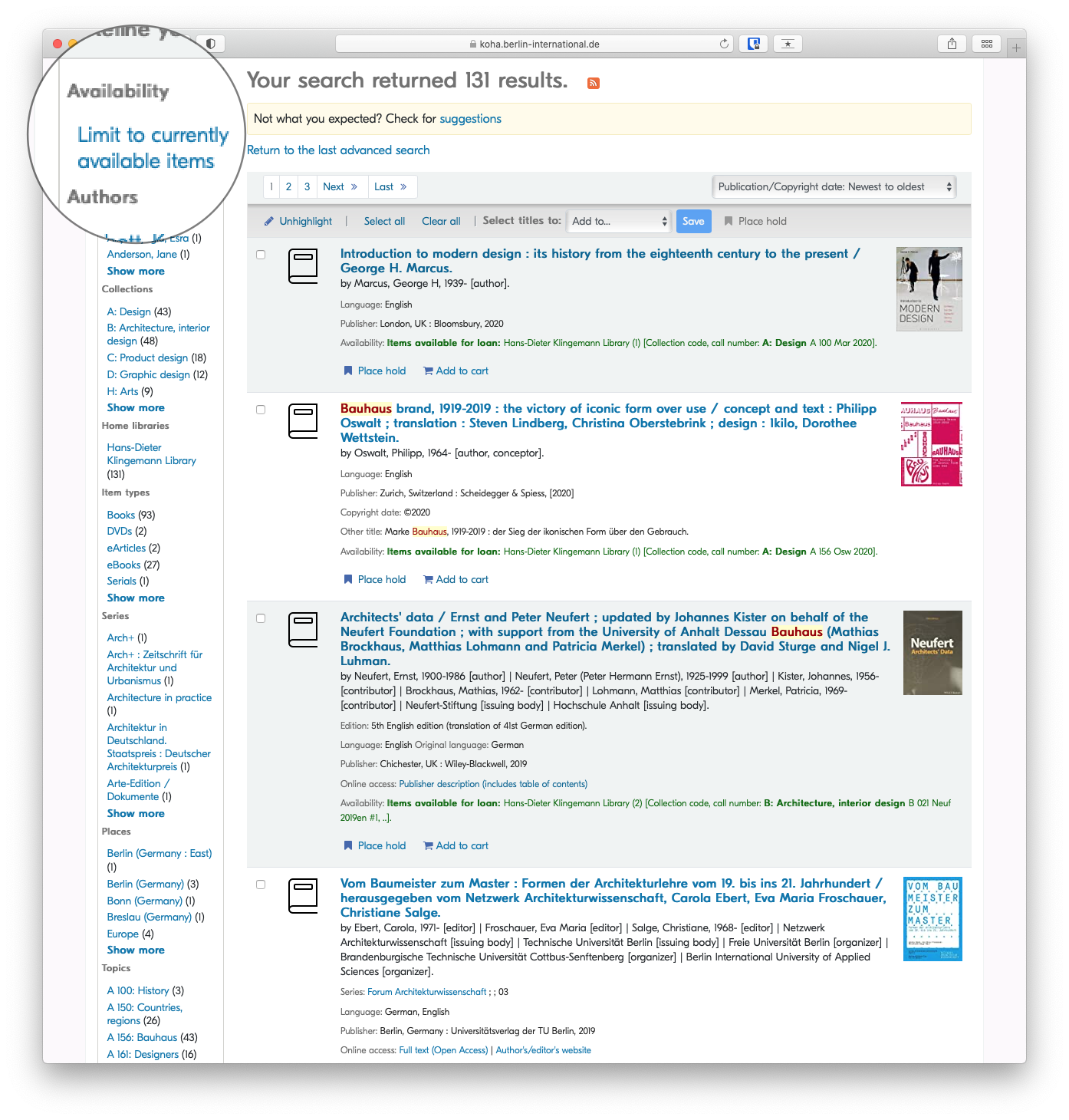
Once your search has returned results, you can narrow those results, or refine your search based on varied criteria, eg author, availability, item type or topic.
By Availability
By Item Type

Developing a search strategy
Overview
Searching for academic literature is different from using Google. A simple web search guesses what you mean; academic databases match your exact words. This means you must build a structured search strategy to ensure you find the most relevant literature without missing crucial studies. This guide outlines how to translate your research question into a database search.
Writing a systematic literature review? See our advanced guide on Conducting Your Search for instructions on building complex concept blocks and testing search strings.
Prerequisites
Before building a search strategy, you must have completed:
- Step 1: Defined your research question.
- Step 2: Gathered background information and academic keywords.
Step 1: Identify Your Key Concepts
Do not type your entire research question into a library database. Instead, break it down into its core concepts (the most important nouns). Ignore instructional words (like "assess" or "describe") and relationship words (like "impact" or "effect").
Example Research Question:
"How do recent European Union regulations impact the marketing strategies of fast fashion retailers?"
Key Concepts:
- Concept 1: European Union regulations
- Concept 2: Marketing strategies
- Concept 3: Fast fashion
Step 2: Brainstorm Alternative Search Terms
| Concept 1: Regulations | Concept 2: Marketing | Concept 3: Fast Fashion |
|---|---|---|
| European Union | Marketing strategy | Fast fashion |
| EU law | Advertising | Disposable clothing |
| Legislation | Public relations | Ultra-fast fashion |
| Policy | Branding | Apparel industry |
Using Truncation and Wildcards
Save time by searching for multiple word endings at once using an asterisk (*). This is called truncation.
- Searching for
market*will find: market, markets, marketing, marketers. - Searching for
sustainab*will find: sustainable, sustainability.
Step 3: Combine Your Terms with Boolean Operators
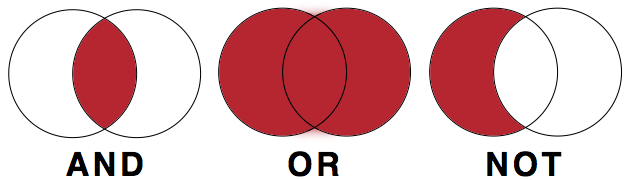
Library databases use three commands—AND, OR, and NOT—to connect your search terms. These must usually be typed in ALL CAPS.
- OR (Expands your search): Connects synonyms. It tells the database to find articles containing any of the words.
- Example: "fast fashion" OR "apparel industry"
- AND (Narrows your search): Connects different concepts. It tells the database to find articles containing all of the words.
- Example: "fast fashion" AND marketing
- NOT (Excludes terms): Removes irrelevant results. Use with caution, as it might remove good articles that happen to mention the excluded word.
- Example: "fast fashion" NOT footwear
Building the Search String
Use brackets to group your synonyms (your OR terms) before connecting them with AND.
("fast fashion" OR "apparel industry") AND (marketing OR advertising) AND ("European Union" OR EU)
Step 4: Choose the Right Tool
Now that you have a search string, you need to decide where to run it. Different tools hold different types of information.
- The Library OPAC (Catalogue): Use this to find physical books, e-books, and architectural magazines held locally at BI. It is best for broad overviews and foundational theories.
- Academic Databases (e.g., EBSCO, JSTOR): Use these to find peer-reviewed journal articles. They are essential for finding the most current, specific research, particularly for your BA thesis.
- Google Scholar: A useful supplement to library databases, but it lacks the advanced filtering options of EBSCO and may hit paywalls. (If you hit a paywall, always check if the BI Library has access).
Library Access: Remember to use the EZProxy Bookmarklet to access paywalled articles from off-campus.
Step 5: Search, Review, and Adjust (Iterative Searching)
Searching is an iterative process. You will rarely get perfect results on your first try.
- Too many results? Add another concept using AND, or use database filters to limit the publication date (e.g., the last 5 years) or language.
- Too few results? Remove a concept, or add more synonyms using OR.
- Wrong results? Review the titles and abstracts of the first few results. Look for the keywords the authors used, add them to your search strategy, and try again.
Using Generative AI to Design Searches
Generative AI can help you brainstorm synonyms and structure your Boolean strings. You can prompt an AI with: "I am researching the impact of EU regulations on fast fashion marketing. Generate a list of academic synonyms for these concepts and format them into a Boolean search string."
Always review the AI's string before using it, as it may include unnecessary punctuation or overly complex terms. For more guidance, see Enhancing Search Queries with AI.
Next Steps
Once you have found a selection of relevant books and articles, you must evaluate them for academic credibility before deciding to use them in your writing.
Continue to: How to evaluate academic sources
Adapted from My Learning Essentials resources developed by the University of Manchester Library and licensed under CC BY-NC 3.0.
Advanced Search Techniques
For more information on using generative AI to design searches, see Enhancing Search Queries with AI.
Keyword
Generally keywords are the default for search queries, and it's important to know how a keyword search works.
Keyword searches will return results in which the keyword appears anywhere in the record, whether title, description, author, etc. A search for multiple keywords will return results in which both keywords appear anywhere in the record, not necessarily beside each other.
Example: industrial design would return all results that include the terms industrial and design irrespective of where the terms were in relation to each other
Grouping keywords with quotation marks
An easy way to group keywords is to enclose them in quotation marks. This can be particularly helpful when searching for specific titles of items.
Example: 'industrial design' would only return results where industrial and design were located beside each other
Boolean Operators (AND, OR, NOT)
AND
Use the Boolean operator AND to narrow search terms more effectively.
Example: Bauhaus AND Albers would return results that include both Bauhaus and Albers
OR
Use the Boolean operator OR to combine search terms.
The Boolean operator OR is helpful for search terms with varying spelling, e.g. o/ou or s/z in English; or when looking for a search term in different languages:
Example: 'labor policy' OR 'labour policy' would return results containing either labor or labour.
Example: 'industrial design' OR Industriedesign would return results containing either industrial design or Industriedesign
NOT
Use the Boolean operator NOT to exclude results.
Example: bauhaus NOT band would return only results which include the term bauhaus but do not include the term band
Wildcards
Wildcards are used in search terms to represent one or more other characters.
The two most commonly used wildcards are:
An asterisk (*) may be used to specify any number of characters. It is typically used at the end of a root word, when it is referred to as "truncation." This is great when you want to search for variable endings of a root word.
Example: searching for librar* would tell the database to look for all possible endings to that root. Results will include library, libraries, librarian, librarians or librarianship.
A question mark (?) may be used to represent a single character, anywhere in the word. It is most useful when there are variable spellings for a word, and you want to search for all variants at once.
Example: Searching for colo?r would return both color and colour.
Wildcard characters can vary among search providers
Making the most of Generative AI (ChatGPT etc.)
Overview
Generative AI tools such as ChatGPT, Microsoft Copilot, Google Gemini, and Claude can assist with many parts of the research and writing process. They can help you brainstorm, draft, refine prompts, and structure search queries. They can also produce convincing but inaccurate content, fabricate sources, and reflect biases present in their training data.
This guide helps you use these tools critically and responsibly. It covers:
- what generative AI can and cannot do reliably
- how to write effective prompts
- how to use AI to assist with database searching
- how to cite AI-generated content
- what risks to watch for
Before you use any AI tool in your coursework, check your course or assignment guidelines. Policies vary by instructor, department, and faculty. If the policy is not stated, ask.
What generative AI does and does not do
Generative AI tools produce text (and sometimes images or code) by drawing on patterns learned during training on large datasets. How they handle information at the point of use varies by tool and by how you access it.
Some tools work from training data alone. These have a knowledge cutoff: they cannot access recent publications, current events, or library resources. Their outputs reflect what was in their training data, nothing more.
Other tools can retrieve external content before generating a response, a technique often called retrieval-augmented generation (RAG). Tools such as Microsoft Copilot, Google Gemini, and certain modes of ChatGPT can search the web or draw on connected sources. Some research-oriented tools (Perplexity, Elicit, Scite) are designed specifically to retrieve and summarize scholarly content.
Retrieval capability does not make a tool reliable. Even tools with web access can:
- misrepresent, misquote, or selectively paraphrase the sources they retrieve
- generate citations to sources that look real but are wrong in detail or do not exist
- present a confident synthesis that misses important contrary evidence
- reflect biases present in whatever sources they surface or were trained on
In practice, you should not assume that because a tool "searched the web" its output is accurate or that its citations are correct. Verify any source an AI tool mentions before citing it, regardless of which tool you used.
Other risks apply across most current tools:
- Bias: AI outputs reflect assumptions and gaps in training data. Be alert to skewed perspectives or missing viewpoints.
- Privacy: Many tools may use your inputs to improve future models. Do not enter personal data, confidential information, or unpublished research unless you have confirmed the tool's data handling policy.
- Academic integrity: Undisclosed AI use may violate institutional policies, regardless of which tool you used or how.
If you are unsure how a specific tool handles data or retrieval, check its documentation or ask a librarian.
Citation and Attribution
Citation practices for generative AI are still evolving. Each major style has issued guidance, but all note that their recommendations may change. Always check your assignment requirements and consult with your instructor if you are unsure whether and how to disclose AI use.
The general principle across styles is: if you use AI-generated content in your work, disclose it. This applies to quoted or paraphrased text, images, and data.
Citing Generative AI: APA
Citing Generative AI: Chicago
Writing Prompts
Expand
Crafting effective prompts for a Generative AI tool is crucial for obtaining high-quality outputs. This guide provides a concise overview and tips to enhance your prompts:
Be Specific:
Generic prompts yield generic results. Specify the type, genre, audience, length, and tone for better outcomes.
Create a visually engaging poster promoting a sustainable design exhibition for a design-savvy audience. Keep it concise and modern.
Draft a concise business proposal outlining key strategies for a sustainable product launch in the current market. Target audience: investors and industry professionals.
"Act as if..." Approach:
Request the AI to assume a certain role, process, or object. This provides context and refines responses, e.g., "Act as if you are my personal trainer" when seeking recipe suggestions.
Act as if you are a design consultant. Provide creative suggestions for enhancing user experience in a mobile app focusing on simplicity and aesthetics.
Act as if you are a marketing strategist. Develop a marketing plan for a new business venture, considering target demographics and competition.
Specify Output Format:
Clearly state the desired output format, such as code, stories, reports, etc. Use phrases like "Present this in the form of..." or "Create a [output format] about/that contains..."
Design an infographic illustrating the evolution of graphic design trends in the last decade. Present this in the form of a visually appealing and informative graphic.
Compose a market analysis report on emerging e-commerce trends. Present this in the form of a concise and visually appealing slide deck for a business presentation.
Use "Do" and "Don't":
Save time and improve results by specifying preferences. For instance, "Create a recipe that includes tomatoes, chicken, and carbs, but exclude chili peppers and wheat-containing ingredients."
Develop a logo for a startup specializing in sustainable packaging solutions. Do incorporate eco-friendly elements and vibrant colors. Don't use overly complex designs.
Draft a proposal for a business event sponsorship. Do highlight the potential benefits for sponsors. Don't include excessive jargon or technical details.
Provide Examples:
Offer a sample sentence or paragraph for the AI to reference, avoiding copyrighted material. This helps shape the desired output.
Provide a description of a modern furniture design studio. For example, discuss the studio's philosophy, materials used, and signature design elements.
Describe a successful case study of a business implementing sustainable practices. For example, highlight the specific strategies adopted and the resulting positive impact on the company's image and profitability.
Consider Tone and Audience:
Specify the audience and desired tone. For example, "Give me ideas for a funny and heartwarming best man's speech suitable for a family audience."
Generate ideas for a creative pitch introducing a new design tool to fellow design students. Ensure the tone is inspiring and resonates with the enthusiasm of budding designers.
Develop content for a promotional video targeting potential investors in a tech startup. Ensure the tone is professional, highlighting the innovation and market potential of the product.
Build on Previous Prompts:
Start with a basic question and refine it over time. Adjust wording, tone, or add more context to guide the AI toward the desired output.
What are the key elements to consider in designing an interactive and user-friendly website? Build on this by providing examples relevant to design students' projects.
Begin with a basic outline for a business plan. Now, add more details about market analysis, financial projections, and potential challenges faced by startups in the current economic landscape.
Correct Mistakes and Give Feedback:
Treat the AI like a colleague, providing feedback on useful parts and areas for improvement. Correct any mistakes to enhance future responses.
The design concept is great, but it needs more emphasis on sustainability. Could you provide alternative color schemes and materials that align with eco-friendly principles?
The market analysis is insightful. However, it lacks information on potential risks. Please incorporate a section discussing potential challenges and mitigation strategies.
Ask for Prompt Creation Assistance:
If unsure how to formulate a prompt, ask the AI for help in creating one. Seek guidance by asking, "What should I ask you to help me write a blog post about AI?"
I'm brainstorming ideas for a design blog post. What prompt should I use to generate content about the impact of minimalist design on user experience?
I need to create a persuasive pitch for a business idea. How can I structure a prompt to gather information on effective strategies for presenting market potential and profitability?
Inquire about Additional Needs:
Conclude prompts by asking, "Tell me what else you need to do this" to fill in any gaps and enhance the AI's ability to generate better outputs.
I want to design a portfolio showcasing my best work. Tell me what else you need to generate prompts that will guide me in creating a visually appealing and impactful portfolio.
I'm preparing a business report on the future of e-commerce. Tell me what additional details or data you need to generate prompts that will help me gather comprehensive insights for the report.
Enhancing Search Queries with AI
Expand
Constructing advanced search queries can be difficult, even for advanced researchers. Research databases use structured query syntax: Boolean operators (AND, OR, NOT), wildcards, and phrase searching. Constructing complex queries takes practice. Generative AI can help you build an initial query structure based on your research question.
Prompt:
Given the research question below, construct a search query to be used in a research database that uses synonyms and employs nesting, booleans (AND, OR, NOT) and wildcards (*):"How does critical design contribute to the reimagining of urban spaces, specifically focusing on its impact on community engagement, sustainability, and the overall user experience in the architectural design process?"
Response:
("critical design" OR "speculative design" OR "design fiction") AND
("urban spaces" OR "city planning" OR "urban development") AND
("community engagement" OR "public participation" OR "stakeholder involvement") AND
("sustainability" OR "environmental impact" OR "ecological design") AND
("user experience" OR "human-centered design" OR "occupant satisfaction") AND
("architectural design process" OR "built environment design" OR "architectural innovation")
Important: Always test AI-generated search queries in the actual database and adjust them. Different databases use different syntax, and the AI does not know which database you are using or what terms it indexes. Treat AI-generated queries as a starting draft, not a final product.
Hallucinations and fabricated citations
Generative AI tools frequently produce inaccurate or entirely invented citations. This is sometimes called "hallucination": the AI generates plausible-sounding but false information. This is a well-documented limitation, not an occasional bug.
When asked to produce a list of sources, an AI tool may return:
- real books or articles with incorrect authors, titles, or dates
- titles that do not exist at all
- real titles that are unrelated to the topic you asked about
This happens inconsistently. A single response may include both real and fabricated citations, with no indication of which is which.
Do not cite any source from an AI output without first verifying it exists, using your library catalog, a database such as Scopus or Web of Science, or Google Scholar. Submitting fabricated citations in academic work is a serious integrity issue, regardless of whether the AI produced them.
The same caution applies to AI-generated factual claims, statistics, and quotations. These should always be verified against a primary or reliable secondary source before you use them.
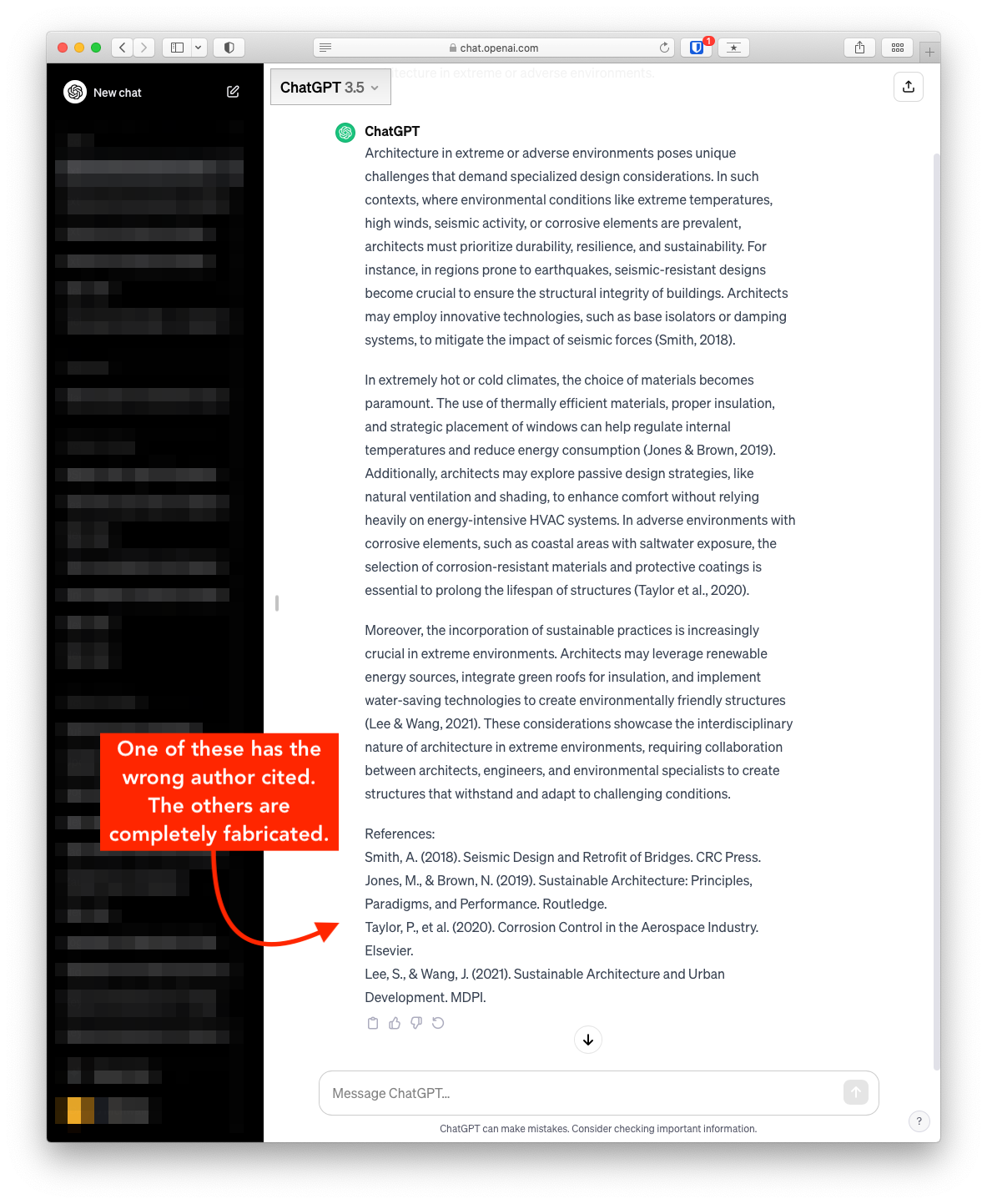
Prompt:
Please provide a list of books, including author, about architecture in extreme or adverse environments.
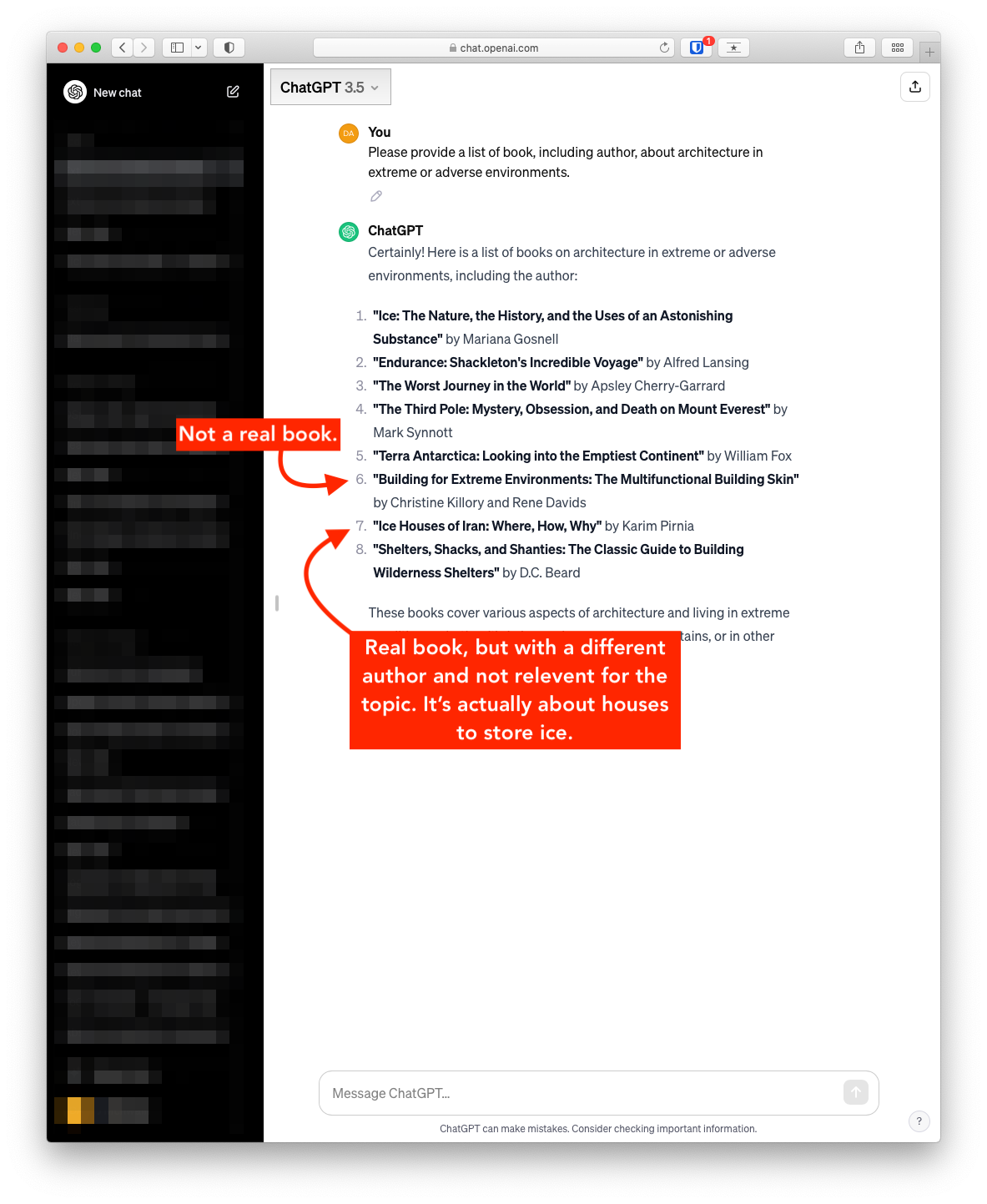
In the next below, ChatGPT was provided with the following prompt:
Please provide two to three paragraphs with in-text citations about architecture in extreme or adverse environments.
The only reference returned that appears to be real is the first, though the author seems to be incorrect. The others are not real.
Open Access (OA)
What Is Open Access?
Open Access (OA) refers to the free, immediate, online availability of research outputs such as journal articles or books, combined with the rights to use these outputs fully in the digital environment. Unlike traditional subscription-based journals, OA content is open to all readers with no access fees. Most open access publications are released under Creative Commons licenses, allowing for broader reuse and distribution while maintaining proper attribution.
Open access is not a fringe movement: it is the direction in which scholarly publishing is heading worldwide. Berlin itself is a birthplace of the modern OA movement — the Berlin Declaration on Open Access to Knowledge in the Sciences and Humanities (2003) remains one of the foundational documents of the global open access movement and has been signed by hundreds of research institutions. As a holder of the Open Library Badge, the Klingemann Library is committed to advancing these principles at Berlin International.
Models of Open Access
Open access is commonly described using a colour system. The four models most relevant to researchers at Berlin International are summarised below.
| Model | How It Works | Who Pays? | When Is It Open? |
|---|---|---|---|
| Gold OA | Published in a fully open access journal. Peer-reviewed and freely available at the point of publication. | Often an Article Processing Charge (APC) paid by the author, institution, or funder. Many Gold OA journals, however, charge no fees at all (see Diamond OA). | Immediately upon publication. |
| Green OA | The author self-archives a version of the work (preprint or accepted manuscript) in an institutional or disciplinary repository. | Free for the author. The article may also be published in a subscription journal. | Immediately, or after an embargo period set by the publisher. Check policies via Sherpa/Romeo. |
| Diamond OA | A special form of Gold OA: the journal charges no fees to authors or readers. Typically community-driven and non-commercial. | Funded by institutions, scholarly societies, or volunteers — not by authors. | Immediately upon publication. |
| Hybrid OA | Individual articles are made open access within a subscription journal, usually by paying an APC. The rest of the journal remains behind a paywall. | An APC paid by the author or institution (often higher than in fully OA journals). | Immediately for the paid article; the journal itself remains subscription-based. |
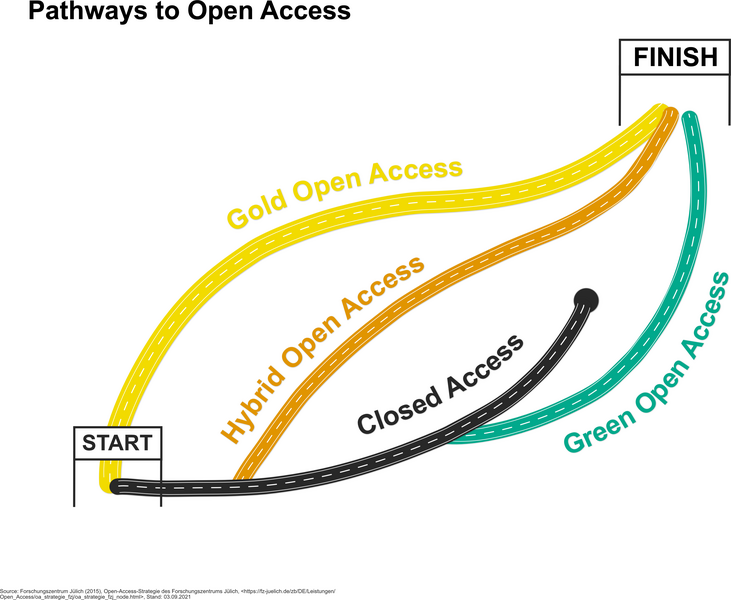
Source: open-access.network (2021), Pathways of Open Access (CC BY 4.0 International)
A note on Hybrid OA and “double dipping”
Hybrid journals collect subscription fees from libraries and APCs from individual authors who choose to publish open access. Critics call this “double dipping” because the publisher is paid twice for the same content. If you are considering a hybrid journal, check whether your institution or funder has a transformative agreement with the publisher that offsets the APC. In Germany, the DEAL agreements with Wiley and Springer Nature are examples of such arrangements, though Berlin International is not currently a DEAL participant.
Why Open Access Matters at Berlin International
Open access offers concrete advantages for researchers and students at a small, international institution:
- Visibility for early-career researchers. OA publications are indexed more broadly and cited more frequently, helping faculty and graduates at a smaller university build their academic profiles.
- Thesis discoverability. When students deposit their theses in the BI Institutional Repository, the work becomes findable worldwide, strengthening both the student's portfolio and the university's research profile.
- Equitable access. Many of our students and partners are based in countries where institutional subscriptions are limited. OA ensures that everyone can read and build on BI research.
- Funder compliance. An increasing number of research funders, including the European Commission (Horizon Europe) and the DFG, require that publicly funded research be published in open access.
- Portfolio building for design faculty. OA repositories and platforms allow designers and architects to share visual research, project documentation, and creative work alongside traditional text publications.
Finding Open Access Resources
Via the Library's Catalog
Many open access items in our catalog can be identified by the OA symbol  . Thanks to enrichment data from the Directory of Open Access Books (DOAB) and the Directory of Open Access Journals (DOAJ), these resources link directly to the open access full text, ensuring immediate access without restrictions. This is part of our broader commitment to openness, as recognised by the Open Library Badge.
Via the Research Database Index
The library's Research Database Index lists all research databases available to the BI community. Many of these include open access content alongside subscription resources. When searching for journal articles, try combining subscription databases with the open access discovery tools below to ensure you find the broadest range of sources.
Open Access Discovery Tools
Recommended tools for finding OA content
- Unpaywall — A free browser extension (Firefox, Chrome) that automatically finds legal open access versions of articles as you browse. Install it once and it works in the background on publisher sites and databases.
- CORE — Aggregates millions of open access papers from repositories and journals worldwide. Useful for cross-disciplinary searching.
- OpenAlex — A free, open bibliometric tool that indexes scholarly works, authors, institutions, and venues. Useful for mapping the open access landscape in your field.
- DOAJ — The authoritative directory of quality-controlled open access journals. Search by subject to find suitable journals in design, business, and related fields.
- DOAB — The equivalent directory for peer-reviewed open access books and monographs.
- BASE (Bielefeld Academic Search Engine) — A powerful search engine for scholarly open access resources, with advanced filtering by document type, language, and subject.
- Open Access Button — Helps locate free, legal versions of research articles. If no OA version exists, it can send an automated request to the author.
Open Access Resources by Discipline
The following resources are particularly relevant to the disciplines taught at Berlin International. For a full list of all databases available to the BI community, consult the Research Database Index.
Design and Architecture
- CumInCAD — Cumulative Index of Computer Aided Architectural Design. An open access bibliographic database covering publications in the field of computer-aided design in architecture, including full-text links.
- DOAJ: Architecture journals — Search the DOAJ specifically for peer-reviewed open access journals in architecture and design.
- DOAJ: Design journals — Filtered search for design-related OA journals.
- Figshare — A general-purpose repository well suited for depositing design artefacts, images, portfolios, presentations, and datasets alongside traditional text outputs.
- Are.na — A collaborative research and bookmarking platform popular in the design community for sharing visual references and research collections.
Business and Management
- SSRN (Social Science Research Network) — A major preprint server for the social sciences and business research. Researchers can upload working papers and preprints for immediate open access.
- EconBiz — A search portal for economics and business studies maintained by the ZBW (German National Library of Economics). Includes open access content and links to full texts.
- RePEc (Research Papers in Economics) — A decentralised database of working papers, journal articles, and software in economics and related fields, with extensive open access content.
- DOAJ: Business and management journals — Filtered DOAJ search for quality-assessed OA journals in business, management, and organisational studies.
How to Publish Open Access
Publishing open access can seem complex, but the steps below provide a practical roadmap. Faculty members are encouraged to contact the library at any stage for personalised support.
1. Identify Suitable Journals or Publishers
Use Sherpa/Romeo to check publisher policies on open access. This platform provides detailed information about copyright and self-archiving policies for thousands of journals, helping you identify where and how you can publish your work openly. You can also search the DOAJ to find quality-assessed open access journals in your discipline, and consult the Research Database Index for an overview of all databases available to the BI community.
2. Deposit Work in Repositories
Repositories are essential for Green OA. Berlin International's Institutional Repository is now live and accepting deposits. Faculty members can deposit accepted manuscripts, preprints, working papers, and other research outputs directly. Students should consult the thesis submission guide for instructions on depositing completed theses.
Additional repository options include:
- Zenodo — A general-purpose open repository hosted by CERN and funded by the European Commission. Accepts any research output (papers, datasets, presentations, posters, software) and assigns a DOI.
- re3data.org — A comprehensive registry of research data repositories across disciplines. Use it to find the right repository for your datasets.
What is the Zweitveröffentlichungsrecht (secondary publication right)?
Under German copyright law (§ 38(4) UrhG), authors of scholarly articles resulting from publicly funded research may make the accepted manuscript version publicly available twelve months after initial publication, regardless of any exclusive rights granted to the publisher. This right applies to articles in periodical publications that appear at least twice per year, and it cannot be waived by contract. It provides a straightforward legal basis for Green OA self-archiving in the BI Institutional Repository. For further details, see the open-access.network guide on the Zweitveröffentlichungsrecht.
3. Disseminate Your Research
After publication, make sure your work reaches the widest possible audience:
- Unpaywall — Ensure your OA deposit is discoverable. Unpaywall harvests from repositories, so depositing in the BI repository or Zenodo means your work will be found automatically.
- ORCID — Register for a free ORCID iD to link all your publications to a single, persistent author identifier. This helps avoid confusion with other researchers who share your name.
- Academic social networks — Platforms such as ResearchGate or Academia.edu can increase visibility, but uploading publisher PDFs to these platforms may violate copyright. Always check with Sherpa/Romeo first, and prefer depositing in a proper repository.
4. Create and Share Open Educational Resources (OERs)
Faculty members can contribute to open education by developing and sharing teaching materials. Platforms include:
- OER Commons — A resource library for finding and contributing openly licensed educational materials.
- twillo — A German OER portal for higher education, supported by the Stifterverband. Particularly relevant for sharing materials in the German academic context.
- BI LibGuide on OER — Our own guide to open educational resources.
Understanding Licensing: Creative Commons
When publishing open access, selecting the right license is essential. Creative Commons (CC) licenses are the standard in scholarly publishing. They allow you to retain copyright while specifying how others may reuse your work. All CC licenses require attribution (credit to the original author); the differences lie in what additional restrictions apply.
| License | Commercial Use? | Adaptations? | Notes |
|---|---|---|---|
| CC BY | Yes | Yes | Most permissive. Recommended by the Berlin Declaration and most funders. Maximises reuse and citation potential. |
| CC BY-SA | Yes | Yes, under the same license | “Share Alike” ensures derivative works remain open. Used by Wikipedia. |
| CC BY-NC | No | Yes | Restricts commercial use. Note: the definition of “commercial” can be ambiguous (e.g., educational fee-charging institutions). |
| CC BY-NC-SA | No | Yes, under the same license | Combines non-commercial and share-alike conditions. Used by the Klingemann Library LibGuides. |
| CC BY-ND | Yes | No | “No Derivatives” prevents others from adapting the work. Rarely recommended for academic use. |
| CC BY-NC-ND | No | No | Most restrictive CC license. Limits both commercial reuse and adaptation. |
Which license should I choose?
For maximum impact and compliance with the Berlin Declaration and most funder mandates, CC BY is recommended. It allows the broadest possible reuse while always requiring attribution. If you have specific concerns about commercial exploitation of your work, CC BY-NC is a common compromise, but be aware that it can restrict legitimate uses (e.g., a commercial educational platform redistributing your paper). The Creative Commons website provides an interactive License Chooser to help you decide. For further guidance, see the open-access.network page on licenses.
Recognising and Avoiding Predatory Publishers
Predatory publishers exploit the open access model by charging publication fees without providing genuine peer review, editorial oversight, or lasting archival. Their journals may look professional at first glance, but the work they publish lacks quality assurance and may damage your academic reputation. This is a particular risk for researchers at international institutions who may receive unsolicited publication invitations in English.
Warning Signs
- Unsolicited emails inviting you to submit, join an editorial board, or speak at a conference, especially if they are overly flattering or use a generic tone.
- Promises of extremely fast peer review (days, not weeks).
- Lack of clear information about the editorial board, peer review process, or publication fees on the journal's website.
- A journal title that closely imitates a well-known publication, often incorporating words like “International,” “European,” or “American.”
- No listing in established indexes such as the DOAJ, Scopus, or Web of Science.
How to Check a Journal
Tools and strategies for evaluating journals
- Think. Check. Submit. — An industry-endorsed checklist to help researchers evaluate whether a journal is trustworthy before submitting their work. Available in multiple languages.
- DOAJ — Inclusion in the DOAJ is a strong quality indicator. The DOAJ applies rigorous criteria covering peer review, editorial transparency, and licensing. If a journal is listed in the DOAJ, it has been vetted.
- Compass to Publish — A tool from the University of Liège that lets you assess a journal's legitimacy by answering a series of questions.
- Ask a colleague. If you have never heard of a journal and cannot find it in standard indexes, consult colleagues in your field or contact the library.
For a detailed German-language checklist, see the open-access.network's guidance on predatory publishing.
Open Access in Berlin and Germany
Berlin International operates within a rich regional and national OA ecosystem. The following resources provide context and support:
Key resources in the Berlin and German OA landscape
- Berlin Declaration on Open Access (2003) — The foundational statement of the global OA movement, signed by hundreds of research organisations worldwide. Originated in Berlin.
- Open-Access-Strategie für Berlin — The State of Berlin's strategy for promoting open access in the city's research institutions.
- open-access.network — Germany's central information platform on open access. Provides comprehensive guides, FAQs, a helpdesk, and training materials in German and English. Funded by the BMBF.
- open-access.network FAQ — Answers to common questions about licensing, self-archiving, predatory journals, and more.
- Berlin Universities Publishing (BerlinUP) — A non-commercial, scholar-owned OA publisher supported by the Berlin University Alliance (FU, HU, TU, Charité).
- Zweitveröffentlichungsrecht — Information on the German secondary publication right (§ 38(4) UrhG), which enables authors to self-archive accepted manuscripts after twelve months.
Support from the Library
The Klingemann Library is here to assist you at every step of the open access process. We provide:
- Guidance on selecting suitable OA journals, repositories, and licenses.
- Support with navigating funder mandates and institutional policies on open access.
- Instruction on using tools such as Sherpa/Romeo, Unpaywall, ORCID, and the Research Database Index.
- Help with depositing research outputs in the BI Institutional Repository.
- Advice on recognising and avoiding predatory publishers.
For more information or personalised support, please email us or chat via Teams.
Structuring Your Paper
How to Write an Outline
Overview
An outline is a structural framework for your paper. It organises your ideas, sources, and arguments before you write the first draft. Taking the time to build a thorough outline prevents writer's block, exposes gaps in your research, and ensures your final argument flows logically from start to finish.
Prerequisites
Before you attempt to write an outline, you must have:
- A clear research question or thesis statement.
- Thematically organized notes, such as a synthesis matrix.
Choosing an Outline Format
Different disciplines and learning styles benefit from different outlining methods. Choose the one that best fits your workflow.
1. The Linear Outline (Standard Alphanumeric)
This is the traditional, top-down approach. It works exceptionally well for Business Administration (FoB) reports and empirical research papers. You use a combination of numbers and letters to establish a hierarchy of ideas.
- I. Introduction
- A. Hook or context
- B. Research question and thesis statement
- II. First Main Theme (e.g., EU Supply Chain Regulations)
- A. Topic sentence introducing the theme
- B. Evidence from Source 1 (Author, Year)
- C. Evidence from Source 2 (Author, Year)
- D. Analysis of how this evidence supports the thesis
- III. Second Main Theme...
2. The Visual Outline (Mind Mapping)
Some students think spatially rather than linearly. A visual outline or mind map allows you to group concepts on a blank canvas before forcing them into a linear sequence.
- Write your main thesis in the centre of the page.
- Draw branches outward for your main themes or case studies.
- Attach specific pieces of evidence, precedent images, or author quotes to each branch.
- Once the map is complete, assign a number to each branch to dictate the final reading order.
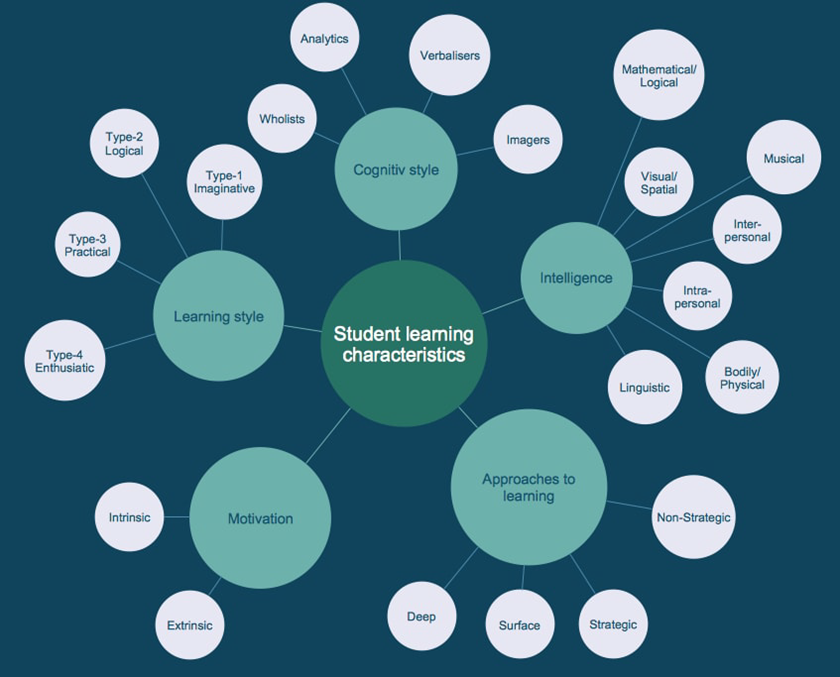
"Spray diagram Student learning characteristics" by CS Odessa is licensed under CC BY 4.0.
The Standard Academic Structure
Regardless of whether you outline visually or linearly, most academic papers require three core components:
The Introduction
Your introduction should account for roughly ten percent of your total word count. It must provide the background context, introduce the specific problem you are investigating, and end with a clear thesis statement. The thesis statement is the direct answer to your research question.
The Body Paragraphs
This is the core of your paper. Do not organise your body paragraphs by author (e.g., "Smith says X. Jones says Y."). Instead, organise them by theme or concept.
Plan each body paragraph using the Topic-Evidence-Analysis structure:
- Topic Sentence: State the main idea of the paragraph clearly.
- Evidence: Introduce your paraphrased sources, data, or precedent analyses.
- Analysis: Explain exactly how this evidence proves your point. Do not leave the reader to guess why the evidence matters.
The Conclusion
The conclusion should also account for roughly ten percent of your paper. It must restate your thesis in a new way, summarise the main findings from your body paragraphs, and explain the broader implications of your research. Never introduce new evidence or new sources in a conclusion.
Tip: Write the introduction last. Many students get stuck trying to write the perfect introduction. Outline the whole paper, draft your body paragraphs first, and then write the introduction once you know exactly what your paper actually says.
Reverse Outlining: A Tool for Editing
If you have already written a messy first draft and feel like the argument is completely lost, use a technique called "reverse outlining."
- Read your draft and highlight the main point of every single paragraph.
- Write those main points in a numbered list on a separate piece of paper.
- Read the list.
Does the list make logical sense? Are there leaps in logic; are ideas repeated in paragraphs three and seven; does a paragraph lack a clear main point? Rearrange or delete the paragraphs based on this reverse outline to instantly fix the structure of your paper.
Using Generative AI for Outlining
Generative AI tools are excellent structural assistants, provided you supply the ideas.
Example Prompt:
"I am writing a BA thesis on sustainable materials in interior design. My main themes are cost, durability, and aesthetic flexibility. My thesis statement is [insert statement]. Suggest a logical, highly detailed structural outline for a thirty-page academic paper based on these themes."
Academic Integrity: Do not ask an AI to write the content of the outline for you. You must provide the themes, the thesis statement, and the evidence. The AI should only be used to suggest the structural sequence. Review the library's guide on Making the most of Generative AI.
Managing Citations
Learn more about creating citations and citation management software such as Zotero.
Creating Citations & Avoiding Plagiarism
What are citations?
Citations are addresses. They tell readers where to find a specific piece of research.
Think of a postal address. There are certain pieces of information that must be included and they must be presented in a certain order (format) so that a letter can find its destination. Postal addresses may vary slightly in different countries or regions, but in the end they all contain the same pieces of critical information. This can be compared to the slightly varied formats of different style guides for citations.
Citations provide basic information like author, title, publisher and year of publication that allow researchers to locate a particular piece of information.
Why are citations needed?
- When we use someone else's ideas, we use citations to tell others exactly where that idea came from (attribution).
- Citations are critical for scholarly communication and knowledge creation because they allow researchers to trace the origins of and development of ideas over time (communication).
- Citations lend credibility to research by situating it within a larger scholarly dialogue (credibility).
How to write citations?
Just like addresses, citations have a very specific format, and different academic disciplines may have slightly different ways that they format citations; adopting the format from one of several style-guides.
Please note: FoB uses APA-style citations and FoAD uses Chicago-style citations.
It is recommended to use Citation Management Software such as Zotero to store your sources and generate bibliographies.
APA
Read more
APA-style citations are outlined in the Publication Manual of the American Psychological Association: the Official Guide to APA Style, but the basic format is as follows:
| Surname of Author(s), Initial of first name of Author(s).(Year of Publication). Title (Edition No.). Publisher. URL |
Basic Example
| Maesse, J., Pühringer, S., Rossier, T., & Benz, P. (Eds.). (2021). Power and influence of economists: Contributions to the social studies of economics (1st ed.). Routledge. https://doi.org/10.4324/9780367817084 |
Further Examples
Chicago
Read more
Chicago-style is outlined in The Chicago Manual of Style (CMOS), but the basic format consists of two parts:
Plagiarism
What is plagiarism?
Plagiarism means presenting someone else’s work, or your own previous work in the case of self-plagiarism, as your own. Plagiarism is intellectual theft and is regarded as academic misconduct.
Types of plagiarism
There are different types of plagiarism and all are serious violations of academic honesty.
- Direct plagiarism: the word-for-word transcription of part of someone else’s work, without attribution and without quotation marks.
- Mosaic Plagiarism occurs when a student borrows phrases from a source without using quotation marks, or finds synonyms for the author’s language while keeping to the same general structure and meaning of the original.
- Self-plagiarism occurs when a student submits his or her own previous work, or mixes parts of previous works.
- Accidental plagiarism occurs when a person neglects to cite their sources or unintentionally paraphrases a source by using similar words, groups of words without attribution.
Avoiding plagiarism
Plagiarism can be committed unintentionally. Make sure you always provide proper source references so that others can see which ideas are those of other authors.
Providing proper source references also enables other people to check these sources.
Additional Resources
Purdue OWL (Online Writing Lab)
The Online Writing Lab (OWL) at Purdue University in the US has been online since 1995 and is one of the most comprehensive sources available regarding style and citation. Indeed, it often has more information than the actual style guides due to the large number of examples available.
Citation Generators
If you have the information about an article or book, you can use one of the tools below to put it in the right format.
-
ZoteroBibA tool for the quick generation of a citation using a URL, DOI, ISBN, arXiv ID, PMID, or title.
-
Citation BuilderAnother library created tool - this time from NC State University Libraries. It has is the most simplified of the tools - choose the type of resource you have, fill out the information, and then select either APA or MLA citation style. Click Submit. It is ready to copy & paste.
Thanks to the following sources for providing partial inspiration/content for this page: University Library Groningen.
Citation Examples: APA
It is recommended to use Citation Management Software such as Zotero to store your sources and generate bibliographies.
Overview
APA-style citations are outlined in the Publication Manual of the American Psychological Association: the Official Guide to APA Style, but the basic format is as follows:
| Surname of Author(s), Initial of first name of Author(s).(Year of Publication). Title (Edition No.). Publisher. URL |
Generative Artificial Intelligence (AI)
APA (7th edition, updated guidance September 2025)
APA recommends citing specific AI-generated outputs similarly to software references, using the developer as author. Because AI conversations are generally not retrievable by readers, APA also recommends including the prompt in the body of your paper or in an appendix when it is relevant.
For cases where the tool does not generate a stable URL, APA suggests including prompts and output in an appendix, or seeking guidance from your instructor or editor.
Guidelines for APA Style Referencing in Undergraduate Assignments:
-
In-Text Citations and Reference List:
- In-text citations are necessary for direct mentions of AI-generated content.
- In the reference list, attribute authorship to the organisation behind the AI model.
-
Integration into Research Description:
- Explain the use of AI tools in your research in the introduction or methods section.
- Provide details about the prompts used to interact with the AI.
-
Handling Text Passages:
- For brief AI-generated excerpts, incorporate them directly into your paper.
- For longer responses, include relevant portions in the main text or direct readers to an appendix or online supplement for the complete content.
Following these guidelines ensures proper acknowledgment and referencing of AI-generated content in your academic writing.
Format
Author. (Date). Name of tool (Version of tool) [Large language model]. URL
In-text citation
| (OpenAI, 2025) |
Reference
| OpenAI. (2025). ChatGPT (GPT-4o version) [Large language model]. https://chatgpt.com |
Consult the APA Style blog for the most current examples, including guidance on citing AI integrated into software such as Microsoft Copilot.
Books
Book/eBook (single author)
Author. (Year). Title (Edition). Publisher. DOI or URL.
In-text citation
| (Kuhlmann, 2021) |
Reference
| Kuhlmann, S. (2021). Public administration in germany. Springer International Publishing. https://doi.org/10.1007/978-3-030-53697-8. |
eBooks and DOIs
If a book has a DOI (Digital Object Identifier), add this to the end of the reference. If the article does not have a DOI but does have an accessible URL, include this at the end of the reference instead. You can check to see if the book you are referencing has a DOI at Crossref.
Book/eBook (two authors)
For sources with two authors, include both surnames in your in-text citation and full reference, maintaining the source's name order:
In-text citation
|
(Smith & Johnson, 2015, p.8) |
Reference
| Smith, A., & Johnson, B. (2015). Strategies for effective business management. Business Press. |
Book/eBook (three to twenty authors)
For sources with three to twenty authors, cite the first author followed by 'et al' in the in-text citation. List all authors in the full reference, separating them with commas and using an ampersand before the last one:
In-text citation
| (Jones et al., 2019) |
Reference
| Jones, M., Davis, R., Clark, P., & Brown, S. (2019). Enhancing Leadership Skills in Business Education. Journal of Business Education, 12(3), 245-260. |
Book/eBook (more than twenty authors)
For sources with more than twenty authors, include only the first author followed by 'et al' in the in-text citation. List the first 19 authors in the full reference, separated by commas, followed by an ellipsis (...) and the final author:
In-text citation
| (Williams et al., 2020) |
Reference
| Williams, C., Adams, E., Turner, G., Harris, M., Miller, J., Moore, K., ...Taylor, R. (2020). Innovations in Business Research. Business Journal, 8, 112-125. |
Book chapters
Chapter in an edited book
In-text citation
| (Smith, 2020) |
Reference
| Smith, J. (2020). Innovations in Market Analysis. In K. Johnson & R. Anderson (Eds.), Business Trends: Navigating the Future (3rd ed., pp. 112-135). Horizon Publications. |
Conferences
Conference Presentation
- Author of paper.
- Year of publication in citation, and full dates of the conference in the reference.
- Title of presentation in italics, with description of presentation type in square brackets.
- Name of conference.
- Location.
- If a link to the video of the presentation is available, add this to the end of the reference.
In-text citation
| (Bird, 2019) |
Reference
| Bird, N. (2019, May 15-17). Strategies for Business Innovation: Exploring the Dynamics of Corporate Dispositions [Conference presentation]. BizInnovate 2019, Virtual Conference. |
Online video
Format
Creator. (Date). Title. [Video]. Site name. URL.
In-text citation
| (MadeUp Business Conference, 2020) |
Reference
| MadeUp Business Conference. (2020). The MadeUp Business Conference experience. [Video]. YouTube. https://www.youtube.com/watch?v=YLxV5L6IaFA |
Webpage
Format
Corporate or individual author. (Date). Title. URL.
In-text citation
| (Fictional Business Conference, 2021) |
Reference
| Fictional Business Conference. (2021, August 6). Updates on Business Innovations. https://www.fictionalbusinessconference.com/updates-business-innovations |
Thanks to the following sources for providing partial inspiration/content for this page: University College London.
Citation Examples: Chicago
It is recommended to use Citation Management Software such as Zotero to store your sources and generate bibliographies.
Chicago style refers to the Chicago Manual of Style, 17th Edition (CMOS 17).
Note: The 18th edition of the Chicago Manual of Style (CMOS 18) was published in September 2024 and introduces some changes, particularly to the handling of electronic sources and AI-generated content. The examples on this page follow CMOS 17, which remains widely used. Please confirm with your instructor which edition is required for your programme.
Citing sources in Chicago Author-Date style consists of two parts:
- An in-text citation (a brief parenthetical reference within the body of your text)
- A bibliography entry (the full source details, listed alphabetically at the end of your paper)
Every in-text citation must correspond to a full entry in your bibliography, and every bibliography entry should be cited at least once in your text. Together, the two parts allow the reader to trace any claim back to its original source.
DOIs preferred over URLs: When citing electronic sources, always use a DOI (Digital Object Identifier) if one is available, as DOIs are permanent and stable. Only use a URL if no DOI exists. A DOI is formatted as a full link: https://doi.org/10.xxxx/xxxxx.
In-text Citations (Author-Date Format)
Basic Format
Detailed Examples and Cases
Multiple Works by the Same Author in the Same Year
If an author has published multiple works in the same year, alphabetise the titles in the reference list and then add a, b, c, etc. to the year.
(Sheringham 2010a)
(Sheringham 2010b)
Sheringham's first study focused on archival practices in urban spaces (Sheringham 2010a), while his later work expanded the analysis to include suburban landscapes (Sheringham 2010b).
Multiple Citations
To cite more than one reference in a single in-text citation, separate the references by semicolons. If the works are by the same author, use just the year and separate with a comma. See CMOS 15.30 for details.
(Thelen 2004; Gourevitch and Shinn 2005)
(Thelen 2004, 2006; Gourevitch and Shinn 2005)
Several scholars have argued that corporate governance structures are shaped by national institutional frameworks (Thelen 2004; Gourevitch and Shinn 2005).
Figures (Artwork/Images)
Images should appear shortly after you mention them in your paper, should be numbered (Figure 1, Figure 2, etc.), and should appear in the List of Figures of your research.
Chicago style also states that "a brief statement of the source of an illustration, known as a credit line, is usually appropriate" (CMOS 3.29: Sources and permissions). Chicago style does not prescribe the exact format of this statement. The style does not require that images included in a paper be listed in the bibliography.
If you wish to include an image in your paper, BI requires at least the following information:
- Author or creator's name
- Title, or brief description if no title exists
- Year (if available)
- Format (plan, photo, diagram, oil on canvas, etc.), if not apparent
- Origin (publication title, website, etc.)
- URL (for online sources only)
- Date of access (for online sources only)
Additional data that add context, such as a caption, are encouraged.
Example
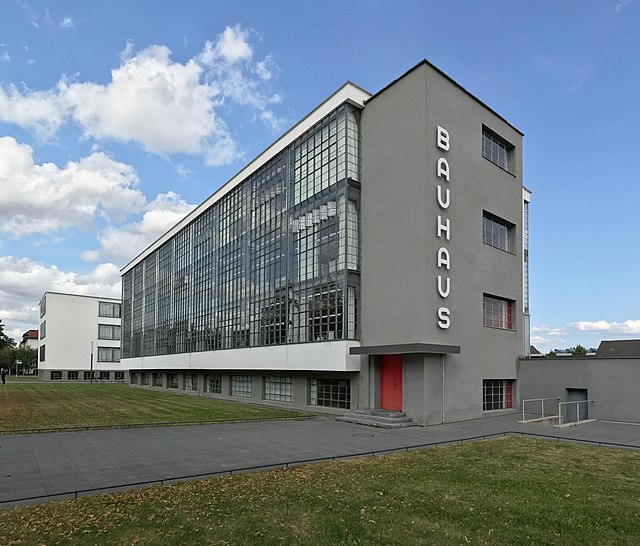
In the example above, the elements correspond to:
Figure 1. Caption, Author/Creator, Title, Date, Publisher/website, URL. License.
Bibliography / References / Works-Cited
The bibliography appears at the end of your paper and provides the full publication details for every source cited in the text. Entries are listed alphabetically by the first author's last name (or by title, ignoring articles such as "A," "The," or "An," when no author is available). The bibliography allows your reader to locate and verify each source you have used.
Formatting note: Bibliography entries use a hanging indent: the first line of each entry is flush left, and all subsequent lines are indented (typically by 1.27 cm / 0.5 in). In Microsoft Word, you can apply this via Paragraph > Special > Hanging. In Google Docs, use Format > Align & indent > Indentation options > Special indent > Hanging.
Generative Artificial Intelligence (AI)
Chicago (18th edition): Author-Date
Chicago style lists the AI tool's developer as the author. The date is the date you generated the content, not a publication date.
In-text citation
(OpenAI 2024)
Reference list entry (with a shareable URL)
OpenAI. 2024. Response to "Describe three approaches to sustainable façade design for a tropical climate." ChatGPT-4o, November 14, 2024. https://chatgpt.com/share/[link].
Reference list entry (prompt included in the text of your paper)
OpenAI. 2024. Text generated by ChatGPT-4o, November 14, 2024. https://chatgpt.com/share/[link].
If no shareable URL is available
Some AI tools, including institutionally licensed versions of Copilot and Gemini, do not generate shareable links. In that case, describe the exchange clearly in your text and note that the conversation is not publicly retrievable. A bibliography entry is optional but should include as much identifying information as possible:
Microsoft. 2024. Response to "Summarize current building regulations for passive house design in Northern Europe." Microsoft Copilot, October 3, 2024. Conversation not publicly retrievable.
Notes
- Replace the example prompts with your own. Keep the prompt text in quotation marks.
- Include the model version (GPT-4o, Gemini 1.5, etc.) where you know it; this matters because different versions produce different outputs.
- Chicago 18th edition guidance on AI citation is covered at section 14.112. The guidance is subject to further revision; check the Chicago Manual of Style Q&A for updates.
Books / eBooks
Book (single author)
Author's Last name, First name. Year of publication. Title: Subtitle. Edition. Place of publication: Publisher.
Thelen, Kathleen. 2004. How Institutions Evolve: The Political Economy of Skills in Germany. Cambridge: Cambridge University Press.
Book (two or three authors)
First author Last name, First name, and second author First name Last name. Year of publication. Title: Subtitle. Edition. Place of publication: Publisher.
Gourevitch, Peter, and James Shinn. 2005. Political Power and Corporate Control: The New Global Politics of Corporate Governance. New Jersey: Princeton University Press.
Book (four or more authors)
First Author Last name, First name, remaining authors' First name Last name. Year of publication. Title: Subtitle. Edition. Place of Publication: Publisher.
De la Bédoyère, Camilla, Ihor Holubizky, Julia Kelly, Michael Kerrigan, James Mackay, William Matar, Tom Middlemos, Michael Robinson, and Iain Zaczek. 2006. A Brief History of Art. London: Flame Tree Publishing.
eBooks
Author(s) Last name, First name. Year of publication. Title: Subtitle. Edition. Place of Publication: Publisher. DOI, URL, or database name.
Beaumont, Lesley A. 2012. Childhood in Ancient Athens: Iconography and Social History. London: Routledge. https://ebookcentral.proquest.com/lib/ucd/detail.action?docID=1114632.
Note: If a book is available in print and online, you must cite the version you consulted. Access dates are only included if no publication date information is available. If no place of publication is available for an eBook, write "n.p." ("no place") in its position.
Note: If you access your book on an eReader or other type of platform, insert that instead of the URL (e.g., Kindle, Google Play Books, Apple Books).
Note: Where page numbers are not available or change depending on the device used, CMOS 17 advises including chapter numbers or section headings instead. If a scanned version of the original book is available online, this version is preferable for citation.
Journal Articles
Journal article (single author)
Author(s) Last name, First name. Year of publication. "Title of Article." Journal Title Volume, Issue no. (month or season): Pages.
Barber, Marcus. 2024. "Global Warming and the Political Ecology of Health: Emerging Crises and Systemic Solutions." The Australian Journal of Anthropology 21, no. 3 (Winter): 390–391.
Journal article (two or three authors)
First Author Last name, First name, remaining authors First name Last name. Year of publication. "Title of Article." Journal Title Volume, Issue no. (month or season): Pages.
Morgan, Sylvia, Danny Carswell, and Lynda Lamore. 2010. "The Rise of Political Correctness in Post-War Britain." Twentieth Century Britain 25, no. 3 (March): 412–416.
Journal article (four or more authors)
First Author Last name, First name, remaining authors First name Last name. Year of publication. "Title of Article." Journal Title Volume, Issue no. (month or season): Pages.
Virtue, Simon, Holly Wright, Dale Diamond, and Sheila Murphy. 1943. "Was Mark Twain a Nihilist?" American Literary Essays 3, no. 88 (Winter): 13–27.
eJournal article
Author(s) Last name, First name. Year of publication. "Title of Article." Journal Title Volume, Issue no. (month or season): Pages. DOI or URL.
Mulvin, Lynda, and Steven E. Sidebotham. 2004. "Roman Game Boards from Abu Sha'ar (Red Sea Coast, Egypt)." Antiquity 78, no. 301 (September): 602–617. https://doi.org/10.1017/S0003598X00113250.
Note: CMOS 17 advises including an access date only when no publication date is provided.
Note: Month of publication only needs to be included where given in the source.
Note: For four or more authors, list all authors in the bibliography. In a footnote, list only the first author followed by "et al." For more than ten authors, list the first seven in the bibliography followed by "et al."
Theses and Dissertations
Author Last name, First name. Year. "Title of Thesis." Type of thesis, Institution. DOI or URL.
Okonkwo, Adaeze. 2024. "Brand Storytelling and Consumer Engagement in the German Start-Up Ecosystem." Master's thesis, Berlin International University of Applied Sciences. https://repository.berlin-international.de/items/example.
Note: The type of thesis should be specified exactly (e.g., "Bachelor's thesis," "Master's thesis," "PhD diss."). If the thesis is available in the BI Institutional Repository or another online repository, include the DOI or URL.
Reports and White Papers
Author(s) or Organisation. Year. Title of Report. Report number (if applicable). Place of publication: Publisher. DOI or URL.
Organisation for Economic Co-operation and Development. 2023. OECD SME and Entrepreneurship Outlook 2023. Paris: OECD Publishing. https://doi.org/10.1787/342b8564-en.
McKinsey & Company. 2024. The State of AI in Early 2024: Gen AI Adoption Spikes and Starts to Generate Value. https://www.mckinsey.com/capabilities/quantumblack/our-insights/the-state-of-ai.
Note: When an organisation is both the author and the publisher, it is acceptable to list the organisation as the author and omit it from the publisher position, or to list it in both positions. Be consistent throughout your bibliography.
Conference Papers and Proceedings
Unpublished conference paper
Author(s) Last name, First name. Year. "Title of Paper." Paper presented at Conference Name, Location, Date. DOI or URL.
Chen, Wei, and Laura Müller. 2023. "Sustainable Materials in Modular Housing: A Comparative Analysis." Paper presented at the International Conference on Sustainable Design, Copenhagen, September 14–16, 2023.
Paper published in a proceedings volume
Author(s) Last name, First name. Year. "Title of Paper." In Title of Proceedings, edited by First name Last name, Pages. Place of publication: Publisher. DOI or URL.
Nakamura, Yuki. 2022. "User Experience Design for Ageing Populations." In Proceedings of the 2022 Design Research Society Conference, edited by Ri Pierce and Paul Rodgers, 312–325. London: Design Research Society. https://doi.org/10.21606/drs.2022.example.
Artworks / Images
Note: CMOS 17 states that paintings, sculptures, and photographs can normally be cited in the text with full source details. A bibliography entry is not a requirement (CMOS 14.235: Citing paintings, photographs, and sculpture).
Creator/Artist(s) Last name, First name. Title. Date of creation/completion. Medium, Dimensions (dimensions conversion). Location of work. DOI, URL, or database name.
Gloag, Isobel. The Woman with the Puppets. 1915. Oil on canvas, 64.5 × 82.5 cm (25.39 × 32.48 in). Hugh Lane Gallery, Dublin, Ireland. http://emuseum.pointblank.ie/online_catalogue/work-detail.php?objectid=619.
Thanks to the following sources for providing partial inspiration and content for this page: Concordia University Chicago, Klinck Memorial Library and UCD Library, University College Dublin.
Citation Management Software
Overview
A reference manager supports researchers in three core steps: searching, storing, and writing. It helps you find relevant literature, store papers and their bibliographic metadata in a personal database, and insert citations and bibliographies in a chosen style when writing.
Fenner, M., Scheliga, K., & Bartling, S. (2014). Reference management. In S. Bartling & S. Friesike (Eds.), Opening Science (pp. 125–137). Springer. https://doi.org/10.1007/978-3-319-00026-8_8
Citation managers reduce transcription errors, automate reformatting when you switch citation styles, and provide structured deduplication across multiple database exports for systematic reviews.
Choosing a Tool
The table below compares the three tools most commonly used in academic contexts. The library recommends Zotero for all students: it is free, open-source, and has no storage paywall for the core workflow.
| Feature | Zotero | Mendeley | EndNote |
|---|---|---|---|
| Cost | Free (open-source) | Free (basic); owned by Elsevier | Paid |
| Storage (free tier) | 300 MB sync; unlimited local | 2 GB | n/a (local only) |
| Browser connector | Yes — all major browsers | Yes | Limited |
| Word processor | Word, LibreOffice, Google Docs | Word, LibreOffice | Word |
| Group libraries | Yes — free, unlimited members | Yes — limited to 25 members | No |
| Deduplication | Built-in duplicate detection | Basic | Basic |
| Open-source | Yes | No | No |
| PDF annotation | Yes (built-in reader, Zotero 7+) | Yes | Yes |
| Cite styles available | 10,000+ (CSL) | 4,000+ (CSL) | 7,000+ |


Installation
Zotero has two required components and one optional one:
- Zotero desktop application: Available for Windows, macOS, Linux, iOS, and Android.
- Browser Connector: a browser extension for Chrome, Firefox, Edge, and Safari. Once installed, a toolbar button appears in your browser. Clicking it captures the metadata (and often the PDF) of whatever page you are viewing — a journal article, a book record, a webpage — directly into your Zotero library.
- Word processor plugin: automatically installed with the desktop app for Microsoft Word and LibreOffice. A Google Docs connector is also available. The plugin inserts in-text citations and generates a bibliography in any style, and reformats both instantly if you switch styles.
Keep the Zotero desktop application open while you are writing. The word processor plugin communicates with the desktop app to retrieve your references; it cannot function if the app is closed.
Core Features
Collecting Sources
- Browser Connector: Save a source with one click from any database, catalogue, or webpage. Zotero detects the item type (journal article, book, report, webpage) and populates the correct metadata fields automatically. For most databases (EBSCO, JSTOR, Google Scholar), it also downloads the PDF where your access allows.
- Manual entry: Add items by DOI, ISBN, or arXiv ID via File → Add Item by Identifier, or enter metadata manually.
- Import from databases: Export search results from EBSCO or JSTOR as RIS or BibTeX files and import them in bulk via File → Import. This is the recommended method for SLR database searches.
Organizing Your Library
- Collections: Create a folder (collection) per database search or project. One item can belong to multiple collections without being duplicated. For SLRs, create one collection per database, one for each screening phase, and one final collection for included studies.
- Tags: Apply keyword tags to items for thematic grouping. Tags can be added manually or imported automatically from database keywords.
- Saved searches: Create persistent, auto-updating searches across your library based on any field combination.
Reading and Annotating
Zotero includes a built-in PDF and EPUB reader with full annotation support: highlights, comments, and text notes are stored in Zotero and can be exported. Annotations appear in the item pane alongside metadata and are searchable across your library.
Citing Sources
The word processor plugin inserts citations and manages bibliographies dynamically. Key operations:
- Insert Citation (Ctrl/Cmd + Shift + A in Word): Search your Zotero library and insert an in-text citation at the cursor.
- Insert Bibliography: Generates a full reference list at the cursor position, automatically sorted and formatted.
- Switch Style: Change the citation style across the entire document in one step; all in-text citations and the bibliography reformat automatically. No manual reformatting is required.
Supported styles include APA 7, Chicago 17 (Author-Date and Notes-Bibliography), MLA, Harvard, and over 10,000 others from the CSL style repository.
Group Libraries
Group libraries allow multiple users to share a Zotero collection in real time. They are free and have no member limit. Use cases:
- Sharing a reading list with fellow students working on a joint project
- Collaborative SLRs where two reviewers need access to the same reference set
- Supervisor access to a student's reference library for review
To create a group: go to zotero.org, sign in, and create a group under Groups. Invite members by email or Zotero username. Group libraries appear in the left panel of the desktop app.
Zotero for Systematic Literature Reviews
For SLRs, Zotero's most important functions are import, deduplication, and collection structure. The workflow below follows the steps described in Conducting Your Search.
Step 1: Create a collection structure before searching
Create the following collections in Zotero before you begin:
My SLR/
├── 01_Database Searches/
│ ├── EBSCO [date]
│ ├── JSTOR [date]
│ └── Google Scholar [date]
├── 02_After Deduplication/
├── 03_Title-Abstract Screening/
│ ├── Included
│ └── Excluded
├── 04_Full-Text Screening/
│ ├── Included
│ └── Excluded
└── 05_Final Included Studies/This structure mirrors your PRISMA flow diagram and makes it easy to report numbers at each stage.
Step 2: Import search results
Export results from each database as an RIS or BibTeX file, then import into the corresponding sub-collection via File → Import. Do this separately for each database so counts per database are preserved.
Step 3: Deduplicate
- Select all items across your database sub-collections and copy them into the 02_After Deduplication collection.
- Click Duplicate Items in the left panel. Zotero groups likely duplicates for review.
- Review each pair: click Merge Items to keep the record with the most complete metadata.
- Record the number of duplicates removed for your PRISMA diagram.
Zotero's automatic duplicate detection works on title similarity and DOI matching. Always review suggested duplicates manually before merging — conference pre-prints and final journal versions of the same paper will be flagged as duplicates but may need to be kept separately depending on your protocol.
Step 4: Use tags for screening decisions
During title/abstract screening, add tags such as include, exclude, or uncertain to each item. The Tags panel (bottom-left) lets you filter your library instantly by any tag, making it easy to move items between collections after screening.
Further Learning
| Resource | Description |
|---|---|
| Zotero Quick Start Guide | Official introduction from the Zotero team |
| Word Processor Plugins | Official instructions for Word, LibreOffice, and Google Docs |
| Zotero for Systematic Reviews | UCL Library guide on deduplication for SLRs |
| ZoteroBib | Quick browser-based citation generator (no account needed; does not require the desktop app) |
Systematic Literature Reviews
Overview
Systematic literature reviews (SLRs) are a structured, reproducible method for identifying and synthesizing existing research to answer a focused research question. This page will guide you through the concept and process step by step.
What Is a Systematic Literature Review?
An SLR is a scholarly synthesis of evidence on a clearly defined topic, using explicit, pre-specified methods to identify, select, critically appraise, and summarise relevant studies. Unlike ad hoc reading of literature, every decision is documented so the review can be replicated.
-
Minimizes selection bias through predefined inclusion/exclusion criteria
-
Provides the highest level of secondary evidence for a research question
-
Common in business research (e.g., management, HRM, strategy, marketing) theses
SLR vs. Traditional Literature Review
| Feature | Traditional Literature Review | Systematic Literature Review |
|---|---|---|
| Research question | Broad or flexible | Narrow and pre-specified |
| Search strategy | Informal, author-led | Documented, reproducible |
| Study selection | Subjective | Governed by explicit criteria |
| Quality appraisal | Often absent | Mandatory |
| Reporting | Variable | Follows standards (e.g., PRISMA) |
| Replicability | Low | High |
When Should You Use an SLR?
-
Your thesis research question asks what does the existing evidence show about X?
-
Your supervisor or faculty expects evidence-based synthesis (common in management, HRM, sustainability, entrepreneurship)
-
You have sufficient time; a rigorous SLR takes weeks to months
-
Note: Not every thesis requires an SLR; confirm with your supervisor first
The SLR Process: Step by Step
Step 1: Define Your Research Question / Select Framework
Read more
A well-defined research question is the foundation of a systematic literature review. Every subsequent decision (which databases to search, what terms to use, which studies to include) flows directly from it. A question that is too broad produces an unmanageable volume of results; one that is too narrow may yield almost nothing. Structured question frameworks give you a reliable method for making your question precise and searchable before you open a single database.
Review Define Your Research Question & Select Framework for more information on this topic.
Step 2: Write a Protocol
Read more
A protocol is a written plan that specifies, in advance, exactly how you intend to conduct your systematic literature review. It is not complete until all 11/12 sub-sections below have been worked through and recorded. Writing the protocol is not a bureaucratic hurdle; it is the mechanism that makes your review transparent, reproducible, and defensible to examiners, supervisors, and future readers.
Review Writing a Protocol for more information on why it matters and what it contains.
Step 3: Conduct Your Search
Read more
This step translates the search strategy you documented in your protocol into actual database queries, records the results systematically, and prepares a clean, deduplicated set of references for screening. Precision and documentation at this stage are critical: every decision you make must be recorded so that your search can be reported transparently in your final thesis.
Review Conducting Your Search for more information on this topic.
Before you search, use our Search Quality Self-Assessment Checklist (adapted from vom Brocke et al., 2015) to verify your search strategy meets the standards expected in a systematic review.
Step 4: Screen Results
Read more
Screening is the process of applying your pre-specified inclusion and exclusion criteria to the deduplicated set of references produced earlier, in order to identify the studies that will form the basis of your review. It proceeds in two sequential phases: first by title and abstract, then by full text. Each phase reduces the total set further; only studies that pass both phases are included in your final review.
Review Screening the Results for more information on this topic.
Step 5: Appraise Study Quality
Read more
Quality appraisal is the systematic assessment of the methodological rigor of each study included after screening. It answers the question: how much confidence can we place in the findings of this study? Appraisal does not judge whether a study is interesting or relevant (screening already established relevance); it judges whether the study was conducted in a way that makes its findings trustworthy.
Review Appraise Study Quality for more information on this topic.
Step 6: Extract Data
Read more
Data extraction is the process of systematically pulling the information you need from each included study and recording it in a standardised form. It bridges the gap between your screened, appraised set of studies and the synthesis you will conduct later. Consistent, thorough extraction is what makes synthesis possible: if you extract different information from different papers, you cannot meaningfully compare or combine them.
Review Extract Data for more information on this topic.
Step 7: Synthesize and Report
Read more
Synthesis is where the work of the review becomes an argument. Having identified, screened, appraised, and extracted data from your included studies, you now interpret what they collectively say in response to your research question. Reporting then translates that interpretation into a structured written account that meets the standards of academic transparency required for a thesis.
Review Synthesize and Report for more information on this topic.
Before Submission: Evaluating Your Own SLR Process
A Note on Process Models
Different disciplines and authors present SLR processes with slightly different stage names and orders. The seven-step structure presented here synthesises best practices from management research (Tranfield et al., 2003), software engineering (Kitchenham & Charters, 2007), and information systems (vom Brocke et al., 2015; Bandara et al., 2015). The core sequence (question → protocol → search → screen → appraise → extract → synthesise) is common across all models; differences are primarily in emphasis rather than substance.
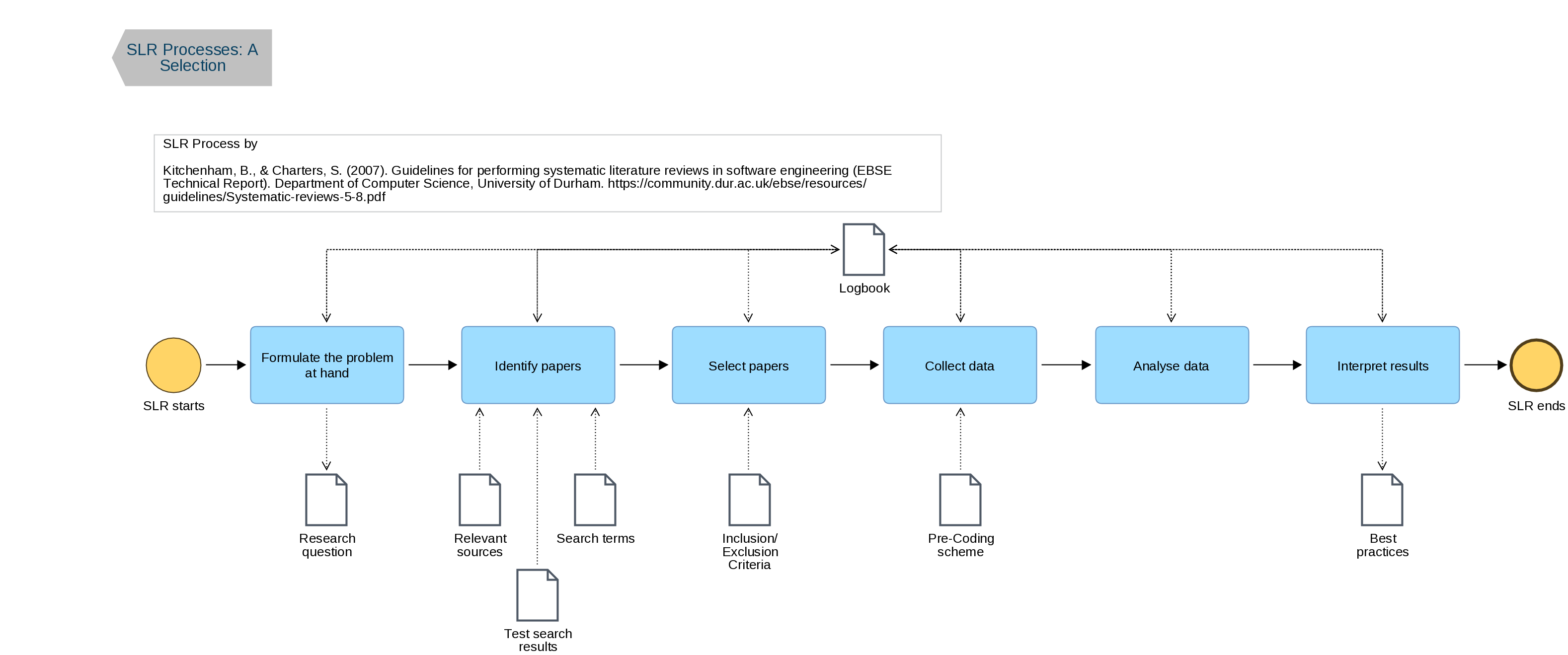
"SLR Process of Kitchenham and Charters 2007" by Hasan Koç is licensed under CC BY-NC-SA 4.0, based on Kitchenham & Charters, 2007.
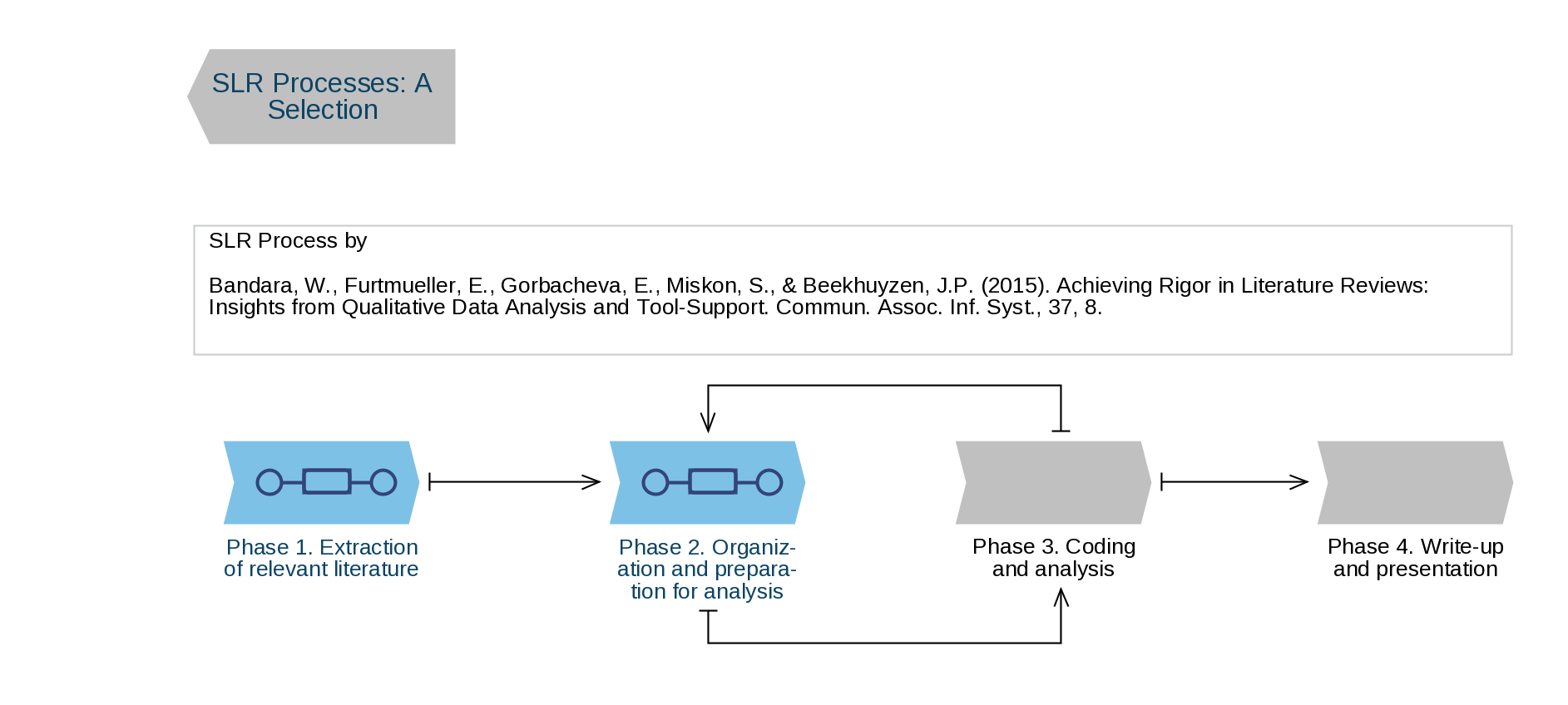
"SLR Process of Bandara et al 2015" by Hasan Koç is licensed under CC BY-NC-SA 4.0, based on Bandara et al., 2015.
Define Your Research Question & Select Framework
Overview
A well-defined research question is the foundation of a systematic literature review. Every subsequent decision (which databases to search, what terms to use, which studies to include) flows directly from it. A question that is too broad produces an unmanageable volume of results; one that is too narrow may yield almost nothing. Structured question frameworks give you a reliable method for making your question precise and searchable before you open a single database.
Why Are You Conducting This Review?
Before formulating your question, be clear about the purpose of your review. A systematic literature review is not a default method; it is the right choice for specific research goals. Common justifications in business and management research include:
- Analyzing the progress of a specific research stream
- Making recommendations for future research directions
- Reviewing how a particular theoretical model has been applied in the literature
- Reviewing how a particular methodological approach has been used across studies
- Developing a conceptual model or framework
- Answering a specific, bounded empirical question
Your research question should follow directly from one of these purposes. If you cannot identify which of these your review serves, discuss the scope with your supervisor before proceeding.
Why Structure Your Question?
Formulating your question using a framework forces you to identify the exact components of your topic and translate them into search terms. This step is worth doing carefully in writing, not just in your head, because:
- It makes your search strategy transparent and reproducible
- It helps you spot gaps or ambiguities in your topic before investing time in searching
- It gives your supervisor something concrete to review and approve
- It is required as part of your protocol
- The components of your framework become the concepts in your Boolean search strings
Choosing a Framework
Different frameworks suit different types of research questions. The table below helps you select the right one.
| Framework | Best suited to | Research types |
|---|---|---|
| PICO | Questions about the effect of something | Quantitative, experimental |
| SPIDER | Questions about experiences, perceptions, or behaviors | Qualitative, mixed-methods |
| PCC | Questions about what exists in a topic area (scoping) | Exploratory, mapping reviews |
As a business or management student, you will most often use SPIDER or PCC, since many management questions ask "how" or "what" rather than "does X cause Y."
The PICO Framework
Stands for: Population · Intervention · Comparison · Outcome
Originally developed for clinical research, PICO is useful when your question tests whether a specific practice, policy, or programme produces a measurable result. It is less common in pure management research but relevant if your thesis touches on organisational interventions, training effectiveness, or behavioral economics.
| Element | Question to ask yourself | Example |
|---|---|---|
| Population | Who or what is the focus? | SMEs in the EU retail sector |
| Intervention | What practice or factor is being examined? | Agile project management adoption |
| Comparison | What is it being compared to? | Traditional waterfall project management |
| Outcome | What result are you measuring? | Employee productivity and project delivery speed |
Resulting question: In EU retail SMEs (P), does adopting agile project management (I) compared to traditional methods (C) improve employee productivity and delivery speed (O)?
The SPIDER Framework
Stands for: Sample · Phenomenon of Interest · Design · Evaluation · Research type
SPIDER was developed specifically for qualitative and mixed-methods research, where the concept of an "intervention" does not apply. It is well-suited to management questions about how people experience organisational phenomena such as leadership styles, workplace culture, or sustainability reporting.
| Element | Question to ask yourself | Example |
|---|---|---|
| Sample | Who is the population being studied? | Mid-level managers in multinational corporations |
| Phenomenon of Interest | What experience, behavior, or issue is the focus? | Remote work and perceived organisational belonging |
| Influencing factors | What contextual factors are relevant? | Post-pandemic hybrid work policies |
| Design | What study designs will you include? | Interviews, surveys, case studies |
| Evaluation | What outcome or concept is being assessed? | Employee engagement, retention intention |
| Research type | Qualitative, quantitative, or mixed? | Qualitative or mixed-methods |
Resulting question: How do mid-level managers in multinationals (S) experience organisational belonging in remote/hybrid work environments (P), as shaped by post-pandemic policies (I), across qualitative and mixed-methods studies (D/R)?
The PCC Framework
Stands for: Population · Concept · Context
PCC is used for scoping reviews, a type of SLR designed to map the existing literature on a topic rather than answer a narrow effectiveness question. It is appropriate when your research question is exploratory: you want to know what has been written about a subject, identify key themes, or find gaps before proposing a more targeted study.
| Element | Question to ask yourself | Example |
|---|---|---|
| Population | Who or what is the subject of study? | Family-owned businesses |
| Concept | What is the core idea or issue? | Succession planning practices |
| Context | In what setting, geography, or timeframe? | European markets, 2010–2025 |
Resulting question: What does the literature report about succession planning practices (C) in family-owned businesses (P) in European markets between 2010 and 2025 (C)?
Practical Tips
- Write your question down before searching. Even one sentence written out forces clarity.
- Test with your supervisor. A good question should take no more than two sentences to explain to someone unfamiliar with the topic.
- Iterate, but only once. It is normal to refine your question slightly after initial scoping searches reveal how much literature exists. Finalise it before formal data collection begins and document any changes in your protocol.
- Avoid "and" creep. A question such as "What is the effect of leadership style on innovation and employee wellbeing and retention?" is three questions in one. Pick the most important element for your thesis argument.
- Check for existing reviews first. Before committing to your question, run a quick search in PROSPERO (crd.york.ac.uk/prospero) or Google Scholar to confirm a recent SLR on exactly your question does not already exist. Finding one is not a dead end; it means you can build on it, update it, or narrow your scope in response to it.
- Keep your framework visible throughout. Pin your completed framework table beside your workstation. Every element becomes a search concept in later steps; consistency between your question and your search string is one of the first things an examiner will check.
From Question to Search: A Preview
The components of your framework map directly onto the concepts in your Boolean search string. Each element becomes a concept block, and synonyms for each element become OR-connected terms within that block. The blocks are then connected with AND.
Using the PICO example above:
| Framework element | Concept block |
|---|---|
| Population: EU retail SMEs | "SME*" OR "small firm*" OR "small business*" AND (Europe* OR "European Union") |
| Intervention: agile project management | "agile" OR "scrum" OR "kanban" OR "agile project management" |
| Outcome: productivity, delivery speed | "employee productivity" OR "project delivery" OR "delivery speed" |
This mapping is covered in full in Conducting Your Search. The point here is that a well-structured question makes the search string nearly self-evident; a vague question makes it nearly impossible.
Self-Assessment Checklist for Your SLR Search
This checklist, adapted from vom Brocke et al. (2015), helps you evaluate whether your search meets the standards of rigor expected in a systematic review. Use it at three stages: before you search, while searching, and after completing your search.
Before the Literature Search
- I have developed an understanding of the topic through preliminary reading
- I have justified why a literature review is necessary (addressed in my protocol background section)
- I have defined an appropriate search scope (inclusion/exclusion criteria are documented)
- I have assessed the feasibility and coverage of my planned search (tested search strings, confirmed database access)
During the Literature Search
- I tested alternative search approaches (tried different combinations of terms, checked controlled vocabulary)
- I used justifiable search techniques and parameters (Boolean operators, truncation, filters documented)
- I applied appropriate criteria for inclusion and exclusion consistently
- I documented every search in my logbook (database, date, string, results count)
After the Literature Search
- I assessed the sensitivity and specificity of my search (did it retrieve known-relevant papers? did it exclude obviously irrelevant ones?)
- I rigorously documented the search process and results (logbook complete, PRISMA numbers recorded)
- I compared my results with those of other reviews on similar topics (if available)
- I collected feedback from my supervisor on the search strategy and results
Reference: vom Brocke, J. et al. (2015). Standing on the shoulders of giants: Challenges and recommendations of literature search in information systems research. Communications of the Association for Information Systems, 37. doi:10.17705/1CAIS.03709
Writing a Protocol
Overview
A protocol is a written plan that specifies, in advance, exactly how you intend to conduct your systematic literature review. It is not complete until all 11/12 sub-sections below have been worked through and recorded. Writing the protocol is not a bureaucratic hurdle; it is the mechanism that makes your review transparent, reproducible, and defensible to examiners, supervisors, and future readers.
The protocol has two functions. First, it forces you to make every methodological decision before you are influenced by seeing results. Second, it creates a timestamped record of those decisions so that any deviation from the plan is visible and requires justification.
Do not begin searching until your protocol is complete and your supervisor has reviewed it.
What a Protocol Contains
The table below lists all required sections. Each is explained in detail in the sub-sections that follow.
| Section | What it records |
|---|---|
| Title | Working title of the review |
| Background | Brief rationale: why this topic, why an SLR, why now |
| Research question | Your structured question from the previous step, using PICO, SPIDER, or PCC |
| Eligibility criteria | Explicit inclusion and exclusion rules |
| Search strategy | Databases, search strings, supplementary methods |
| Screening process | Phases, tools, screeners, conflict resolution |
| Quality appraisal | Tool selected and how scores will affect inclusion |
| Data extraction | Fields to be collected and who will extract |
| Synthesis method | Narrative, thematic, or meta-analytic approach |
| Timeline | Planned dates for each stage |
| Registration | PROSPERO or OSF registration number, or a statement of why registration was not pursued |
| Protocol Amendments | Any changes made to the protocol after searching begins: the date of each change, the section affected, the original wording, and the reason for the change. This section is blank at submission and completed during the review process. All amendments must be disclosed in the thesis methods chapter. |
For a thesis-level SLR, the protocol will typically run two to four pages. A downloadable template covering all sections is available here.
Why a Protocol Matters
The core risk in any literature review is unconscious bias: the tendency to favor studies that confirm what you already expect to find. A pre-registered protocol addresses this directly by committing you to your methods before you have seen the results. Specifically, a protocol:
- Prevents outcome-driven decisions. Without a protocol, it is easy to quietly shift your inclusion criteria after seeing which studies support your argument. A protocol makes any such deviation visible and requires justification.
- Supports reproducibility. Another researcher following your protocol should be able to replicate your search and arrive at substantially the same set of included studies.
- Strengthens your thesis. Examiners can evaluate the rigor of your method independently of your findings. A well-written protocol demonstrates systematic thinking before you have produced a single result.
- Saves time downstream. Decisions made in the protocol (date ranges, languages, study types) do not have to be renegotiated at each subsequent stage.
Eligibility Criteria
Eligibility criteria are the explicit rules that determine which studies are included in or excluded from your review. They are derived directly from your research question: each element of your PICO, SPIDER, or PCC framework suggests at least one criterion.
Criteria are divided into two types:
- Inclusion criteria define the characteristics a study must have to be eligible. Every included study must meet all inclusion criteria.
- Exclusion criteria define characteristics that disqualify a study, even if it otherwise appears relevant. Exclusion criteria often address practical constraints (language, access, study quality) rather than topic relevance.
Common Criterion Categories
| Category | Example inclusion criterion | Example exclusion criterion |
|---|---|---|
| Publication date | Published between January 2015 and December 2025 | Published before 2015 |
| Language | Written in English or German | Written in any other language |
| Document type | Peer-reviewed journal articles and conference papers | Editorials, opinion pieces, book reviews, dissertations |
| Study design | Empirical studies (qualitative, quantitative, or mixed-methods) | Purely conceptual or theoretical papers |
| Geographic scope | Studies conducted in EU member states | Studies conducted outside Europe |
| Population/context | Studies focused on SMEs | Studies focused exclusively on large corporations |
| Relevance | Studies directly addressing the phenomenon of interest | Studies mentioning the topic only incidentally |
Why Criteria Must Be Pre-Specified
Criteria written after you have seen the results of your search are retrospective and therefore biased. If you find yourself wanting to exclude a specific study because it complicates your synthesis, that is a signal to engage with it more carefully, not to rewrite a criterion. Any change to criteria after searching begins is a protocol amendment and must be documented.
Testing Your Criteria
Before finalizing your criteria, test them against five to ten records from a preliminary search: a mix of obviously relevant, obviously irrelevant, and borderline papers. If you cannot apply the criteria consistently to this small sample, they need further specification before you proceed to full screening.
Search Strategy
Your search strategy records exactly how you will find the literature. It has three components.
Databases: List every database you will search. For business and management research, the standard set is Business Source Ultimate (EBSCO) and JSTOR. Google Scholar may be used supplementarily for grey literature. The rationale for including each database should be noted briefly (coverage of the discipline, access to specific journal types, etc.).
Search strings: Document the complete Boolean search string you will use in each database. Strings are built from the concepts in your research question framework, with synonyms connected by OR and concepts connected by AND. If strings vary between databases due to different controlled vocabularies, record each variation. Full guidance on constructing strings is provided in Conducting Your Search.
Supplementary methods: Document any additional search methods beyond database searching. The most important of these is snowballing, a technique in which you trace citations forward and backward from a confirmed set of relevant papers. Backward snowballing examines the reference lists of included studies to find earlier relevant work; forward snowballing uses citation databases (Google Scholar, Scopus, Web of Science) to find later papers that have cited an included study. Snowballing is particularly valuable in management research, where relevant work may be published in practitioner journals or conference proceedings not fully indexed in major databases.
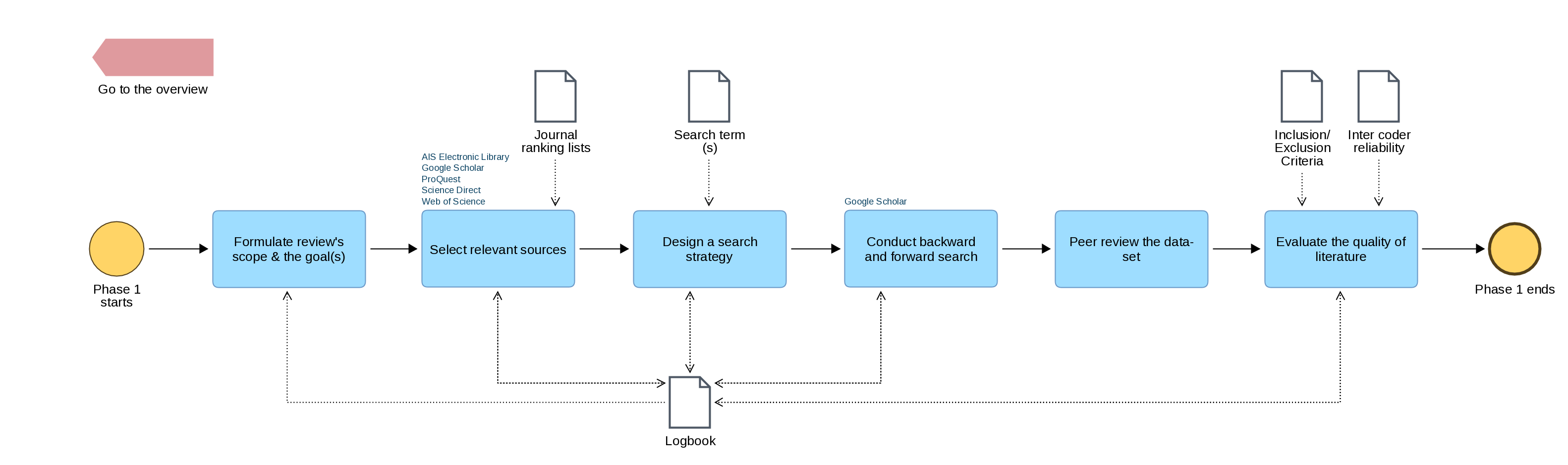
"Phase 1 of the Bandara et al. SLR process: extraction of relevant literature" by Hasan Koç is licensed under CC BY-NC-SA 4.0, based on Bandara et al., 2015.
Screening Process
The screening process section of your protocol records how you will apply your eligibility criteria to the records returned by your search. It should specify:
- The two phases of screening (title/abstract, then full text) and what decisions are made at each phase
- The tool you will use (e.g. Rayyan or a spreadsheet)
- Who will screen (solo screening is acceptable at thesis level but must be stated as a limitation)
- What you will do with full texts that cannot be retrieved
Full guidance on conducting screening is provided in Screening the Results.
Quality Appraisal Approach
The quality appraisal section of your protocol specifies how you will assess the methodological rigor of included studies. Record:
- The appraisal tool you will use and why it is appropriate for your study types (CASP, MMAT, or JBI; all are free)
- Whether studies scoring below a threshold will be excluded, or whether all studies will be retained with quality noted in the synthesis
- Who will appraise (solo appraisal is acceptable at thesis level)
This decision must be made before appraising any study. Deciding post-hoc to exclude low-quality studies after seeing their findings is a form of bias. Full guidance on quality appraisal is provided in Appraise Study Quality.
You will also be asked, at the end of your review, to evaluate the rigor of your own process using the self-assessment rubric on Evaluating Your Own SLR Process.
Data Extraction and Synthesis Method
Data extraction: Specify the fields you will extract from each included study and the format of your extraction form (typically a spreadsheet). At minimum, record: author, year, country, methodology, sample, key findings, theoretical framework, limitations, and quality appraisal rating. A blank copy of your extraction form should be included as a thesis appendix. Full guidance is provided in Extract Data.
Synthesis method: State whether you will use narrative synthesis, thematic synthesis, or meta-analysis, and briefly justify the choice in relation to your research question and expected study types. Even a one-sentence commitment ("findings will be synthesised narratively using thematic grouping") is sufficient at protocol stage. Full guidance on synthesis approaches is provided in Synthesise and Report.
Timeline
Provide estimated completion dates for each stage. A systematic review takes significantly longer than most students anticipate; building in buffer time is essential.
| Stage | Planned completion date |
|---|---|
| Protocol finalised and supervisor-approved | |
| Database searches completed | |
| Title/abstract screening completed | |
| Full-text screening completed | |
| Quality appraisal completed | |
| Data extraction completed | |
| Synthesis and write-up completed |
Protocol Registration (Optional)
Registering your protocol with an external repository creates a timestamped, publicly accessible record of your planned methods. This is optional for most student theses but is increasingly expected in academic publishing and demonstrates a high standard of rigor.
PROSPERO
PROSPERO (International Prospective Register of Systematic Reviews), hosted by the University of York, accepts reviews from health, social science, education, welfare, and business contexts. Registration is free and requires an ORCID iD. Note that PROSPERO does not accept scoping reviews; use OSF for those.
OSF (Open Science Framework)
The OSF, maintained by the Center for Open Science, accepts protocol registrations for any discipline with no topic restrictions. It is the more flexible option for management, design, or interdisciplinary business research, and accepts scoping reviews.
- URL: osf.io
When Registration Is Not Required
Registration is not a formal requirement for most taught or research master's theses. If you do not register, state this explicitly in your methods chapter and give a brief reason (for example, the review is a thesis component rather than a standalone publication). Do not simply omit the topic.
Amendments to the Protocol
Any change made to the protocol after searching begins must be recorded as a formal amendment. For each amendment, document:
- The date of the change
- Which section was changed and what the original wording was
- The reason for the change
Amendments are not a sign of failure; they are a sign of transparency. What is not acceptable is changing methods silently to accommodate inconvenient results. Include the amendments log as an appendix in your thesis.
Common Mistakes to Avoid
- Writing the protocol after searching. A retrospective protocol defeats its purpose entirely.
- Being too vague. "Recent articles in English" is not a criterion; "peer-reviewed journal articles in English or German, published between January 2015 and December 2025" is.
- Separating the criteria from the protocol. Eligibility criteria are a section of the protocol, not a prior step. Do not finalise them in isolation.
- Leaving the synthesis section blank. Students frequently specify their search in detail but leave synthesis unaddressed. Commit to a method before you begin.
-
Not getting supervisor sign-off. The protocol review is a checkpoint, not a formality. A supervisor who has approved your protocol cannot later object that your method was inappropriate.
Conducting Your Search
Overview
This step translates the search strategy you documented in your protocol into actual database queries, records the results systematically, and prepares a clean, deduplicated set of references for screening. Precision and documentation at this stage are critical: every decision you make must be recorded so that your search can be reported transparently in your final thesis.
Before You Begin
Confirm the following are in place before opening any database:
- Your research question is finalized
- Your inclusion and exclusion criteria are written down
- Your search strings are drafted for each database
- Your reference manager (Zotero) is installed and a new collection has been created for this review
- Your protocol has been reviewed by your supervisor
When your search is complete, use the Search Quality Self-Assessment Checklist to verify the search meets the standards of a rigorous systematic review. The checklist covers what to confirm before, during, and after searching.
Set Up Your Search Logbook
A search logbook is a running record of every search action you take. It is distinct from your protocol: the protocol records what you planned to do; the logbook records what you actually did. Both are required for a transparent, reportable review.
Your logbook should record, for every search:
| Field | Example |
|---|---|
| Database | Business Source Ultimate (EBSCO) |
| Date of search | 2026-02-23 |
| Search string used | ("sustainability reporting" OR "CSR disclosure") AND ("SME*" OR "small firm*") AND (Europe*) |
| Filters applied | Peer-reviewed; 2015–2025; English |
| Number of results | 347 |
| Notes | Reran with "non-financial reporting" added; 412 results |
A simple spreadsheet works well for this purpose. The logbook feeds directly into the PRISMA flow diagram you will produce during write-up, so keep it current throughout.
Search Each Database
Execute your search strings in the order listed in your protocol. The recommended databases for business and management research at this institution are listed below, with notes on their particular strengths.
| Database | Strengths | Access |
|---|---|---|
| Business Source Ultimate (EBSCO) | Largest business-specific database; covers management, finance, marketing, HRM, economics; includes trade publications alongside peer-reviewed journals | Via Research Database Index |
| JSTOR | Strong for older foundational literature (pre-2010); humanities and social sciences including business history | Via Research Database Index |
| Google Scholar | Useful for supplementary grey literature and thesis searches; not suitable as a primary database due to lack of advanced filtering and inconsistent coverage | Free; use supplementary only |
Search each database independently. Do not rely on a single database regardless of how many results it returns; coverage varies significantly between databases, and a study that appears in JSTOR may not be indexed in Business Source Ultimate, and vice versa.
Constructing Effective Search Strings
If your strings from the protocol stage need refinement when you arrive at a database interface, follow these principles.
Boolean Operators
Three operators control how search terms are combined:
- OR broadens your search: use it to connect synonyms and variant terms for the same concept. Example:
"remote work" OR "telework" OR "working from home" - AND narrows your search: use it to connect different concepts that must both appear. Example:
"remote work" AND "employee engagement" - NOT excludes terms: use sparingly, as it can unintentionally remove relevant records. Example:
"sustainability" NOT "environmental science"
Phrase Searching
Enclose multi-word concepts in quotation marks to search for the exact phrase rather than the individual words. Example: "knowledge management" rather than knowledge management.
Truncation and Wildcards
Most databases support truncation with an asterisk (*) to capture variant word endings:
organis*captures organise, organisation, organisational, organisingsustain*captures sustain, sustainability, sustainable, sustained
Check each database's documentation, as wildcard characters vary: EBSCO uses * and ?; Web of Science uses *, ?, and $.
Controlled Vocabulary
Many databases use a subject thesaurus to index articles with standardised terms regardless of the words an author used. Using these terms improves recall significantly:
- EBSCO Business Source Ultimate: use the EBSCO Subject Thesaurus (available in the database interface under "Subject Terms")
Combining controlled vocabulary terms with free-text keywords in the same search string gives the best coverage. Example: (DE "employee engagement") OR ("employee engagement" OR "work engagement" OR "job involvement")
For more information on constructing search queries, review Advanced Search Techniques and Making the most of Generative AI.
An Example
Research question: How do sustainability reporting practices in European SMEs influence investor decision-making?
| Concept | Synonyms and variants |
|---|---|
| Sustainability reporting | "sustainability reporting", "CSR disclosure", "non-financial reporting", "ESG reporting", "integrated reporting" |
| European SMEs | "SME*", "small firm*", "small business*", Europe*, "European Union" |
| Investor decision-making | "investor behavior", "investment decision*", "capital allocation", "shareholder*" |
Combined string:
("sustainability reporting" OR "CSR disclosure" OR "non-financial reporting" OR "ESG reporting")
AND
("SME*" OR "small firm*" OR "small business*")
AND
(Europe* OR "European Union")
AND
("investor behavior" OR "investment decision*" OR "capital allocation")Testing and Iterating Your Search
Before committing to a final string, run test searches to calibrate your results.
- Too many results (over 1,000): Add an additional AND concept, apply stricter filters (date range, document type), or use more specific terminology
- Too few results (under twenty): Remove an AND concept, broaden synonyms using OR, check whether your terminology matches the vocabulary used in the field, or widen the date range
- Zero results: Check for syntax errors (mismatched quotation marks or parentheses), try individual concepts separately to identify which combination is causing the problem
A useful calibration technique is to take three to five papers you already know are relevant to your topic and verify that your search string retrieves them. If a known-relevant paper is not found, revise the string before proceeding.
Example: Iterating a Search
Initial search: "government branding" AND communication
Database: Web of Science
Results: 1,856 hits (too many to screen)
Refinement 1: Added language and document type filters (English, journal articles only)
Results: 1,626 hits
Refinement 2: Added date range filter (2000–2021)
Results: 1,553 hits (manageable for screening)
Documented in logbook: Three iterations recorded with reasons for each refinement.
This iterative approach is normal and expected; document each iteration in your search logbook rather than only recording the final string.
Export and Deduplicate References
Once you are satisfied with your search strings and have run them across all databases, export all results and combine them into a single reference set.
Exporting from Databases
Export records in RIS format (also called .ris or "citation export"), which is compatible with Zotero and all major screening tools. Export the full record including abstract, author, year, journal, and DOI. Do not export title-only records.
Importing into Zotero
- In Zotero, create a new collection named for your review (e.g., "SLR — Sustainability Reporting SMEs")
- Import each database export file: File → Import → select your .ris file
- Repeat for each database export
- All records will now appear together in the collection
Deduplication
The same article will often appear in multiple databases. Duplicates must be removed before screening begins, as screening the same paper twice distorts your counts and PRISMA numbers.
- In Zotero: select all items in your collection → right-click → "Find Duplicates." Zotero will flag probable duplicates for manual review and merging. Note that Zotero's deduplication is not perfect; a manual check is advisable for smaller datasets
- In Rayyan or Covidence: both tools include automatic deduplication when you upload your reference files, and this is often more reliable than Zotero for large datasets
Record the total number of records before and after deduplication in your search logbook. Both figures are required for the PRISMA flow diagram.
Supplementary Search Methods
Snowballing
Database searching alone may miss relevant studies published in venues not fully indexed or using terminology that differs from your search string. Snowballing addresses this by tracing citations forward and backward from a confirmed set of relevant papers.
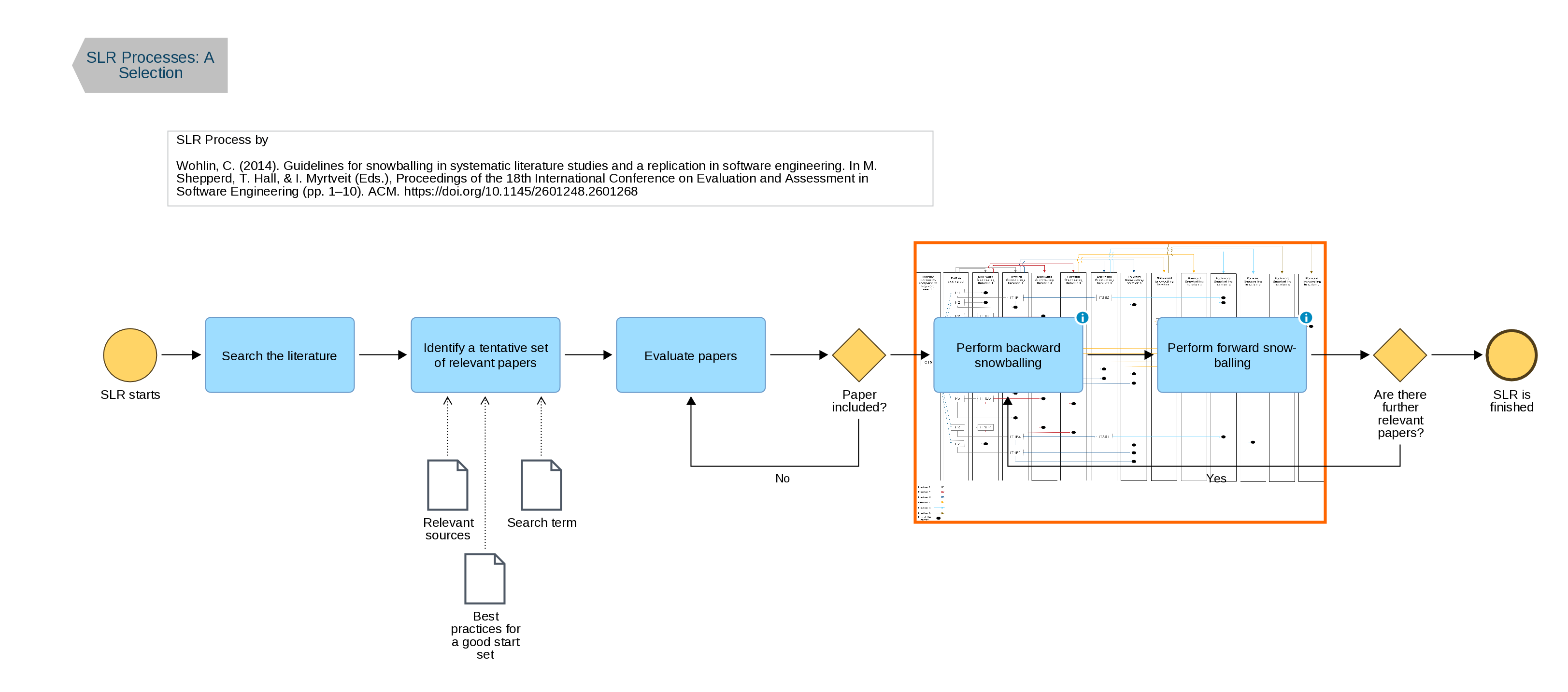
"Snowball-centred SLR process" by Hasan Koç is licensed under CC BY-NC-SA 4.0, based on Wohlin (2014).
Backward Snowballing
Review the reference lists of your included studies to identify earlier work that was not retrieved by your database search. This is particularly valuable for foundational studies that established key concepts in your topic area.
Forward Snowballing
Use citation databases (Google Scholar, Web of Science, Scopus if available) to identify later papers that have cited an included study. This captures recent work that builds on established findings.
Illustration
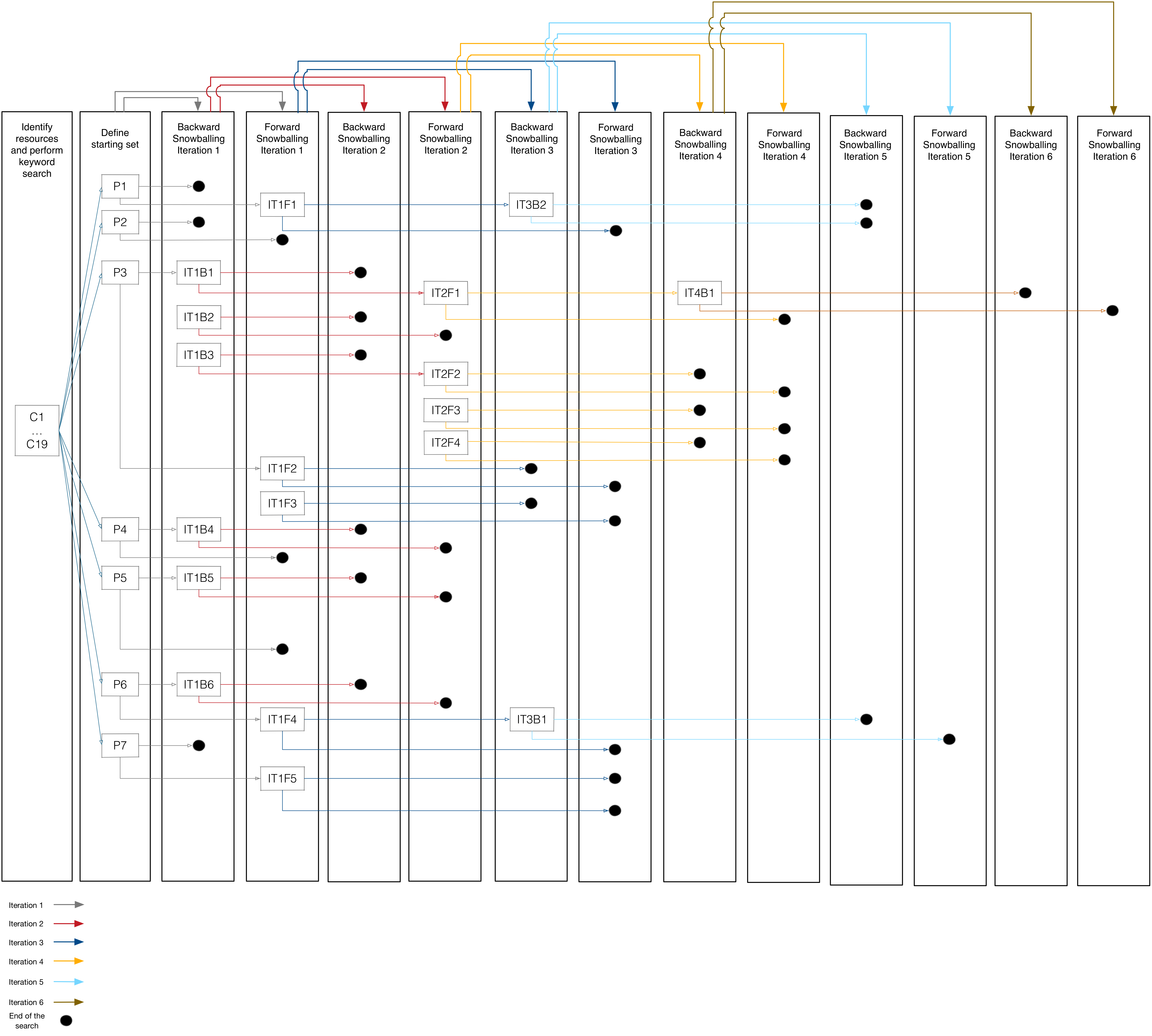
"Iterative backward and forward snowballing across six iterations" by Hasan Koç is licensed under CC BY-NC-SA 4.0, based on Wohlin (2014).
When to Apply Snowballing
Snowballing is not a replacement for systematic database searching; it is a supplement applied after your initial screening phase when you have a confirmed set of relevant studies. Record all snowballing activity in your search logbook: the source paper, the direction (forward or backward), and the number of additional records identified.
For an indepth discussion of snowballing, see:
- Wohlin, C. (2014). Guidelines for snowballing in systematic literature studies and a replication in software engineering. In Proceedings of the 18th International Conference on Evaluation and Assessment in Software Engineering (pp. 1–10). ACM. doi:10.1145/2601248.2601268
Checking Grey Literature
Depending on your topic, relevant evidence may exist outside peer-reviewed journals. Grey literature includes reports from industry bodies, government agencies, NGOs, think tanks, and working papers. For business research, relevant sources include:
- European Commission (ec.europa.eu): policy documents, impact assessments, sector reports
- OECD iLibrary (oecd-ilibrary.org): working papers and statistical reports, free access
- Statista: industry statistics and market research (access via library portal)
- SSRN (ssrn.com): pre-prints and working papers in economics, finance, and management, free access
Grey literature is generally searched manually rather than by Boolean string. Record any sources checked and the date of search in your logbook, even if they yield no results.
Common Mistakes to Avoid
- Searching without a documented string. Running an undocumented search cannot be reported or replicated.
- Using only one database. No single database covers the full scope of business and management literature.
- Forgetting to record the search date. Database content changes; the date is required for your methods section.
- Exporting only titles. Abstracts are required for the screening stage; always export full records.
- Deduplicating by eye only. Manual deduplication of large datasets is unreliable; use a tool.
Screening the Results
Overview
Screening is the process of applying your pre-specified inclusion and exclusion criteria to the deduplicated set of references produced earlier, in order to identify the studies that will form the basis of your review. It proceeds in two sequential phases: first by title and abstract, then by full text. Each phase reduces the total set further; only studies that pass both phases are included in your final review.
Screening is the step most vulnerable to unconscious bias. The discipline of applying your criteria consistently, rather than on a case-by-case intuitive basis, is what separates a systematic review from an informal one.
Prepare for Screening
Before beginning, confirm the following:
- Your inclusion and exclusion criteria are written out explicitly (not held in your head)
- Your deduplicated reference set has been imported into your screening tool
- You have conducted a short calibration exercise (see below)
Calibration
Before screening the full dataset, test your criteria against a small sample of twenty to thirty records drawn randomly from your reference set. Apply the criteria independently, then compare decisions. This exercise helps surface edge cases and sharpen your application of the criteria.
Phase 1: Title and Abstract Screening
In the first phase, you review the title and abstract of every record in your deduplicated set and make a binary decision: include (proceed to full-text screening) or exclude (remove from the set, with reason recorded).
Decision Rules
- Include any record where the title and abstract suggest the study could meet your criteria. When in doubt at this phase, include rather than exclude; you will assess more carefully in Phase 2.
- Exclude only when you are confident the record does not meet one or more criteria. Record which criterion it fails.
- Cannot determine: if the abstract is absent or too brief to judge, mark the record for full-text retrieval. Do not exclude on the basis of insufficient information.
Recording Exclusions
For every excluded record, note the primary reason for exclusion using the categories from your inclusion/exclusion criteria. Example reasons:
- Outside date range
- Not peer-reviewed
- Not relevant to research question
- Wrong population or context
- Language not covered by criteria
- Duplicate not caught in deduplication
These reasons feed directly into the PRISMA flow diagram. You do not need to record a reason for every individual exclusion; recording the category count is sufficient (e.g., "247 excluded: wrong topic; 43 excluded: outside date range").
Phase 2: Full-Text Screening
Records that pass Phase 1 are retrieved in full and assessed against the complete set of inclusion and exclusion criteria. Full-text screening is more demanding than title/abstract screening because you are working with the entire paper and must make a definitive inclusion decision.
Retrieving Full Texts
- If you don't already have the full texts, search library databases
- For items not available through the library databases: contact the library reference desk
- For preprints or working papers, check SSRN (ssrn.com) or the author's institutional repository
- If a full text genuinely cannot be obtained after reasonable effort, record it as "full text not retrievable" in your PRISMA count; do not exclude it silently
Assessing Full Texts
Read at minimum the abstract, introduction, methods section, and conclusion of each paper. You do not need to read every paper cover to cover at this stage; the goal is to confirm eligibility, not to extract data. Focus on:
- Does the study actually investigate the population and phenomenon specified in your research question?
- Does the methodology match the study types in your inclusion criteria?
- Is the publication context (journal, conference, report type) within scope?
- Does the date of data collection (not just publication) fall within your date range?
Record a clear reason for every full-text exclusion. At this phase, vague reasons such as "not relevant" are insufficient; specify which criterion was not met.
Screening Tools
Rayyan (Recommended for most students)
Rayyan (rayyan.ai) is a free, web-based screening tool designed specifically for systematic reviews. Key features:
- Allows labelling of exclusion reasons
- Exports screening decisions for the PRISMA diagram
- No software installation required; browser-based
- Free for individual and small team use
To get started: create a free account at rayyan.ai, create a new review, and upload your .ris export files. Rayyan deduplicates on import.
Spreadsheet (Fallback Option)
An Excel or LibreOffice Calc spreadsheet with one row per reference, columns for title, abstract, Phase 1 decision, Phase 2 decision, and exclusion reason is a fully acceptable approach for smaller datasets (under 500 records). It requires more manual discipline but has no access barriers.
Produce the PRISMA Flow Diagram
At the conclusion of screening, compile the following counts from your logbook and screening tool:
- Total records identified across all databases
- Total records after deduplication
- Records excluded at title/abstract screening (with reason categories)
- Full texts sought
- Full texts not retrievable
- Full texts excluded (with reason categories)
- Studies included in the final review
These numbers populate the PRISMA 2020 flow diagram, a standardised visual representation of the screening process. A pre-formatted Word version of the PRISMA 2020 flow diagram is available here. Complete it as you go; do not attempt to reconstruct the numbers from memory at write-up stage.
Common Mistakes to Avoid
- Applying criteria inconsistently. If you find yourself making exceptions, revisit the written criteria rather than bending them for individual records.
- Excluding at Phase 1 on a hunch. If an abstract is ambiguous, include it for full-text review rather than excluding it.
- Not recording exclusion reasons. Without reasons, the PRISMA diagram cannot be completed and your methods section cannot be written.
- Screener fatigue. For large datasets, screen in sessions of no more than ninety minutes. Fatigue measurably increases inconsistency.
-
Conflating screening with data extraction. Screening answers only one question: does this study meet the eligibility criteria? Deeper engagement with content comes later.
Appraise Study Quality
Overview
Quality appraisal is the systematic assessment of the methodological rigor of each study included after screening. It answers the question: how much confidence can we place in the findings of this study? Appraisal does not judge whether a study is interesting or relevant (screening already established relevance); it judges whether the study was conducted in a way that makes its findings trustworthy.
Quality appraisal is mandatory in a rigorous SLR. Omitting it means you treat a poorly designed survey and a well-designed longitudinal study as equally credible evidence, which undermines the validity of your synthesis.
What Quality Appraisal Assesses
Appraisal criteria vary by study type, but the core questions are consistent across tools:
- Is the research question or aim clearly stated?
- Is the methodology appropriate to the research question?
- Is the sample or data source described and justified?
- Are data collection procedures transparent and consistent?
- Are the analysis methods appropriate and described in sufficient detail?
- Are the findings clearly presented and supported by the data?
- Are the limitations acknowledged by the authors?
No study is perfect. The goal of appraisal is not to exclude everything with weaknesses but to provide an honest account of the evidence base and to weight your synthesis accordingly.
Decide Before You Appraise
Two decisions must be made in your protocol and applied consistently here:
Will quality scores affect inclusion?
You have two options:
- Threshold-based exclusion: studies scoring below a defined threshold are excluded from the review. This produces a higher-quality evidence base but risks excluding the only available evidence on niche topics. If you use a threshold, state it in your protocol before appraising (e.g., "studies scoring below 50% on the CASP checklist will be excluded").
- Retain all, note quality in synthesis: all studies passing screening are included, but quality scores are reported alongside findings and used to qualify the strength of evidence in your discussion. This is the more common approach in business and management SLRs, where evidence bases are often smaller and more heterogeneous.
Either approach is defensible; what is not defensible is deciding after seeing the scores.
Who will appraise?
As with screening, appraisal by two independent reviewers with a conflict resolution process is the gold standard. For a thesis-level review, solo appraisal is acceptable but should be stated as a limitation in your methods chapter.
Selecting an Appraisal Tool
Choose your tool based on the study types in your included set. All three tools listed below are freely available with no registration required.
CASP Checklists
Access: casp-uk.net (direct PDF download, no registration)
The Critical Appraisal Skills Programme checklists are the most accessible entry point for students new to quality appraisal. Each checklist is short (ten to twelve questions with yes/no/can't tell responses) and includes guidance notes. Separate checklists exist for:
- Qualitative studies
- Randomised controlled trials
- Cohort studies
- Case-control studies
- Systematic reviews
- Economic evaluations
- Diagnostic test studies
For most business and management SLRs, the qualitative checklist will be the primary tool. If your included studies are methodologically mixed, you will need to apply different checklists to different study types and note which checklist was used for each study in your data extraction form.
Mixed Methods Appraisal Tool (MMAT)
Access: mcgill.ca (free PDF download from McGill University)
The MMAT is the strongest choice when your included studies span multiple methodological types, since a single tool handles qualitative, quantitative descriptive, quantitative randomised, quantitative non-randomised, and mixed-methods studies consistently. Each category has five criteria, allowing cross-study comparison of quality scores within a heterogeneous dataset.
The MMAT does not produce a numerical score; instead, each criterion is rated yes, no, or can't tell. This is intentional: the authors explicitly caution against summing scores into a single quality number, as this can create false precision.
JBI Critical Appraisal Tools
Access: jbi.global (free PDF download, no registration)
The Joanna Briggs Institute tools are comparable in accessibility to CASP and provide thirteen separate checklists covering a wider range of study types, including prevalence studies, case reports, case series, and qualitative evidence synthesis. They are slightly more detailed than CASP and include more extensive guidance notes.
Conducting the Appraisal
Work through each included study using your chosen tool. For each study, complete the checklist and record:
- The tool used and checklist type (where multiple types apply)
- The response for each criterion (yes / no / can't tell)
- Any notes on specific methodological concerns
- The overall quality judgement (strong / moderate / weak, or equivalent)
A suggested format for recording appraisal results is a spreadsheet with one row per study and one column per checklist criterion, plus an overall rating column. This makes it easy to sort by quality rating and to identify patterns (for example, if most studies share a common weakness such as lack of reflexivity, this becomes a theme in your discussion).
A Practical Tip
Read the methods section of each paper carefully before completing the checklist. Authors do not always report methods in detail in the abstract or even the results section; insufficient reporting is itself a quality concern, but it is worth distinguishing between a study that did not address a criterion and one that did but failed to report it.
Reporting Quality Appraisal in Your Thesis
Quality appraisal results must be reported transparently in your methods chapter and referenced in your discussion. Standard practice is to:
- Name the tool(s) used and cite the source
- Present results in a summary table, with one row per included study and columns for each criterion or an overall rating
- Describe the overall quality of the evidence base in narrative: were most studies of moderate quality? Were there systematic weaknesses across studies (e.g., small sample sizes, single-country contexts)?
- Reference quality in your discussion: when interpreting conflicting findings, note whether higher-quality studies favor one conclusion over another
Avoid the common error of completing a quality appraisal table and then never mentioning it again. The appraisal should inform how confidently you present your conclusions.
Common Mistakes to Avoid
- Appraising after synthesis. Quality appraisal must precede synthesis; if you read deeply before appraising, your judgements will be influenced by whether you liked the findings.
- Applying the wrong checklist. Using a qualitative checklist on a survey study, or vice versa, produces meaningless results. Identify each study's methodology before selecting the checklist.
- Rating "can't tell" on everything. If most responses are "can't tell," the issue is usually that you are not reading the methods section carefully enough, or the reporting is genuinely poor (which is itself a quality concern worth noting).
- Treating quality appraisal as a hurdle to clear. Its purpose is to characterise the evidence base, not to disqualify papers. A study with weaknesses can still contribute useful evidence if its limitations are acknowledged in the synthesis.
-
Forgetting to cite the appraisal tool. The tool is a published instrument and must be referenced in your methods chapter.
Extract Data
Overview
Data extraction is the process of systematically pulling the information you need from each included study and recording it in a standardised form. It bridges the gap between your screened, appraised set of studies and the synthesis you will conduct later. Consistent, thorough extraction is what makes synthesis possible: if you extract different information from different papers, you cannot meaningfully compare or combine them.
Extraction is not the same as reading for interest. You are not summarizing papers freely; you are completing a pre-designed form that captures the same fields from every study in the same way.
Design Your Extraction Form
Your extraction form should have been designed as part of your protocol. Review it now against your actual included studies and refine if necessary. Any changes at this stage count as a protocol amendment and should be documented.
Core Fields
Every extraction form for a business or management SLR should include the following fields as a minimum:
| Field | What to record |
|---|---|
| Study ID | A unique reference number you assign (e.g., S01, S02) for use in tables and in-text citation during synthesis |
| Author(s) | Last name and initials of all authors |
| Year | Year of publication |
| Title | Full title of the article |
| Journal/Source | Journal name, conference, or report series |
| Country/Region | Country where the study was conducted or the data originate |
| Study design/method | Qualitative, quantitative, mixed-methods; specify further (e.g., semi-structured interviews, survey, case study) |
| Sample | Size, type, and characteristics of the sample or dataset |
| Data collection period | When data were collected (may differ from publication year) |
| Key findings | A concise, accurate summary of findings relevant to your research question; use the authors' own language where possible |
| Theoretical framework | Any theory the study draws on (relevant for deductive synthesis) |
| Limitations noted by authors | As reported in the paper |
| Quality appraisal rating | Transfer the overall rating from earlier appraisal |
| Notes | Any observations relevant to synthesis (e.g., contradicts S04; uses unusual operationalisation) |
Additional Fields by Research Type
Depending on your topic, you may also need:
- Quantitative studies: key statistical outcomes (effect sizes, correlation coefficients, significance levels), measurement instruments used
- Qualitative studies: epistemological position (interpretivist, constructivist), method of analysis (thematic analysis, grounded theory, discourse analysis)
- Conceptual or review papers: type of contribution (framework, typology, critique), scope of literature reviewed
Format of the Extraction Form
A spreadsheet (Excel or LibreOffice Calc) with one row per study and one column per field is the standard format and works well for most thesis-level reviews.
Advantages:
- Easy to sort and filter by country, method, year, or quality rating
- Column widths can accommodate varying amounts of text
- Can be shared with a supervisor for review
- Exports cleanly to a summary table for the thesis appendix
A blank version of the extraction form should be included as an appendix in your final thesis.
Conducting the Extraction
Work through each included study in order of your Study ID. For each paper:
- Read the full text carefully, focusing on the abstract, introduction, methods, results, and discussion sections
- Complete every field in the extraction form; leave no field blank (use "not reported" where the paper does not provide the information rather than leaving the cell empty)
- Record findings in your own words, except for key definitions or theoretical statements where the authors' precise language matters; note any direct quotations with page numbers
- Note any information that is ambiguous, inconsistent between sections of the paper, or that raises a question for synthesis
Handling Ambiguity
You will encounter papers where the methodology is not clearly described, findings are presented inconsistently, or the research question shifts between the introduction and the discussion. Record what is actually in the paper, note the ambiguity explicitly, and do not interpret charitably to fill gaps. Gaps in reporting are themselves evidence of methodological weakness and belong in your quality appraisal record.
Pilot Extraction
Before extracting all included studies, conduct a pilot on three to five papers. It tests whether your form captures the information you actually need for synthesis
After the pilot, review the form: are any fields consistently empty or impossible to complete? Are any fields producing inconsistent entries between reviewers? Revise the form before proceeding, and document any changes as a protocol amendment.
Maintaining an Audit Trail
Keep a running note of any decisions you make during extraction that go beyond straightforward form completion. Examples:
- "S07 reports two separate studies in one paper; extracted as two separate rows"
- "S12 uses 'SME' to mean firms with under 500 employees, which differs from the EU definition; noted in synthesis"
- "S19 abstract reports significant results but body of paper presents a non-significant finding; used body of paper"
These notes protect you if your decisions are questioned during examination, and they support transparency if your review is ever published.
Preparing for Synthesis
Before moving to next step, review your completed extraction form as a whole:
- Are there patterns in the countries, methods, or theoretical frameworks of included studies?
- Are there clusters of studies addressing the same sub-question or using the same construct?
- Are there contradictions between studies that will need to be addressed in synthesis?
- Are there gaps in the evidence base that were not apparent before extraction?
A brief written memo at this stage, even half a page of notes, is a valuable precursor to synthesis. It helps you enter the next step with a sense of the landscape of the evidence rather than facing a blank page.
Common Mistakes to Avoid
- Extracting selectively. Record all findings relevant to your research question, including those that contradict your expectations. Selective extraction is a form of bias.
- Leaving fields blank. An empty field is ambiguous: it may mean the information was not reported, or it may mean you forgot to check. Use "not reported" explicitly.
- Conflating extraction with synthesis. The extraction form captures what each study says; synthesis is where you interpret and compare across studies. Do not begin drawing conclusions in the extraction form.
- Using only the abstract. Abstracts routinely omit, simplify, or misrepresent the findings of the full paper. Always extract from the full text.
-
Not versioning the form. If you revise the extraction form after beginning extraction, save both versions and note when the change was made. Applying revised criteria retrospectively without documentation introduces inconsistency.
Synthesize and Report
Overview
Synthesis is where the work of the review becomes an argument. Having identified, screened, appraised, and extracted data from your included studies, you now interpret what they collectively say in response to your research question. Reporting then translates that interpretation into a structured written account that meets the standards of academic transparency required for a thesis.
These two activities, synthesis and reporting, are treated together here because they are iterative: the structure of your synthesis shapes the structure of your report, and drafting the report often reveals gaps in the synthesis that require you to return to your notes.
Choose Your Synthesis Approach
Your synthesis method was specified in your protocol. The two principal options for business and management SLRs are narrative synthesis and meta-analysis. A third option, thematic synthesis, is increasingly common and sits between the two.
Narrative Synthesis
Narrative synthesis organises findings from included studies into themes or categories and describes patterns, relationships, contradictions, and gaps in discursive prose. It is appropriate when:
- Included studies use different methodologies that cannot be statistically combined
- The evidence base is heterogeneous in population, context, or outcome measures
- Your research question asks "what," "how," or "why" rather than "how much"
This is the most common synthesis approach in business and management research and is suitable for the majority of thesis-level SLRs.
Thematic Synthesis
Thematic synthesis, developed by Thomas and Harden (2008), applies a more structured coding procedure to the findings of included studies before organising them into themes. It is particularly well-suited to reviews of qualitative studies and connects directly to the deductive, inductive, and combined coding approaches described in the Bandara et al. (2015) framework. The process involves three stages:
- Line-by-line coding of the findings and conclusions sections of each included study
- Developing descriptive themes by grouping related codes
- Generating analytical themes that go beyond description to interpret what the evidence means in relation to your research question
Meta-Analysis
Meta-analysis pools numerical results from multiple quantitative studies using statistical methods to produce an overall effect size estimate. It is only appropriate when:
- Included studies are sufficiently homogeneous in design, population, and outcome measure to be meaningfully combined
- A sufficient number of studies report compatible quantitative outcomes
- You have the statistical training to conduct and report the analysis correctly
Meta-analysis is rarely appropriate at thesis level in business and management research; if your supervisor has suggested it, seek guidance early on statistical software (R, Stata, or JASP) and reporting requirements.
Conducting Narrative or Thematic Synthesis
The following steps apply to both narrative and thematic synthesis.
Step 1: Familiarize Yourself with the Evidence Base
Before coding, read all your extraction notes as a whole. Review the memo you wrote at the end of Extract Data. Note the overall shape of the evidence: how many studies, what methods, what contexts, what time period.
Step 2: Develop a Coding Framework
Decide whether you will code deductively, inductively, or using a combined approach.
Deductive, Inductive, and Combined Coding
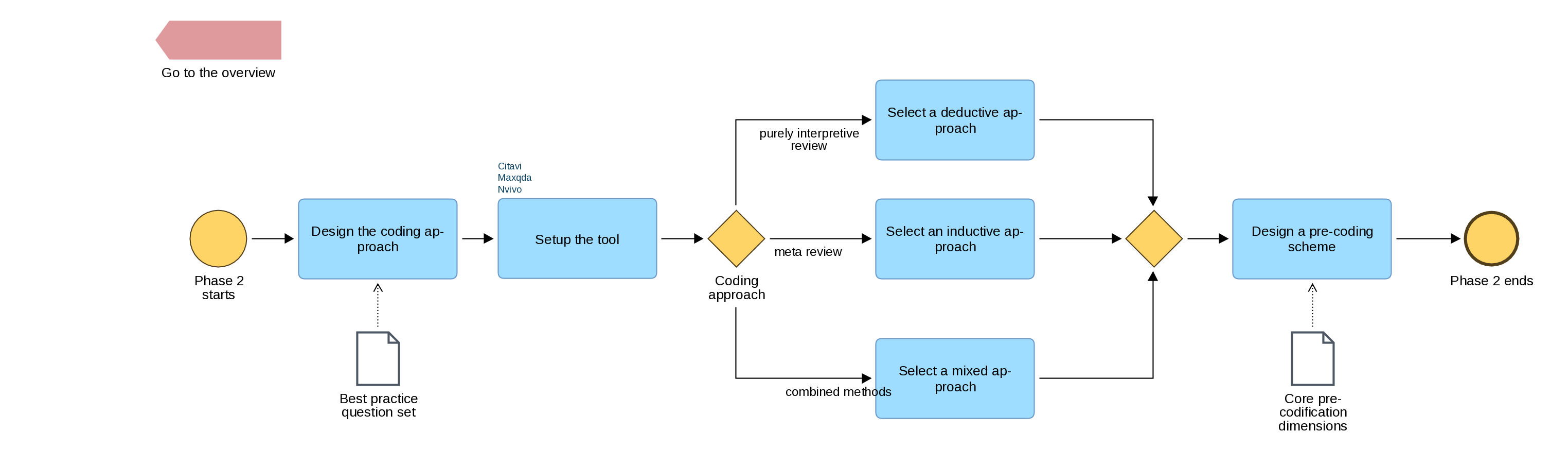
"Phase 2 of the Bandara et al. SLR process: organisation and preparation for analysis, including coding approach selection" by Hasan Koç is licensed under CC BY-NC-SA 4.0, based on Bandara et al., 2015.
The Bandara et al. (2015) framework, widely used in information systems and management SLRs, defines three approaches to coding:
Deductive coding: You bring a pre-existing theoretical framework or model to the data and apply its categories to the findings of included studies. This approach is appropriate when your research question asks how a specific theory has been applied across contexts, or when you are testing whether empirical evidence supports a theoretical proposition.
Inductive coding: Codes emerge from the data without a predetermined structure. You read findings across studies and assign descriptive labels that capture what is being said, allowing themes to develop organically. This approach is appropriate for exploratory research questions where the conceptual landscape is not yet well defined.
Combined approach: Begin with a small set of deductive codes derived from your research question or theoretical framework, then allow additional codes to emerge inductively as you encounter concepts not anticipated by the initial framework. This is the most flexible approach and is common in thesis-level SLRs where the scope is narrower than a full mapping review but broader than a theory-testing study.
For most business thesis SLRs, a combined approach is practical and defensible. Document your starting framework explicitly in your protocol and note any inductively derived codes as you develop them.
Step 3: Code the Findings
Work through your extraction form, reading the key findings field for each study and assigning one or more codes. Use a simple coding log: a spreadsheet or table with Study ID, finding, and code assigned. Keep codes concise (two to five words) and descriptive at this stage.
Step 4: Develop Themes
- Capture a meaningful pattern across multiple studies
- Be distinct from other themes (minimal overlap)
- Be grounded in the evidence (traceable back to specific studies)
- Be relevant to your research question
Aim for three to six themes for a typical thesis-level review. Fewer than three suggests over-aggregation; more than six suggests insufficient grouping.
Step 5: Interpret and Analyse
For each theme, write an analytical account that:
- Describes what the studies within the theme collectively show
- Notes the strength and consistency of the evidence (referencing quality appraisal ratings from Appraise Study Quality)
- Identifies contradictions between studies and offers an explanation if possible
- Notes where evidence is absent or weak
This is the intellectual contribution of your review. Do not simply list what each study found; explain what the body of evidence means.
Reporting Your Review
Your written report should follow the PRISMA 2020 reporting guidelines, which specify what information must be included and where. The standard structure for an SLR thesis chapter or standalone review paper maps onto the following sections.
Introduction
- Background and rationale for the review
- Research question, stated explicitly using your chosen framework (PICO, SPIDER, or PCC)
- Brief note on what the review contributes (addressing a gap, updating an earlier review, etc.)
Methods
The methods section must be detailed enough for the review to be replicated. Include:
- Protocol reference (PROSPERO registration number or statement that no registration was conducted and why)
- Eligibility criteria, stated in full
- All databases searched, with dates and full search strings
- Screening process: phases, tools used, number of screeners, inter-rater reliability statistic if applicable
- Quality appraisal tool(s) used, with citations
- Data extraction approach, with reference to the form (included as an appendix)
- Synthesis method, with justification
Results
Present results in three parts:
- PRISMA flow diagram: a visual account of records identified, screened, excluded at each phase, and finally included. The pre-formatted PRISMA 2020 Word template is available here.
- Characteristics of included studies: a summary table (one row per study) covering author, year, country, method, sample, and quality rating. This table belongs in the results section, not the appendix.
- Synthesis findings: your thematic or narrative synthesis, organised by theme, with in-text citations to included studies using your Study ID codes (e.g., S01, S07, S12).
Discussion
- Interpret your findings in relation to your research question
- Compare your findings with those of related reviews or foundational theoretical frameworks
- Discuss the quality of the evidence base honestly
- Identify gaps in the literature and propose directions for future research
- State the limitations of your own review (search coverage, solo screening, language restrictions, etc.)
Conclusion
A brief section (one to two paragraphs) stating the main answer to your research question and its implications for research or practice. Do not introduce new evidence here.
The PRISMA Flow Diagram
The PRISMA 2020 flow diagram is a mandatory element of any SLR report. It visually documents the flow of records through the review process and allows readers to evaluate the thoroughness of your search and the basis for your inclusions.
The four stages represented in the diagram are:
- Identification: total records retrieved from each database, plus any records from supplementary sources (grey literature, snowballing, hand-searching)
- Screening: records after deduplication; records excluded at title/abstract screening with reason counts
- Eligibility: full texts assessed; full texts excluded with reason counts; full texts not retrievable
- Included: final number of studies included in the review
A pre-formatted Word version of the PRISMA 2020 flow diagram is available here. Complete the numbers from your search logbook and screening tool records; do not estimate.
Presenting Included Studies
In-Text Citation Convention
During synthesis, refer to included studies by their Study ID (e.g., S01) rather than by author and year, to distinguish them visually from other literature cited in the discussion. Provide a complete reference list of included studies as a separate appendix, clearly labelled "Included Studies," so that examiners can locate them independently of your general reference list.
The Characteristics Table
The summary table of included study characteristics is one of the most-read elements of an SLR report. Present it clearly and completely. At minimum, include: Study ID, author(s), year, country, methodology, sample, and your quality rating. If space allows, add a brief "key finding" column (one sentence per study).
Common Mistakes to Avoid
- Synthesizing by summary. Listing what each study found, one by one, is not synthesis. Synthesis requires you to compare across studies, identify patterns, and draw analytical conclusions.
- Ignoring contradictory evidence. If two studies reach opposing conclusions, engage with both and attempt an explanation. Omitting contradictions is a form of bias.
- Detaching quality appraisal from synthesis. The confidence you express in your conclusions should reflect the quality of the underlying evidence. A finding supported only by weak studies should be qualified accordingly.
- Incomplete PRISMA numbers. Every number in the flow diagram must be traceable to your logbook. Inconsistencies between the diagram and the methods text undermine the credibility of the review.
-
Conflating limitations of included studies with limitations of your review. The limitations section of your discussion should address both, but separately: weaknesses in the evidence base are distinct from weaknesses in your review process.
Evaluating Your Own SLR Process
This section is distinct from Appraise Study Quality, which assesses the rigor of the primary studies you have included. This section asks a different question: how rigorously did you conduct the review itself?
Overview
Quality appraisal tools such as CASP, MMAT, and JBI look outward: they help you evaluate the studies in your dataset. The checklist and scoring rubric on this page look inward: they help you evaluate your own review process against recognized best practices.
The items below are adapted from Petersen, Vakkalanka, and Kuzniarz (2015), who derived them from a systematic mapping study of how SLRs and systematic mapping studies are conducted in practice. Use this rubric in two ways:
- During planning: as a checklist of actions to build into your protocol.
- Before submission: as a retrospective audit to identify gaps in your process and to disclose them transparently in your methods chapter.
This rubric was developed in the context of software engineering research. The core dimensions; motivating the review, search strategy, search evaluation, extraction/classification, and validity; apply equally to business and management SLRs. Items that refer to software-engineering-specific classification schemes may be skipped if they are not relevant to your discipline.
Part 1: Activities Checklist
The table below lists the 26 actions identified by Petersen et al. (2015) as relevant to a rigorous systematic review or mapping study. Work through each row and mark whether the action was taken (✓), partially taken (~), or not taken (✗). This produces a ratio score: count your ✓ marks and divide by 26 (or by the number of applicable items).
| Phase | Action | Taken? |
|---|---|---|
| Motivate the review | Motivate the need and relevance of the review | |
| Define objectives and research questions | ||
| Consult with the target audience (e.g., supervisor, domain expert) to refine questions | ||
| Search strategy | Conduct a database search | |
| Apply snowball sampling (backward and/or forward) | ||
| Conduct a manual search of key journals or conference proceedings | ||
| Develop the search | Use a structured framework (PICO, SPIDER, or PCC) to derive keywords | |
| Consult a librarian or domain expert during search design | ||
| Iteratively refine the search string to improve coverage | ||
| Derive additional keywords from known relevant papers | ||
| Use thesauri, encyclopedias, or controlled vocabularies (e.g., MeSH, EBSCO subject headings) | ||
| Evaluate the search | Test the search against a set of known-relevant papers | |
| Have an expert evaluate the search results | ||
| Check the web pages or profiles of key authors in the field | ||
| Conduct a test–retest to check consistency | ||
| Inclusion and exclusion | Define objective, pre-specified criteria for inclusion and exclusion | |
| Involve a second reviewer; resolve disagreements systematically | ||
| Define and apply explicit decision rules for borderline cases | ||
| Data extraction | Define objective criteria for the extraction process | |
| Blind or obscure information that could bias extraction | ||
| Involve a second reviewer; resolve disagreements in extraction | ||
| Conduct test–retest of extraction on a subset | ||
| Classification | Classify studies by research type (e.g., empirical, conceptual, review) | |
| Classify studies by research method (e.g., case study, survey, experiment) | ||
| Classify studies by venue type (e.g., journal, conference, practitioner publication) | ||
| Validity | Discuss validity threats and limitations of the review process |
Part 2: Scoring Rubrics
After completing the checklist, use the rubrics below to assign a score to each of the five key dimensions. Record these scores in your methods chapter alongside a brief narrative.
Rubric 1: Motivating the Review
| Score | Label | Description |
|---|---|---|
| 0 | Not described | The review is not motivated and no objectives are stated |
| 1 | Partial | Motivations and research questions are provided |
| 2 | Full | Motivations and questions are provided and have been developed in dialogue with the target audience (supervisor, practitioners, or domain experts) |
Rubric 2: Search Strategy
| Score | Label | Description |
|---|---|---|
| 0 | Not described | Only one type of search was conducted |
| 1 | Minimal | Two search strategies were used |
| 2 | Full | All three strategies were used: database search, snowball sampling, and manual search |
Rubric 3: Evaluating the Search
| Score | Label | Description |
|---|---|---|
| 0 | Not described | No actions were taken to improve the reliability of the search or inclusion/exclusion process |
| 1 | Minimal | At least one action was taken to improve either the reliability of the search or the inclusion/exclusion process |
| 2 | Partial | At least one action was taken to improve both the search and the inclusion/exclusion process |
| 3 | Full | All identified actions were taken |
Rubric 4: Extraction and Classification
| Score | Label | Description |
|---|---|---|
| 0 | Not described | No actions were taken to improve extraction reliability or enable comparability between studies |
| 1 | Minimal | At least one action was taken to increase extraction reliability |
| 2 | Partial | At least one action to increase extraction reliability and studies were classified by research type and method |
| 3 | Full | All identified actions were taken |
Rubric 5: Study Validity
| Score | Label | Description |
|---|---|---|
| 0 | Not described | No threats or limitations are described |
| 1 | Full | Threats and limitations of the review process are described |
Interpreting Your Scores
No minimum threshold is formally established in the literature for general SLRs; the rubric is a diagnostic tool, not a pass/fail gate. Use the results as follows:
- In your methods chapter: Report your scores and briefly explain any dimension rated 0 or 1. A low score on a dimension is not automatically a fatal flaw, but it must be acknowledged as a limitation.
- In your discussion: Dimensions scored 0 (especially search strategy and validity) should be discussed explicitly when qualifying the strength of your conclusions.
- As a planning aid: If you are still in the protocol stage, any action not yet checked is a concrete item to build into your plan before searching begins.
For more detail on designing and evaluating your search strategy, see the Search Quality Self-Assessment Checklist (adapted from vom Brocke et al., 2015), which provides granular guidance on the search phase specifically.